The photo you would never put on a job application and the headshot you wish you had are one edit pass apart. That pass has a name now. An ai selfie to headshot run takes the ordinary picture on your phone, rebuilds the scene around your face, and hands back something that could pass for a studio session.
Key Takeaways
- A selfie to headshot conversion concentrates its work on background, clothing, and lighting. The face is supposed to stay untouched, so judge any result by whether it still reads as you.
- The input photo decides more than the model does. A sharp, front-facing, well-lit picture converts cleanly; a dim, angled one leaves the model nothing to work with.
- Single-photo editing and multi-photo training are different products. One returns your own photo restyled in seconds. The other wants six or more uploads and half an hour, then delivers a full set of new poses.
- LinkedIn permits AI renderings of yourself with one condition: the result must reflect your likeness. Some models also sign outputs with content credentials that travel inside the file.
- To see the output style before spending anything, the free AI headshot generator gives every account one full generation with no credit card.
What an AI Selfie to Headshot Run Actually Rewrites
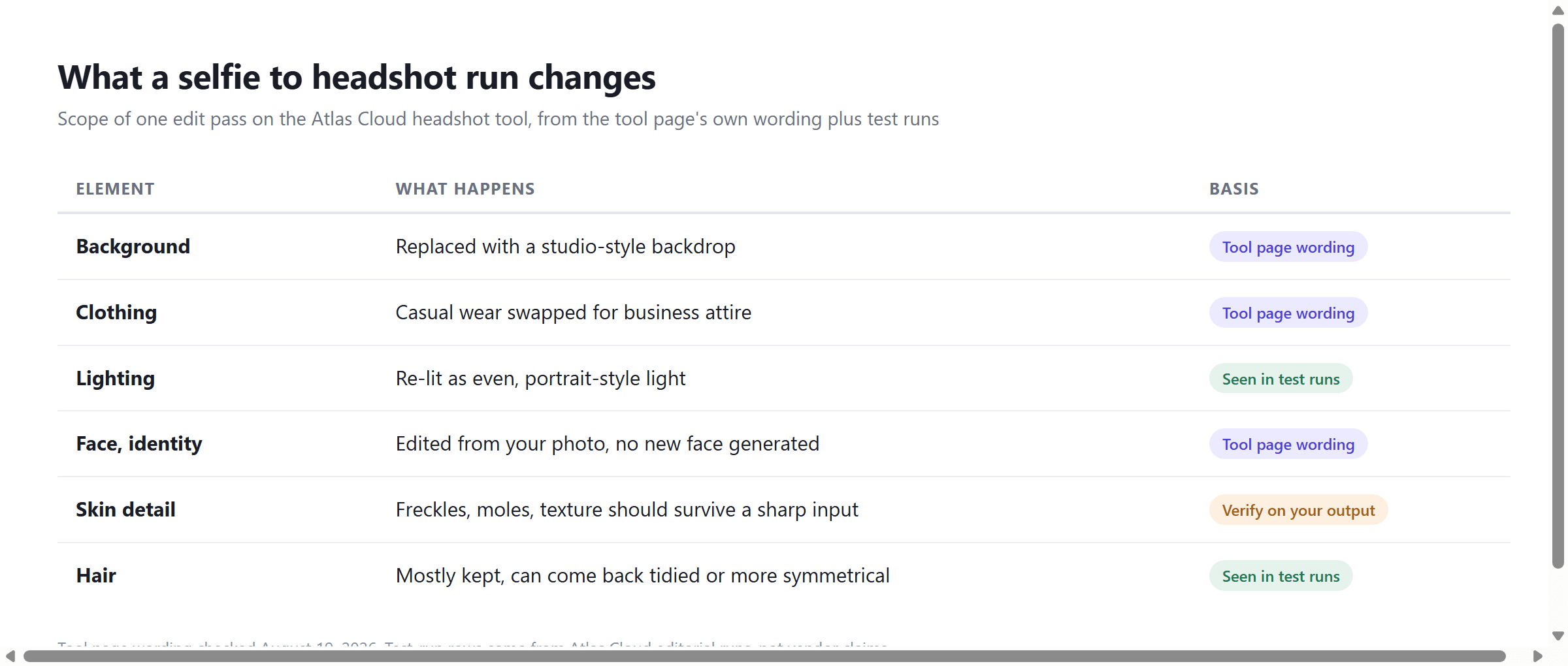
Set the marketing aside and the operation is narrow. The Atlas Cloud headshot tool describes its own scope in one line: "The model updates your background and attire to match your chosen style, and returns your result in seconds." Background and attire. Casual clothing becomes business dress and whatever was behind you becomes a studio backdrop. In our test runs the lighting came back evened out as well.
The face works under a different contract. The same page states the model "edits your uploaded photo rather than generating an entirely new face, so the final result still looks like you, just polished and camera-ready." That sentence doubles as your acceptance test. A headshot that looks like a better-dressed stranger has failed, however polished the blazer.
One misconception worth clearing early: "headshot" is not a separate model category on the platform side. The Atlas Cloud tool is exposed the same way as the editing models around it and behaves like one, portrait editing with a fixed intent, which means its strengths and its failure modes are inherited from image editing. That inheritance matters later, when the conversion breaks.
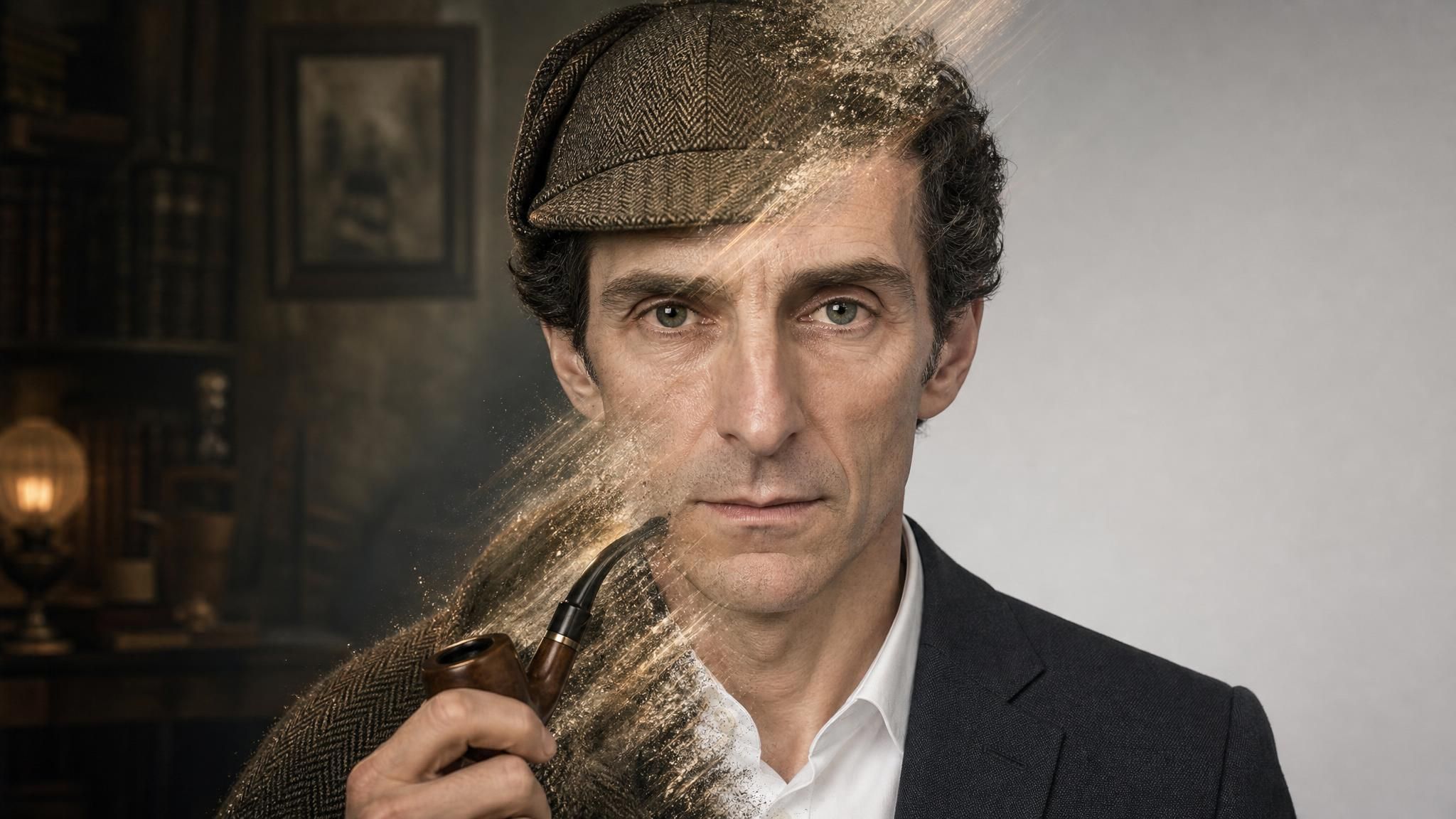
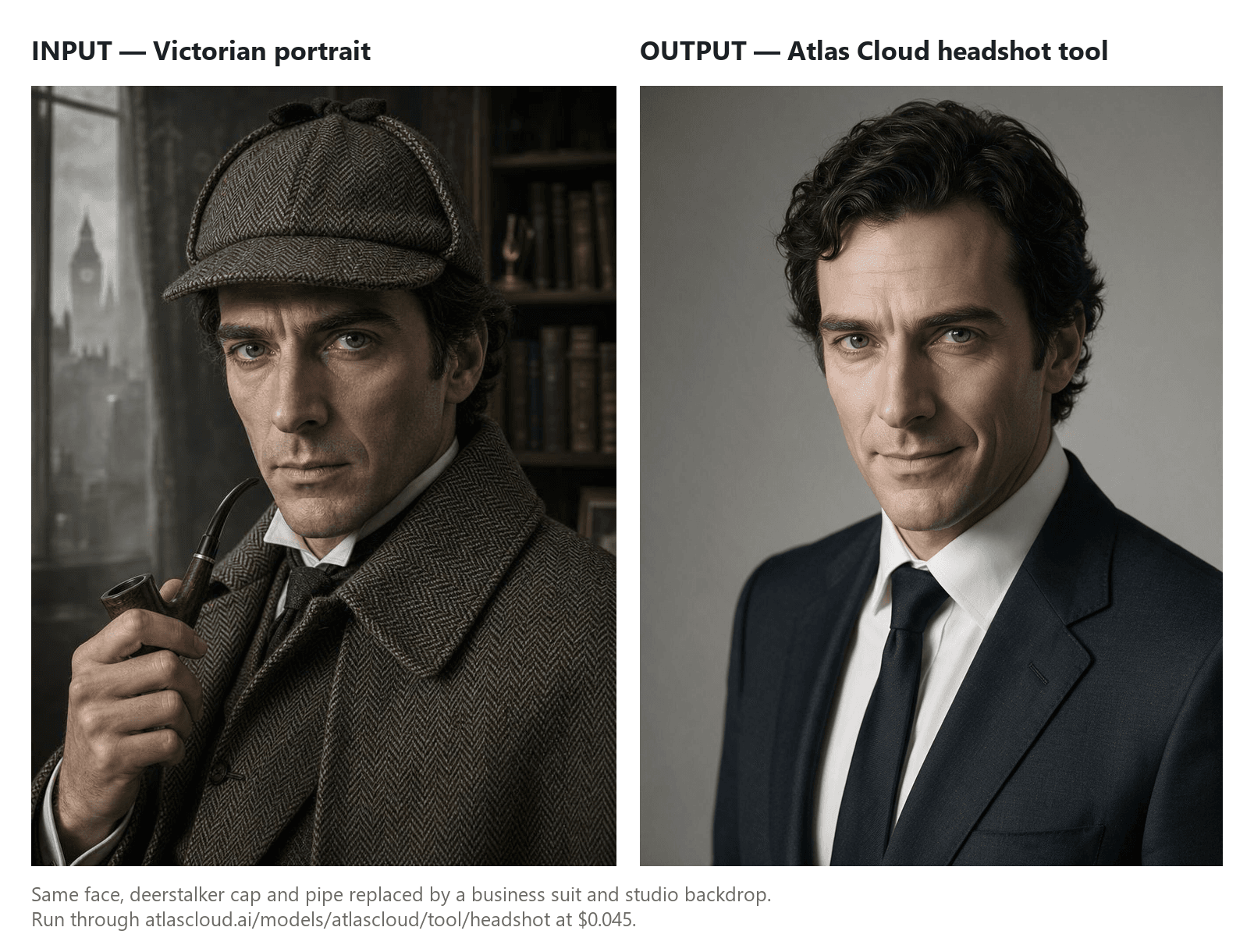
The rule holds even when the input isn't an ordinary photo at all. Feed the tool a portrait of Sherlock Holmes, deerstalker cap, tweed cape, and curved pipe included, and every one of those items counts as attire under the rule above. The output drops the hat, the cape, and the pipe entirely and puts him in a studio-lit business suit. What survives is the face, the same aquiline nose and sharp gaze, which is exactly the point: strip away every recognizable prop and the conversion still has to leave the one thing that actually identifies him.
Turning a Photo Into a Headshot on Atlas Cloud
Since the rewrite is this contained, testing it costs you nothing. Atlas Cloud runs a unified API platform for image and video models, and its AI tools collection includes a free AI headshot generator built on that stack. Every account gets one full generation free, no credit card. The tool page itself lists no dollar figure anywhere; per-run pricing only appears once you open the headshot playground, where a metered billing label sits next to the Run button. For manual style control there is a second lane through the editing models behind it, such as the Nano Banana 2 Lite family.
Method 1: A Free AI Headshot From One Photo
The flow is shorter than most signup forms. Sign in, upload one clear front-facing portrait, run. A green banner in the playground notes that assets are uploaded to AtlasCloud OSS and external URLs are not accepted, so the photo has to come off your device. There is no style menu and no prompt box in the current tool. You get its default business look: studio backdrop, professional attire, even light.
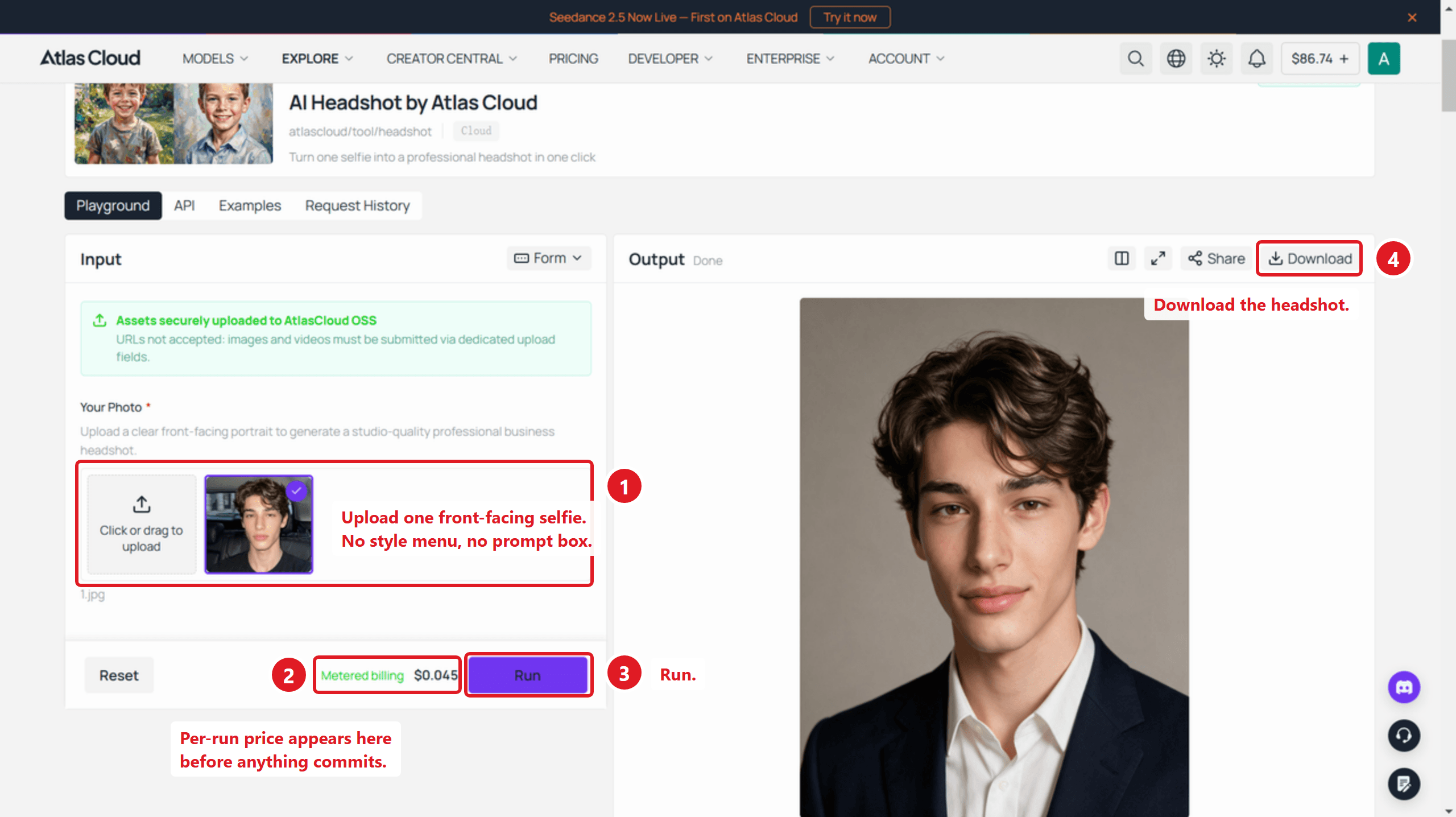
After the free generation, the page offers a balance top-up to keep going, or the API route for calling the same model from code. The playground quoted $0.045 per run at full price when we checked on August 19, 2026, and the figure is displayed before anything commits.
Method 2: Selfie to Headshot With Prompt Control
The fixed tool decides the styling for you. When you want a specific backdrop, a specific jacket, or a wider crop, move one layer down to a general editing model in the same playground interface. Nano Banana 2 Lite Edit ran at $0.04 per image on August 19, 2026, outputs at 1k resolution only, and accepts up to 14 reference images with 14 aspect ratios to pick from, so a LinkedIn square and a wider website banner can come from the same upload.
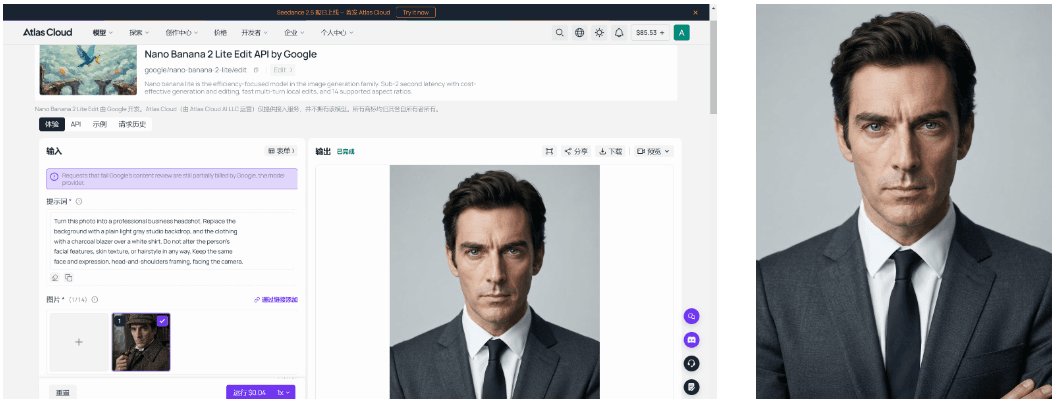
Output from an Atlas Cloud editorial run of Nano Banana 2 Lite Edit, using the same input photo as the headshot at the top of this article.
The part that matters most is the line stating what must not change. A prompt built around that idea reads like this:
plaintext1Turn this photo into a professional business headshot. Replace the 2background with a plain light gray studio backdrop, and the clothing 3with a charcoal blazer over a white shirt. Do not alter the person's 4facial features, skin texture, or hairstyle in any way. Keep the same 5face and expression, head-and-shoulders framing, facing the camera.
Method 3: Selfie to Headshot Through the API
Once a prompt earns its keep in the playground, calling it from code is the same request with the manual click removed.
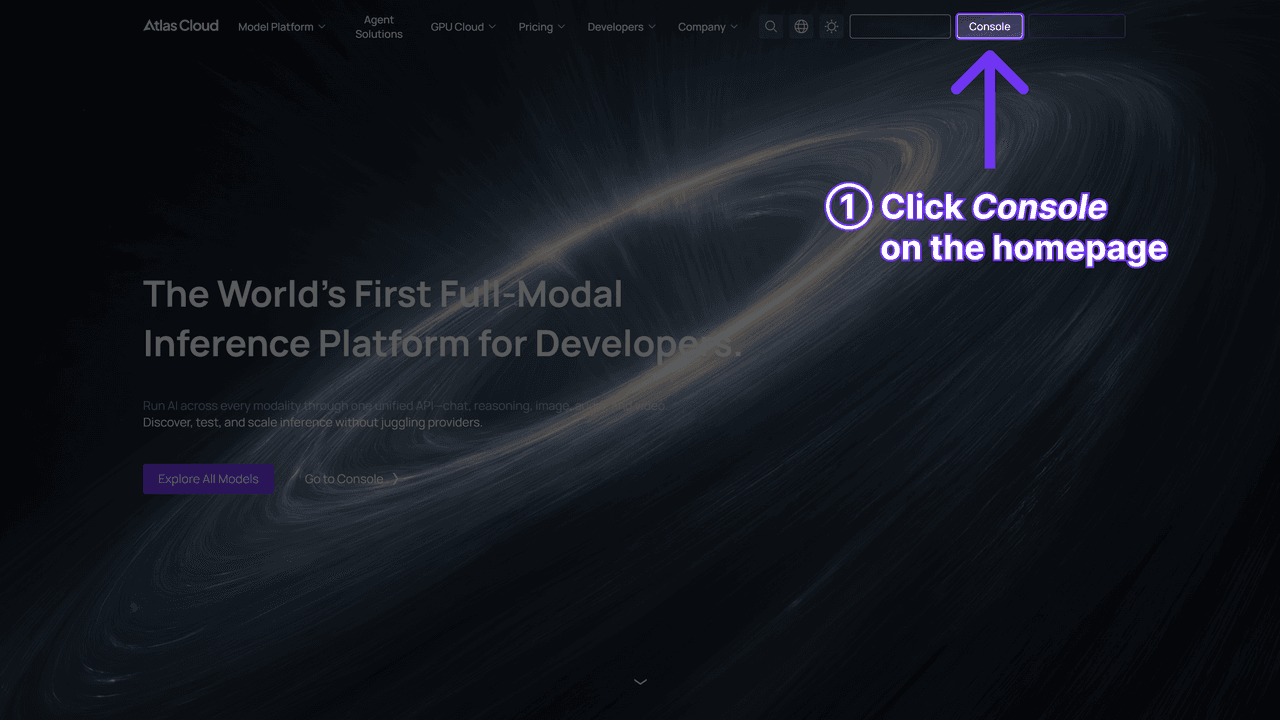
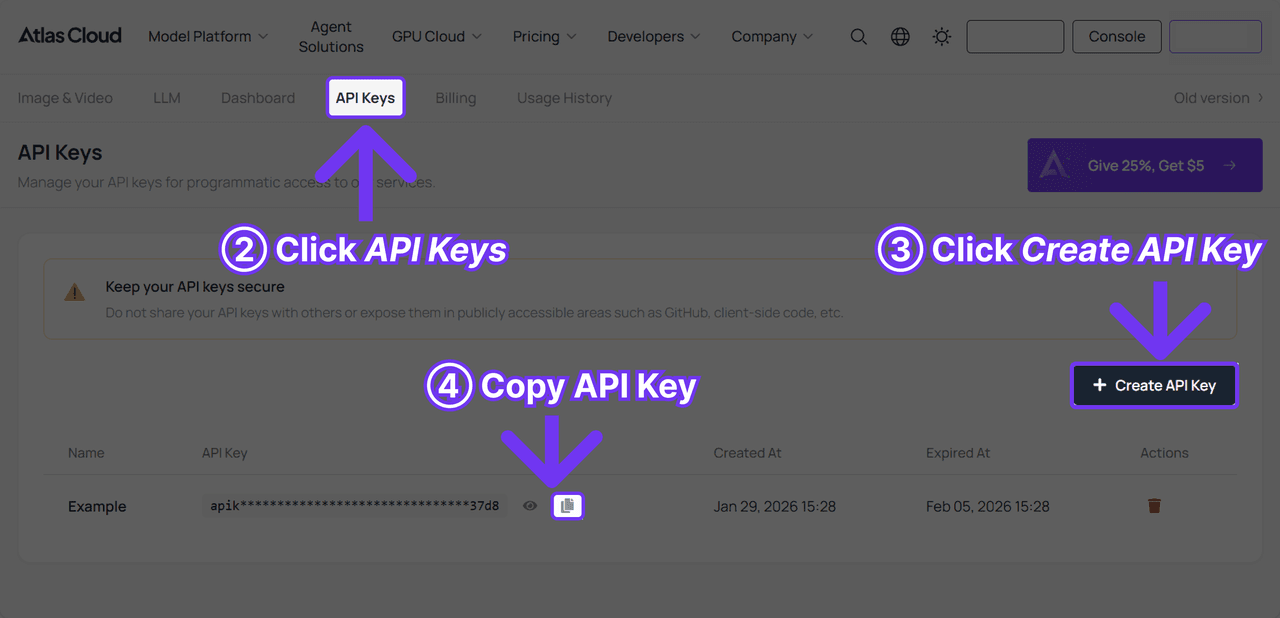
- Create an API key in the Atlas Cloud console and keep it server-side.
- Check theAPI docs for the shared endpoint and each model's own schema.
- Send the request, using the same prompt tested in Method 2, then poll for the result.
plaintext1curl -X POST https://api.atlascloud.ai/api/v1/model/generateImage \ 2 -H "Content-Type: application/json" \ 3 -H "Authorization: Bearer $ATLASCLOUD_API_KEY" \ 4 -d '{ 5 "model": "google/nano-banana-2-lite/edit", 6 "prompt": "Turn this photo into a professional business headshot. Replace the background with a plain light gray studio backdrop, and the clothing with a charcoal blazer over a white shirt. Do not alter the persons facial features, skin texture, or hairstyle in any way. Keep the same face and expression, head-and-shoulders framing, facing the camera.", 7 "images": ["https://your-cdn.com/portrait.jpg"] 8 }'
plaintext1curl -s https://api.atlascloud.ai/api/v1/model/prediction/<PREDICTION_ID> \ 2 -H "Authorization: Bearer $ATLASCLOUD_API_KEY"
Submission is asynchronous, so the first call only returns a prediction id; poll the second endpoint until status reads completed and read the image out of outputs. One field-naming trap worth knowing before you wire up a batch: this general edit endpoint takes images as an array, while the fixed atlascloud/tool/headshot endpoint from Method 1 takes a single image field instead, so switching between the two isn't a drop-in swap. For the deeper dive on pricing per endpoint, request shapes, and error handling, the AI headshot API guide covers that ground on its own.
The Input Photo Rules Behind a Usable Selfie to Headshot
When a run disappoints, the uploaded photo is the first suspect, and usually the right one. The model can restyle what it can see. It cannot invent detail that was never captured, which is why a compressed thumbnail forwarded through three chat apps converts into a soft, waxy result no prompt can rescue.
Two rule sets apply to the same file. The model side is spelled out on the tool page: "Use a clear, front-facing selfie with good lighting and no sunglasses, hats, or hair covering your face." The destination side is stricter than most people expect: LinkedIn's upload help page specifies a pixel range of 400 x 400 up to 7680 x 4320, an 8MB cap, and PNG or JPG only. The same page adds "We don't support GIFs," a detail some secondhand guides get wrong by listing GIF as accepted.
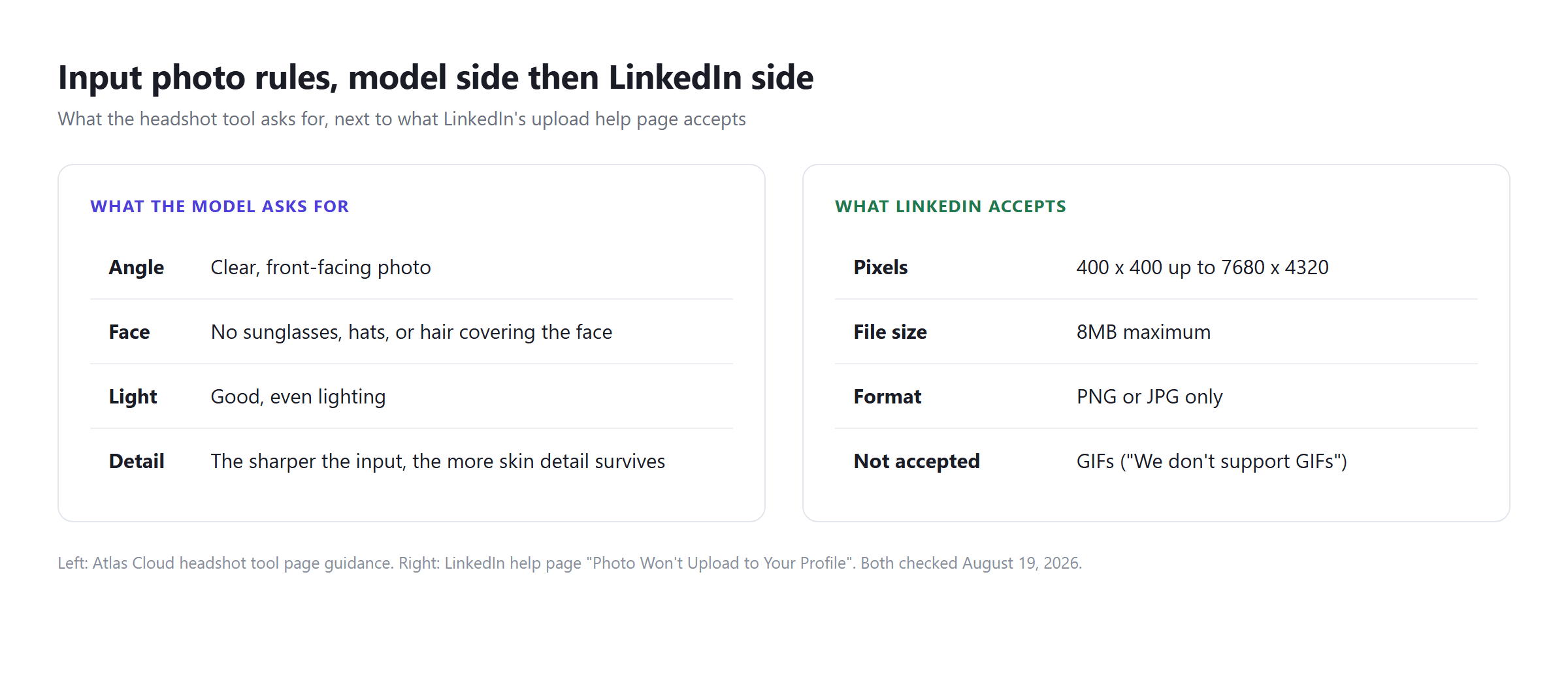
Read those numbers against the output side and the practical bar turns out to be low. A 1k output clears LinkedIn's 400 pixel floor several times over. Resolution is almost never why an AI headshot gets rejected. Likeness is.
Where a Selfie to Headshot Conversion Breaks Down
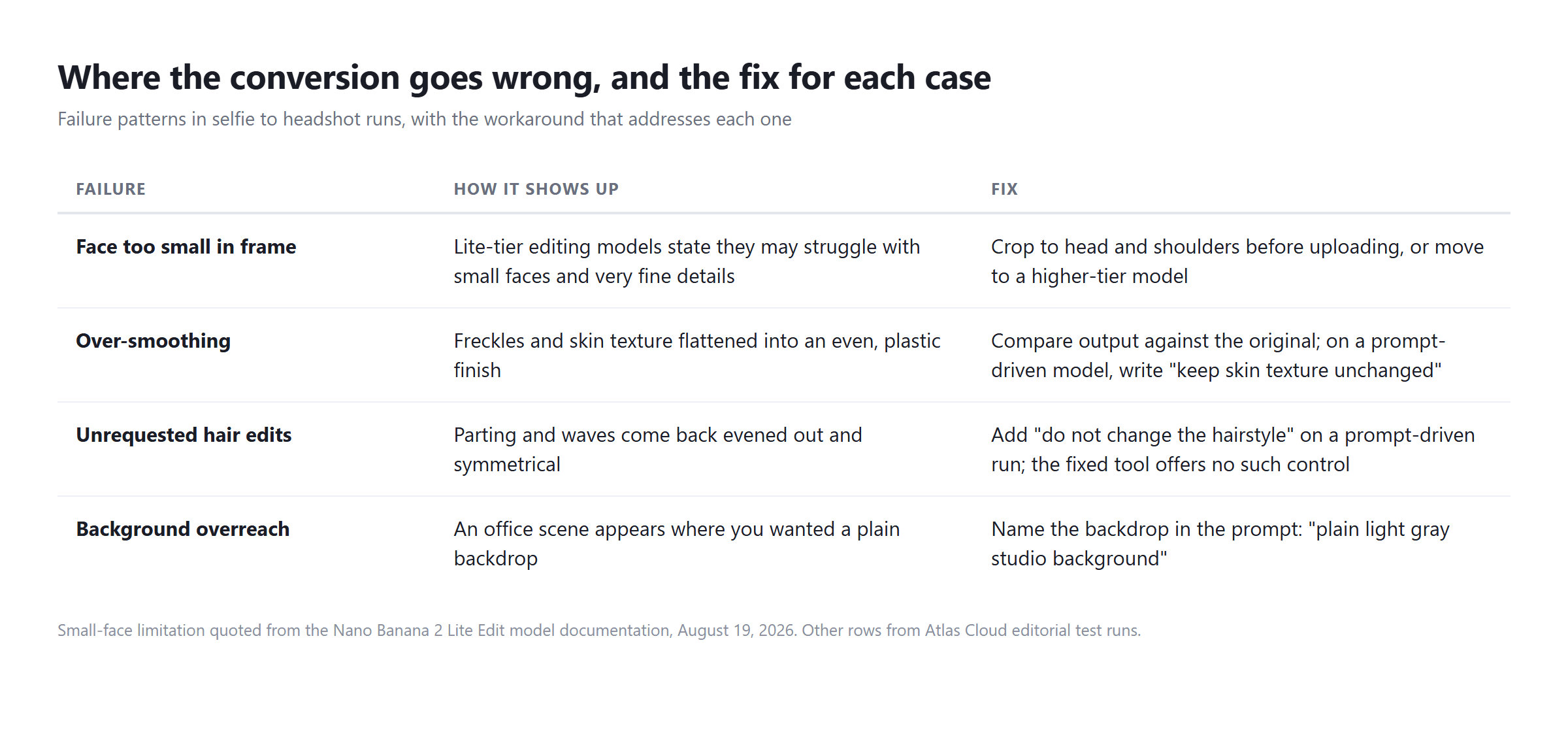
The failures cluster into patterns, and each one has a working fix.
Small faces are a documented weak point. The Nano Banana 2 Lite Edit page says plainly that the model "may struggle with small faces, accurate spelling, and very fine details." A full-body photo where your head occupies a corner of the frame plays directly into that weakness. Crop to head and shoulders before uploading, or step up to a higher-tier model for the same request.
Over-smoothing is subtler. Some conversions flatten freckles, moles, and skin texture into an even plastic finish, which quietly erodes the likeness the whole exercise depends on. Compare the output against your original at full size. On a prompt-driven run, "keep skin texture unchanged" belongs in the instruction.
Then there are the edits nobody asked for. In our test runs a model returned hair noticeably more symmetrical than the input, with parting and waves evened out, and consumer tools we tried swapped in office scenes where a plain backdrop would have done. The fixed tool offers no lever against this. The prompt route does: name the backdrop, forbid the hairstyle change.
One Photo or a Dozen: Two Routes to an AI Headshot
Everything above describes the single-photo route: one upload, one restyled image, seconds of waiting, billing per picture. There is a second product shape that gets sold under the same "AI headshot" label, and mixing them up leads to mismatched expectations in both directions.
Multi-photo services train on a batch of your pictures and then generate new ones. Aragon, a representative example, asks you to "drop in at least 6 selfies from different angles," takes about 30 minutes, and delivers by email. Its paid packs listed 40 to 100 photos per pack as of early August 2026, billed per pack rather than per image, and its free tier is explicitly rationed: "Free generations are limited per day and may go on a waitlist during high demand."
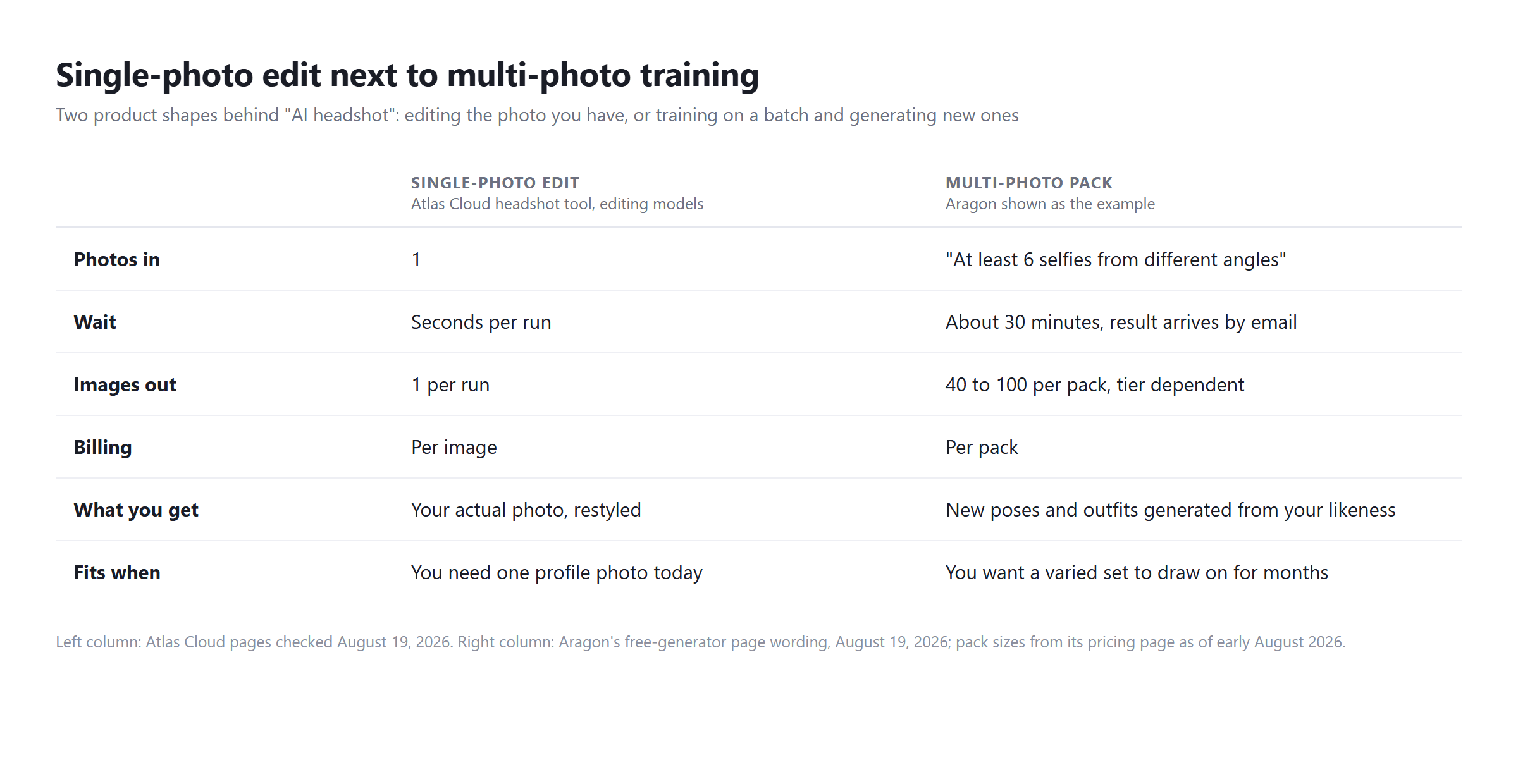
The trade is straightforward. The single-photo route edits a picture that really exists, which limits how far likeness can drift. The multi-photo route generates poses and outfits that were never photographed, which adds variety and raises that same drift risk. Need one profile photo today, use the first. Want a season's worth of varied portraits, budget for the second.
Does an AI Headshot From Your Photo Clear LinkedIn's Rules?
LinkedIn answered this in its own photo guidelines: "You can use an illustration, caricature, or other artistic rendering of yourself, but your profile photo must reflect your likeness." AI generation is fine. Drifting away from your actual appearance is the violation. The removal list targets photos consisting solely of company logos, emojis, landscapes, animals, words, flags, childhood photos, or others' likenesses, including celebrities and fictional characters.
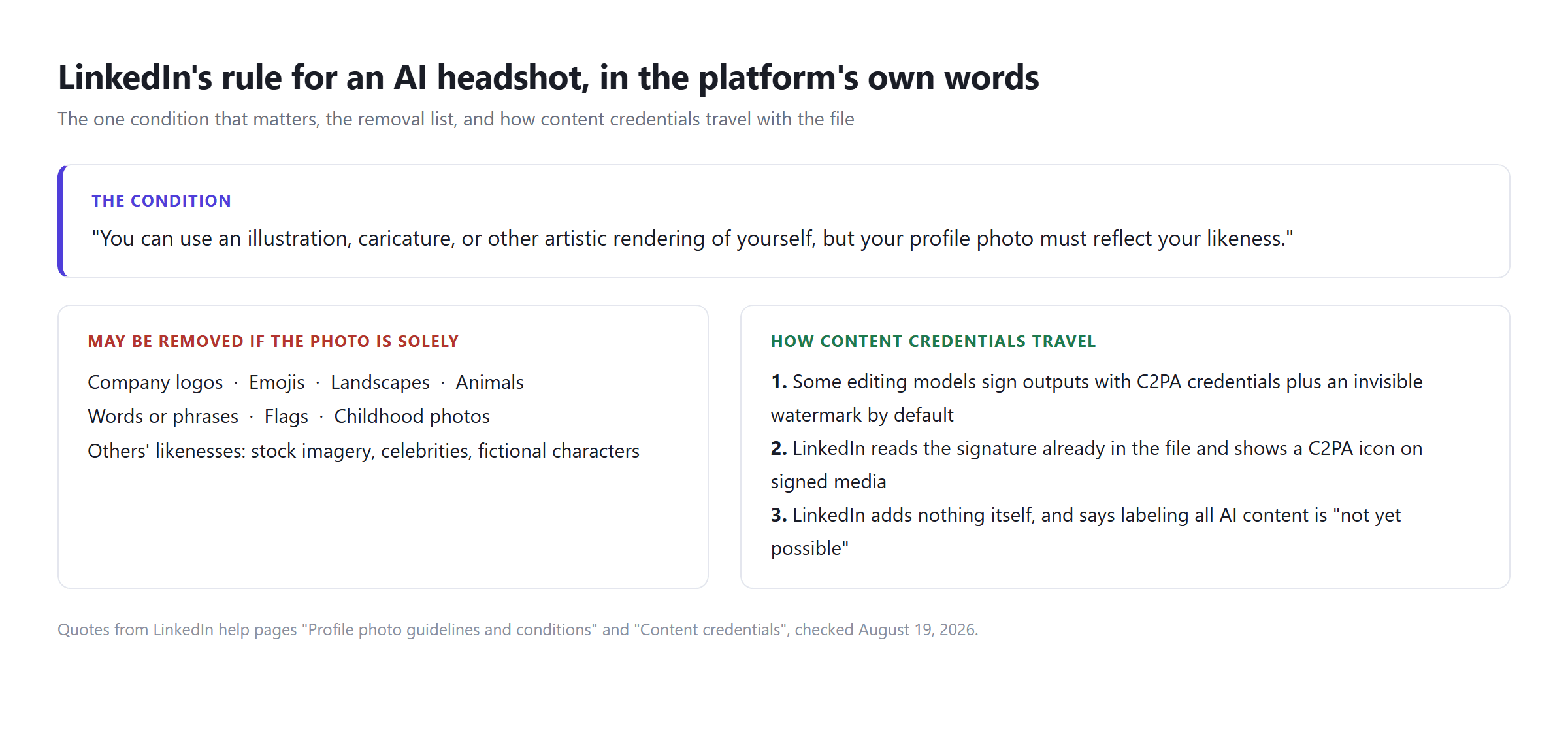
There is a second, quieter layer. Nano Banana 2 Lite Edit signs its work: "Edited images include C2PA content credentials and an imperceptible SynthID watermark by default, so outputs can be identified as AI-generated." LinkedIn's content credentials page explains what happens next: media "cryptographically signed using C2PA Content Credentials will be noted with the C2PA icon," including an assertion on "whether AI was used to generate or edit any part of the content." LinkedIn reads the signature already inside the file and adds nothing of its own, while admitting that labeling all AI content is "not yet possible."
So an AI headshot from your own photo may carry a small provenance icon, and that is the honest state of things. The compliance risk never lived in the generation step. It shows up the moment an output stops looking like the person who will walk into the interview.
Frequently Asked Questions
Can AI turn a single photo into a professional headshot?
Yes. Single-photo tools edit the picture you upload, replacing the background and clothing with business styling while keeping the face from the original. The Atlas Cloud headshot tool does this in one run from one front-facing photo, and general editing models do the same with a written prompt.
Will an AI headshot still look like me?
That is the design goal of the editing approach, since the model modifies your photo instead of generating a new face. Verify it yourself: compare skin texture, hair, and features against the original at full size. Over-smoothing and small unrequested changes are the main ways likeness slips.
How many photos does an AI headshot generator need?
Editing tools need exactly one. Training-based services need a batch; Aragon, for example, asks for at least six selfies from different angles and takes about half an hour. More input photos add pose variety. They do not improve the fidelity of any single image.
Is there a genuinely free way to turn a photo into a headshot?
Yes. The free AI headshot generator on Atlas Cloud covers one complete generation per account, and no card details are collected. After that, runs are metered and the playground shows the exact price next to the Run button before you commit.
What resolution does a LinkedIn profile photo need?
LinkedIn accepts anything from 400 x 400 up to 7680 x 4320 pixels, at most 8MB, in PNG or JPG. GIFs are not supported. A standard 1k output from an editing model clears the minimum comfortably.
Are AI headshot outputs watermarked or content-credentialed?
Some are, by default. Nano Banana 2 Lite Edit attaches C2PA content credentials and an invisible SynthID watermark to edited images. Platforms that read C2PA, LinkedIn among them, may show a provenance icon on such files; LinkedIn itself adds no labels beyond what the file carries.
Conclusion
A selfie to headshot run is a background, wardrobe, and lighting job with a strict no-touch zone around your face. If what you need is one credible business portrait this afternoon, the single-photo route settles it: one free run to see the default style, a metered run or a prompt-driven edit if you want a say in the backdrop. The multi-photo route earns its wait and its pack pricing only when you genuinely need many different poses. Whichever you pick, spend your effort on the input photo and hold every output to the one test that matters, on LinkedIn's rules and everywhere else: it has to look like you.