The footage is fine. The outfit is the problem. Maybe the sponsor wants the blue jacket, maybe the hoodie reads sloppy on camera, maybe the dress code changed after the shoot wrapped. An AI video clothes changer solves this without a reshoot: you hand over a photo or a clip, describe what the person should be wearing, and the model redraws the clothing while leaving the face, pose, and background alone. This guide maps the two core routes that solve that problem. Every price below was checked on the same day, and the cheapest starting point costs nothing.
Key Takeaways
- Two routes to a clothes swap on video — redraw the outfit on a photo and animate it, or edit an existing clip with a text instruction.
- Start free — the free change clothes AI tool on Atlas Cloud produces full-resolution images at no cost; animation adds $0.175 to $0.30.
- Direct clip editing preserves motion — Wan 2.7 Video Edit keeps your original background and movement while redressing the person; costs $0.50–$0.75 for 5 seconds.
- Test cheap before scaling — every video model here charges by the second, so run short low-resolution drafts before committing to a long render.
- Forsellersonly — the Virtual Try-On workflow takes a single garment photo and renders a finished try-on film, with no charges for failed runs.
What an AI Video Clothes Changer Actually Does
The phrase covers two different mechanisms, and knowing which one you need saves both money and disappointment. Both end in the same place, a person on video wearing clothes they never put on, but they start from different material: a single photo or an existing clip.
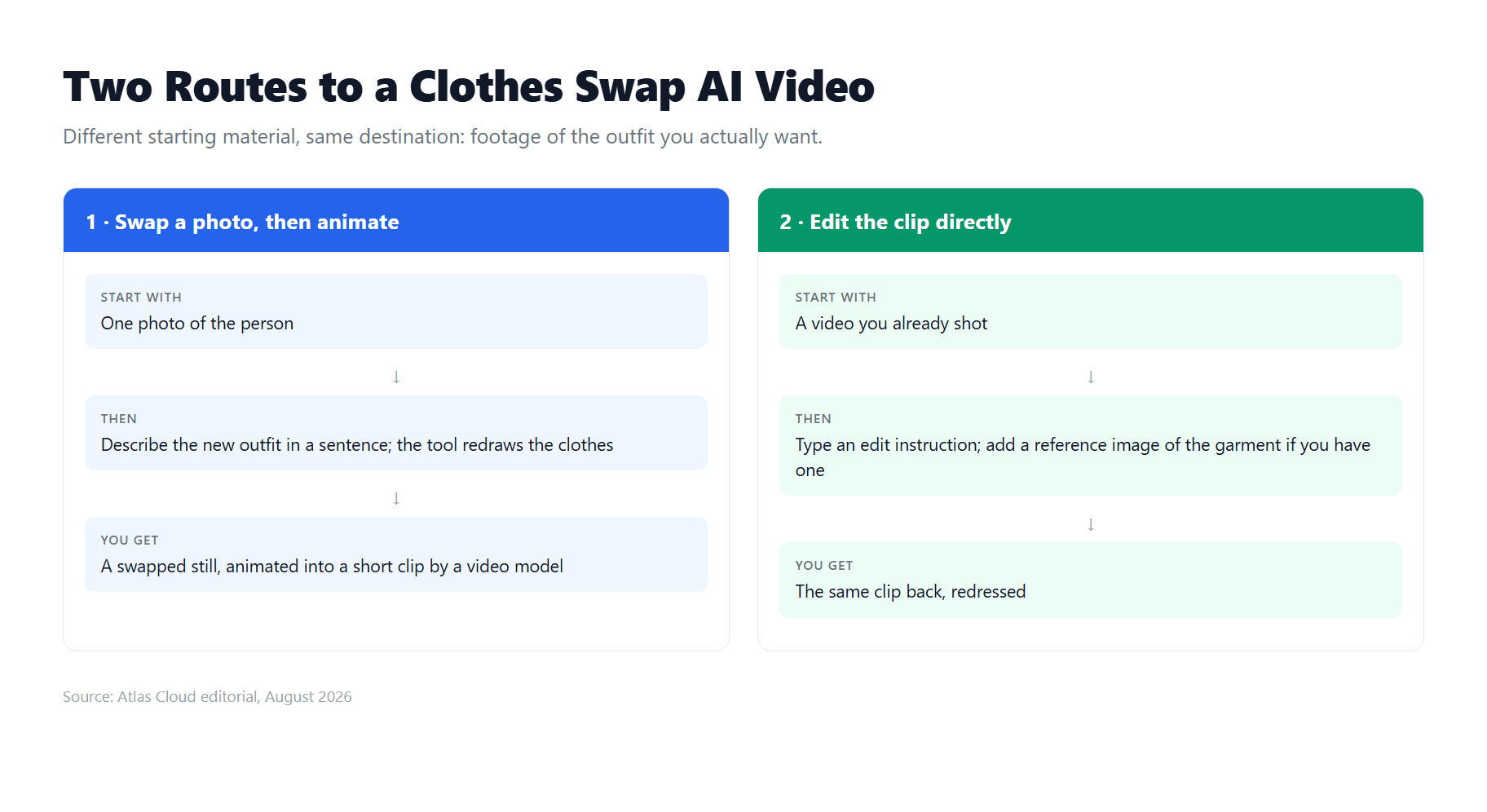
What stays constant across routes is the division of labor. The model treats the person as fixed and the clothing as disposable: the garment gets regenerated from scratch while identity, lighting, and scene carry over from your input. That is also why input quality decides output quality. A sharp, well-lit source photo or clip gives the model something to preserve; a blurry one produces guesswork in the output.
Which route fits you depends on what you are holding right now. Let's start with the one that costs nothing to try.
Change Clothes in a Video with AI for Free
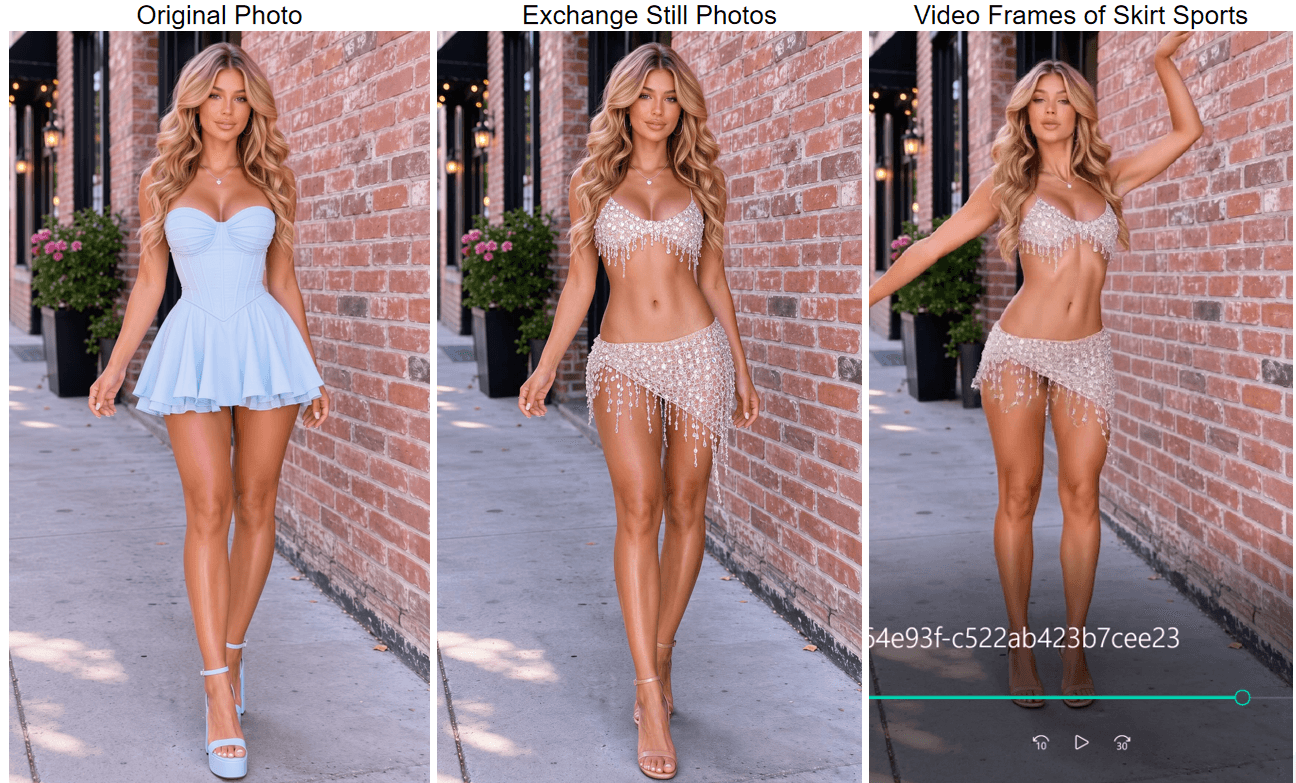
The two-step route: swap the outfit on a still image first, then hand that image to a video model to set it in motion. It is the cheapest path and the one with the most outfit control, since the swap happens on a frame you can inspect and redo before any video render starts.
Step 1: Swap the Outfit with a Text Description
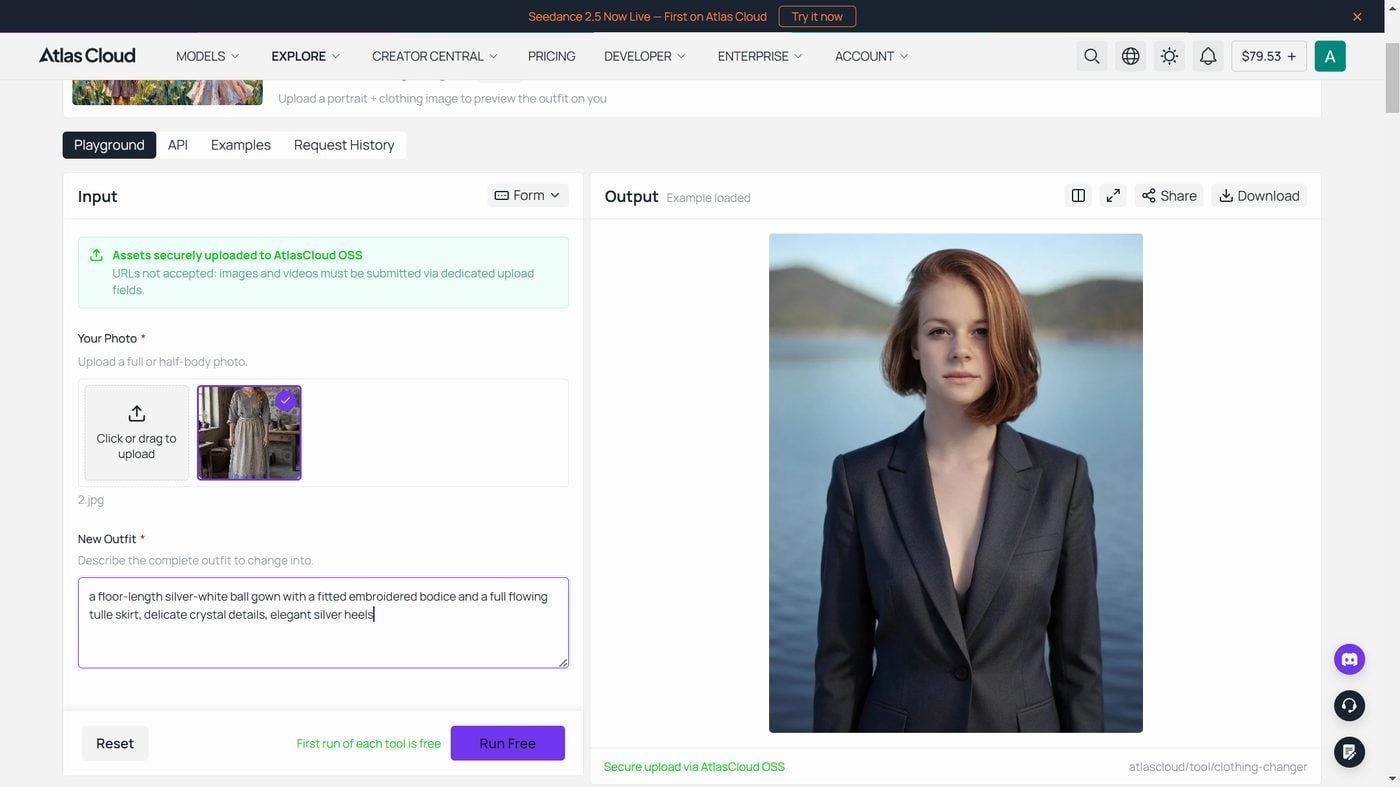
Atlas Cloud runs a free clothes changer in the browser. Upload one photo and write one sentence about the outfit. There is no template gallery and no garment upload on this tool; the new clothes come entirely from your written description, so a line like "emerald satin slip dress with thin straps" is the entire creative input. The tool is built to keep the face and hair untouched and redraw only the clothing.
Results download at 1328 by 1776 pixels with no watermark, and the page quotes about 40 seconds per generation. One practical rule: match the photo framing to the outfit you describe. If the description includes shoes, upload a full-body shot, since the tool cannot dress feet it cannot see. The changer sits alongside the other free AI tools on the platform, all running on the same account.
Step 2: Animate the Swapped Photo with PixVerse V6
Take the swapped image to the PixVerse V6 image-to-video playground. It renders clips from 1 to 15 seconds at up to 1080p, with an optional audio track. The prompt here should describe motion, never the outfit again; the outfit is already baked into your still. Something like "she turns slowly toward the camera, fabric swaying naturally, soft indoor light, static camera" keeps the model focused on movement instead of re-imagining the clothes.
Keep the first render short and low-resolution. If the garment holds up over 5 seconds, it will usually hold at higher settings, and you have spent cents finding out.
Clothes Swap AI Video on an Existing Clip
Sometimes the video already exists and the motion in it is the whole point: a walkthrough, a dance, a product demo with specific gestures. Re-generating from a still would throw that away. This is the case for direct video editing, where the model rewrites the clothing inside your original footage.
Wan 2.7 Video Edit is built for exactly this input pattern: a source video plus a text instruction, with optional reference images when the edit needs visual guidance. For a clothes swap, that reference slot matters. You can attach a photo of the actual garment instead of hoping the model interprets "olive bomber jacket" the way you picture it. An instruction that works tells the model what to change and what to protect, for example: "Replace the gray hoodie with a fitted black blazer over a white t-shirt. Keep the face, hair, jeans, and background unchanged."
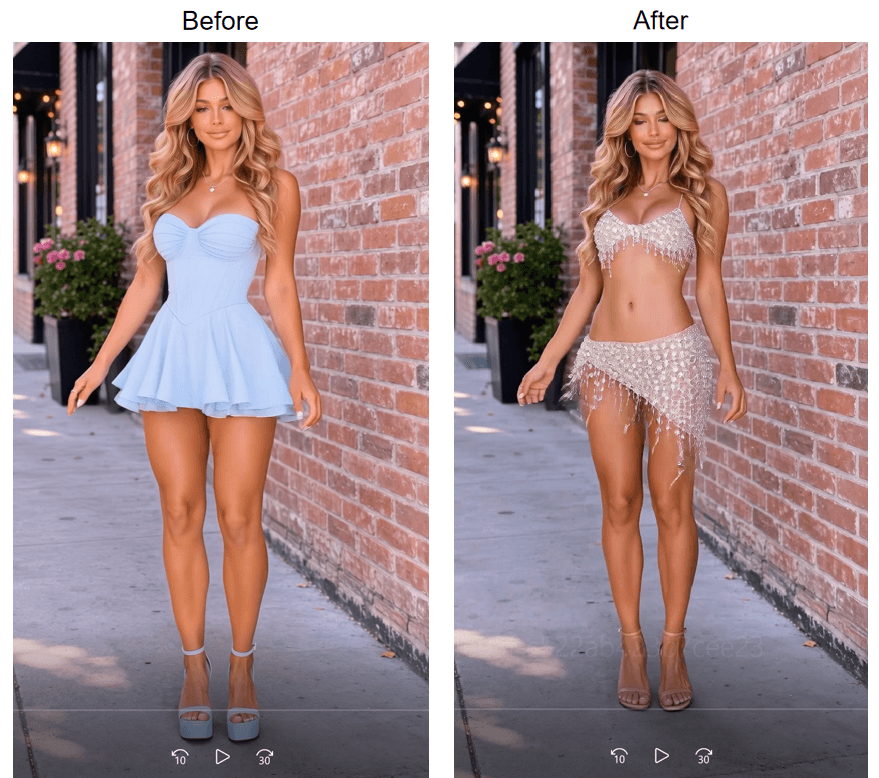
Output comes back at native 720P or 1080P in common aspect ratios, with 5 seconds as the default length. Billing is per second: $0.10 at 720P and $0.15 at 1080P as of late August 2026, with no discount active on the model page. Results do vary with the clip: fast motion, crossed arms, and outfits that drift in and out of frame are the hard cases, so test one 5-second segment before feeding it a full take. The same catalog lists more instruction-driven video editors, including Kling Video O3 and Gemini Omni Flash, if a stubborn clip deserves a second opinion.
Automate Clothes Swap Videos with the Atlas Cloud API
Nobody clicks through a playground 40 times because the store carries 40 jackets. Everything above is also callable from code, and the routes scale to batch work.
Step 1: Create an API key. Generate one in the Atlas Cloud console and keep it server-side. One key authenticates every model on the platform, so the same credential covers try-on films today and clip edits tomorrow.

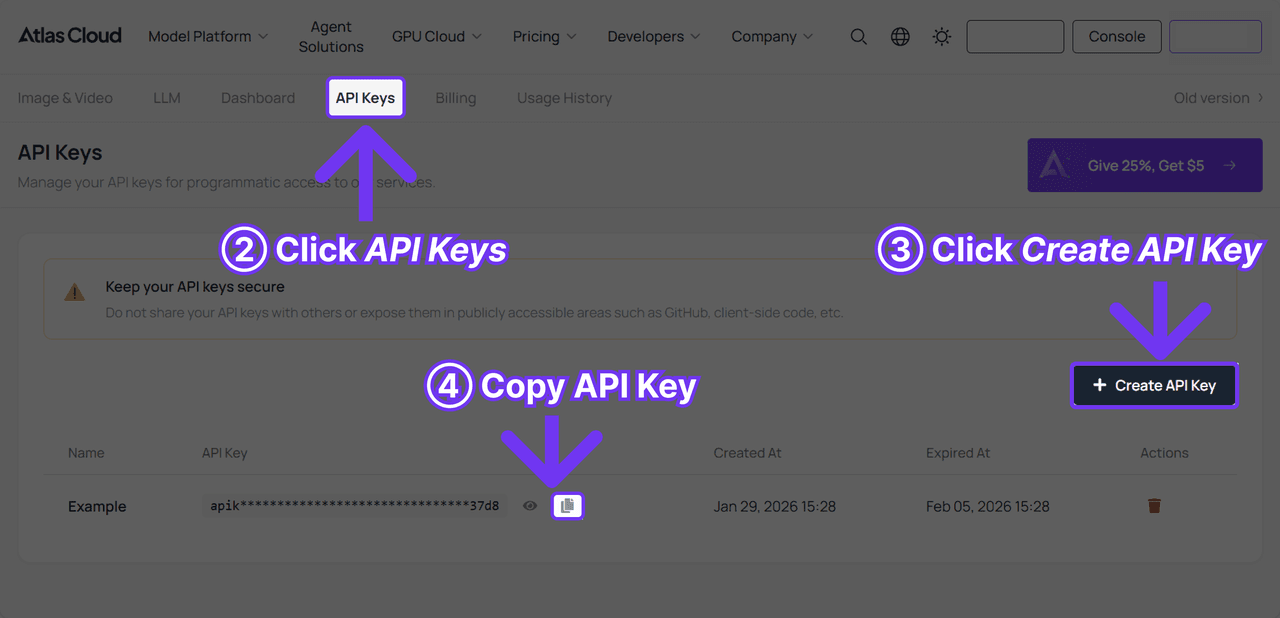
Step 2: Check the request shape. The API documentation covers authentication and polling, and each model page carries an API tab with its exact fields. The try-on endpoint wants a product image, a short brief, and your duration and format choices.
Step 3: Send the request and poll. Generation is asynchronous: the first call returns a request id, and you poll until the film is ready.
plaintext1curl -X POST "https://api.atlascloud.ai/api/v1/model/generateVideo" \ 2 -H "Authorization: Bearer $ATLASCLOUD_API_KEY" \ 3 -H "Content-Type: application/json" \ 4 --data-raw '{ 5 "model": "atlascloud/studio/virtual-try-on", 6 "product_image": ["https://your-store.com/products/navy-parka.jpg"], 7 "user_prompt": "Outdoor brand, relaxed fit, city winter styling", 8 "duration": 8, 9 "ratio": "9:16", 10 "resolution": "720p" 11 }'
plaintext1curl "https://api.atlascloud.ai/api/v1/model/prediction/<request_id>" \ 2 -H "Authorization: Bearer $ATLASCLOUD_API_KEY"
When status flips to completed, the outputs array holds the hosted video URL. Swapping routes is a one-line change: set "model" to alibaba/wan-2.7/video-edit, swap the product_image field for a video field, and adjust the prompt to an edit instruction instead of a styling brief.
Free AI Video Clothes Changer Routes Compared
Quick math before you pick. The two routes differ mainly in what they ask you to bring and what a single test run costs.
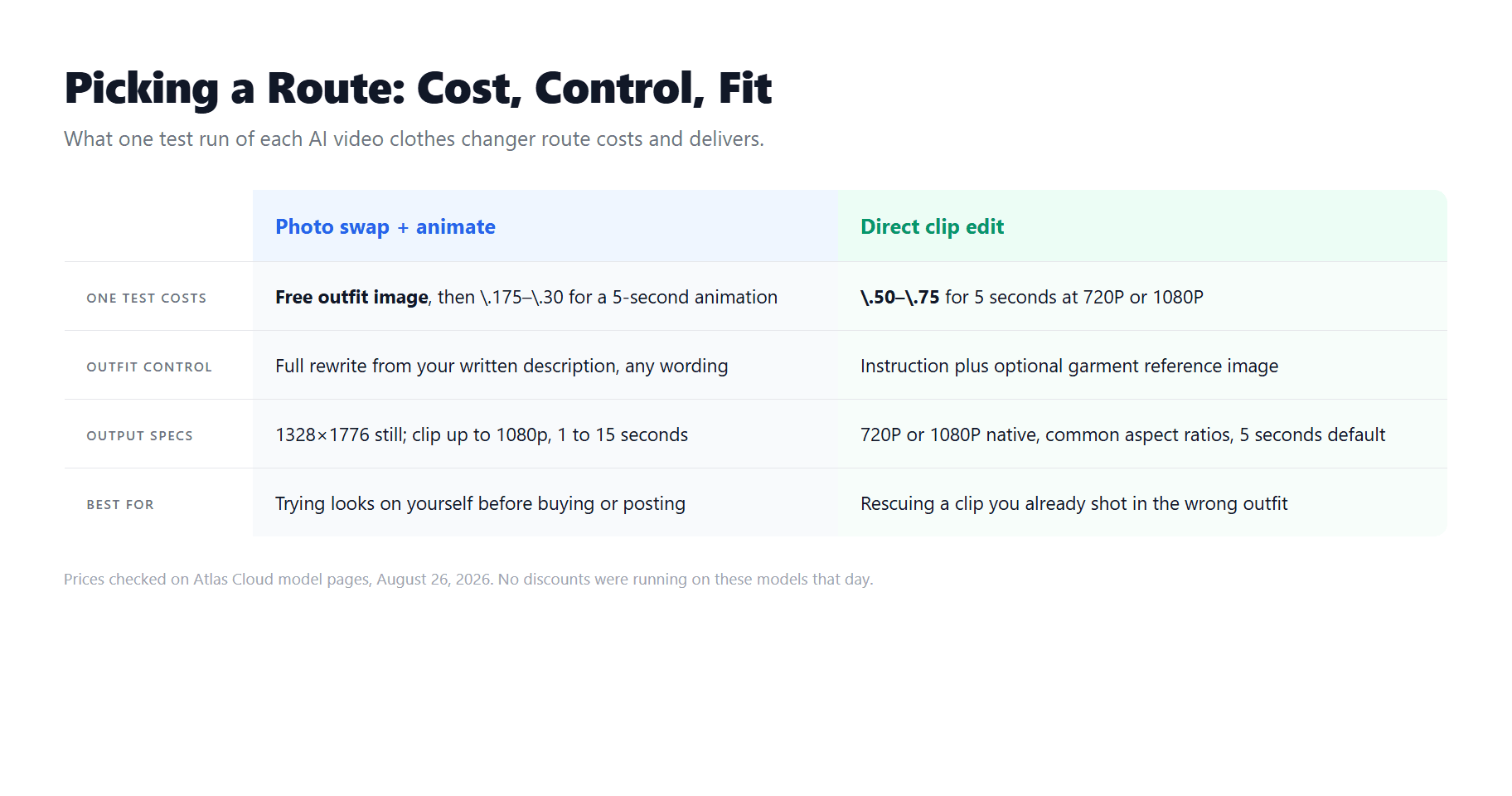
Reading that as a decision: if the video does not exist yet and the subject is you, start with the photo route. If the footage exists and the motion matters, pay for the direct edit rather than trying to recreate the performance. If you are still shopping for the image-side tool itself, our tested roundup of the best AI clothes changers compares nine of them on identical photos.
Why Video Clothes Swaps Fail
Most bad results trace back to a handful of preventable causes, and knowing them upfront is cheaper than learning each one on a paid render.
Garment drift is the usual failure on animated stills: a dress that subtly changes cut or color as the clip progresses. Shorter clips and simpler garments reduce it. On direct edits, watch for incomplete replacement, where sleeves or collars from the original outfit ghost back in for a few frames during fast motion. Printed logos and text tend to be the most fragile part of any swap, so favor plain fabrics when the brand mark does not matter.
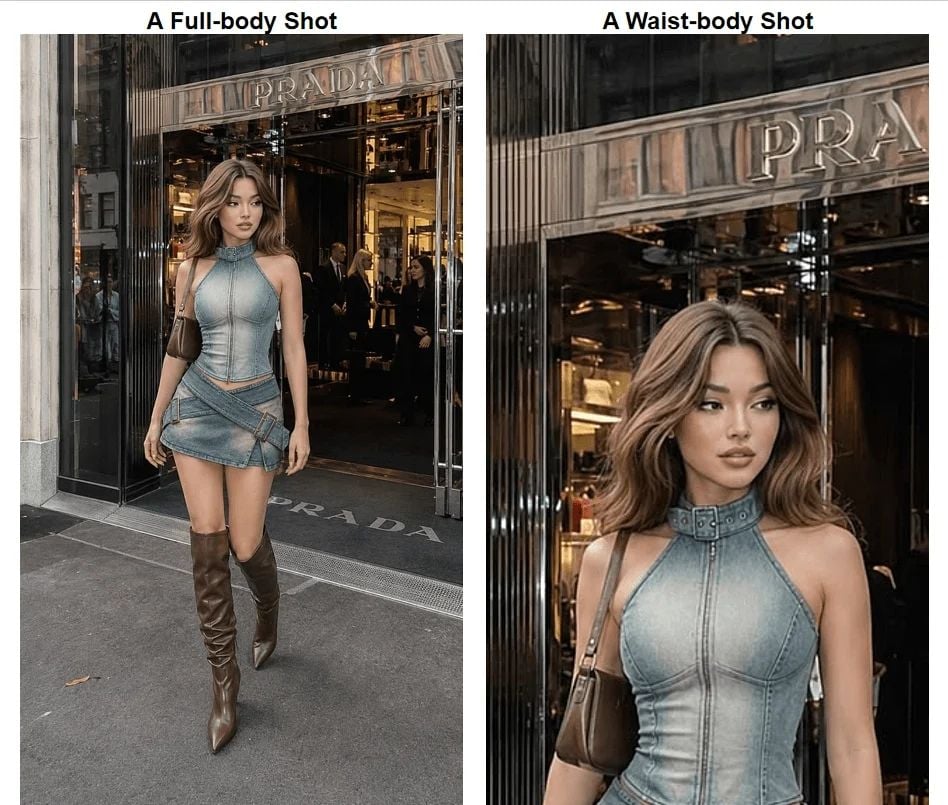
Then there is the mistake that happens before any model runs: framing. Describing a full outfit with shoes while uploading a waist-up photo forces the tool to guess at everything below the frame. The photo-stage failure catalog runs deeper than this section can, and the AI outfit swap guide walks through those cases with examples.
Frequently Asked Questions
Can I use an AI clothes changer in video online free?
The image half of the workflow, yes. The free change clothes tool on Atlas Cloud swaps the outfit on your photo at no cost, at full resolution. The video render itself is metered, but short drafts are cheap: a 5-second 360p PixVerse V6 animation of your swapped still came to $0.175 when we checked in late August 2026. So a complete photo-to-video test stays under 20 cents, with the most important step free.
Is there an AI video clothes changer online free without a watermark?
On the image stage, the Atlas Cloud clothes changer states that downloads carry no watermark. On the video stage it depends on the model: Wan 2.7 Video Edit exposes a watermark option in its request parameters, and for any other model the reliable check is one inexpensive draft at the lowest resolution, inspected corner to corner, before you pay for a long clip.
Does a video clothes changer AI free route work on mobile?
The routes in this guide run in a browser tab with rendering handled server-side, so a phone only uploads the photo and downloads the result. Nothing installs locally. Heavier renders take the same time they would on a desktop, since your device is not doing the computing.
Can I change clothes in someone else's video?
Only with their permission. Redressing a person on video edits their likeness, and using it commercially without a release invites real legal trouble in most jurisdictions. For client work, get written consent the same way you would for any retouching that alters appearance. And keep swaps to ordinary clothing: reputable tools refuse explicit edits, and attempting them can cost you the account.
Conclusion
Two starting materials, two routes. A photo of yourself plus a sentence gets you a free swapped still and a few cents of animation. A clip you already shot goes through an instruction-driven edit that preserves the motion you filmed. The prices quoted here were all checked on August 26, 2026, and each model page shows its current rate before you run anything.
The practical advice condenses to one habit: prove the swap on the cheapest possible unit first, a free still or a 5-second draft, then scale the settings up. Do that, and an AI video clothes changer earns a permanent slot in how you produce footage.