Type "fotor ai headshot generator" into a search bar and the top result promises a professional photo in seconds, no photographer required. I uploaded one ordinary phone selfie to test that, picked a corporate style, and had a finished headshot before my coffee cooled. The picture itself was fine. The word free is where the story gets more complicated, because a second and third attempt a few minutes later got blocked for a reason that had nothing to do with photo quality and everything to do with a credit balance.
Key Takeaways
- Fotor's tool page is titled free, but generating a headshot draws down a credit balance, and the free allotment runs out fast.
- Styles come from a preset list, picked with clicks rather than described in a sentence. A prompted editing model turns that same job into a paragraph you can rewrite.
- Fotor also sells a separate, per-seat team pricing structure with volume discounts, and none of those numbers appear on the consumer page.
- Atlas Cloud's free AI headshot generator gives every account one full generation with no card and no credits spent, then switches to flat per-photo metered billing once that run is used.
- Uploaded photos get wiped from Fotor's servers within 24 hours, but basic specs like output resolution and accepted file formats never show up on the tool's own page.
What Fotor's AI Headshot Generator Actually Does With Your Selfie
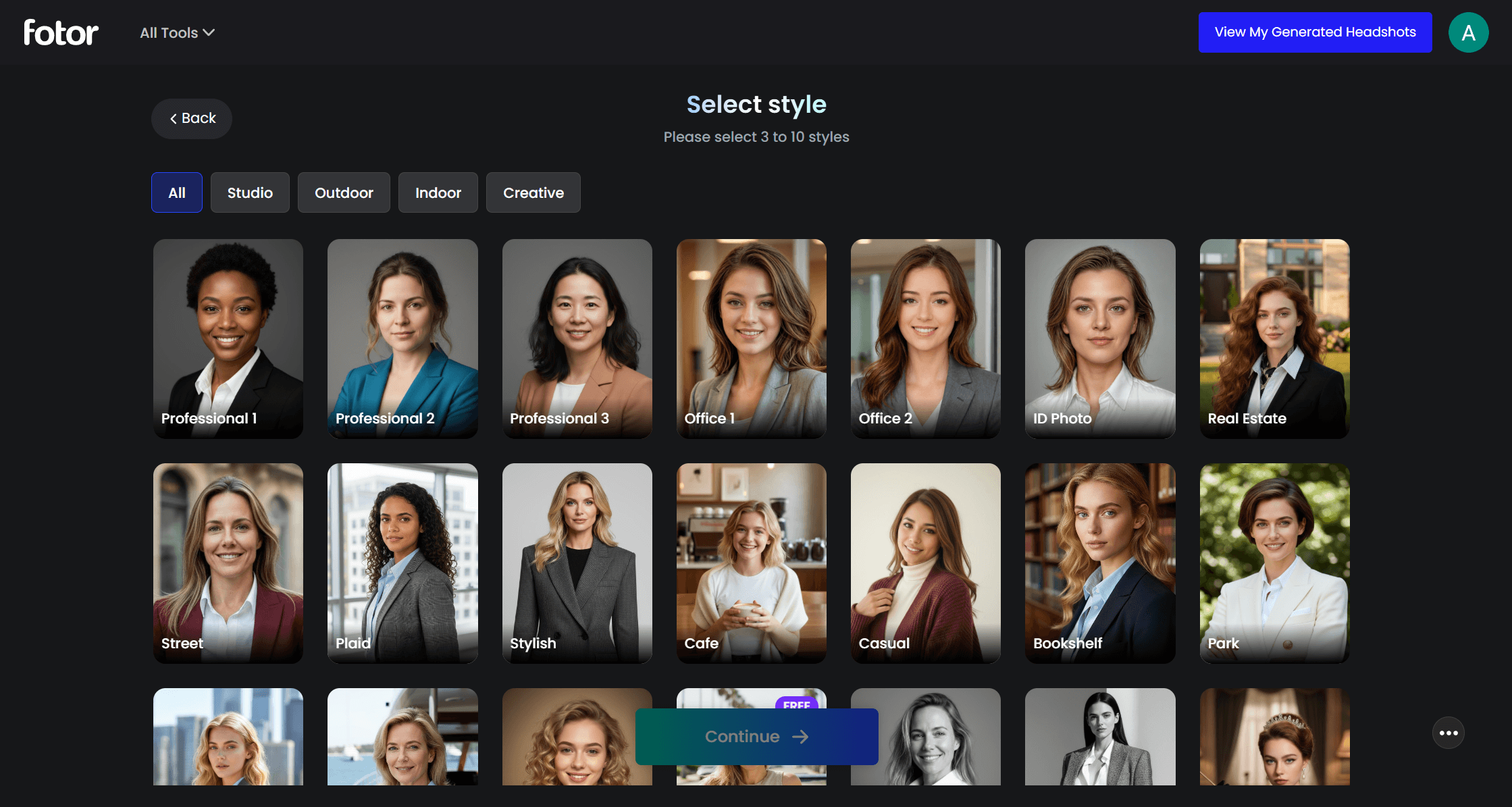
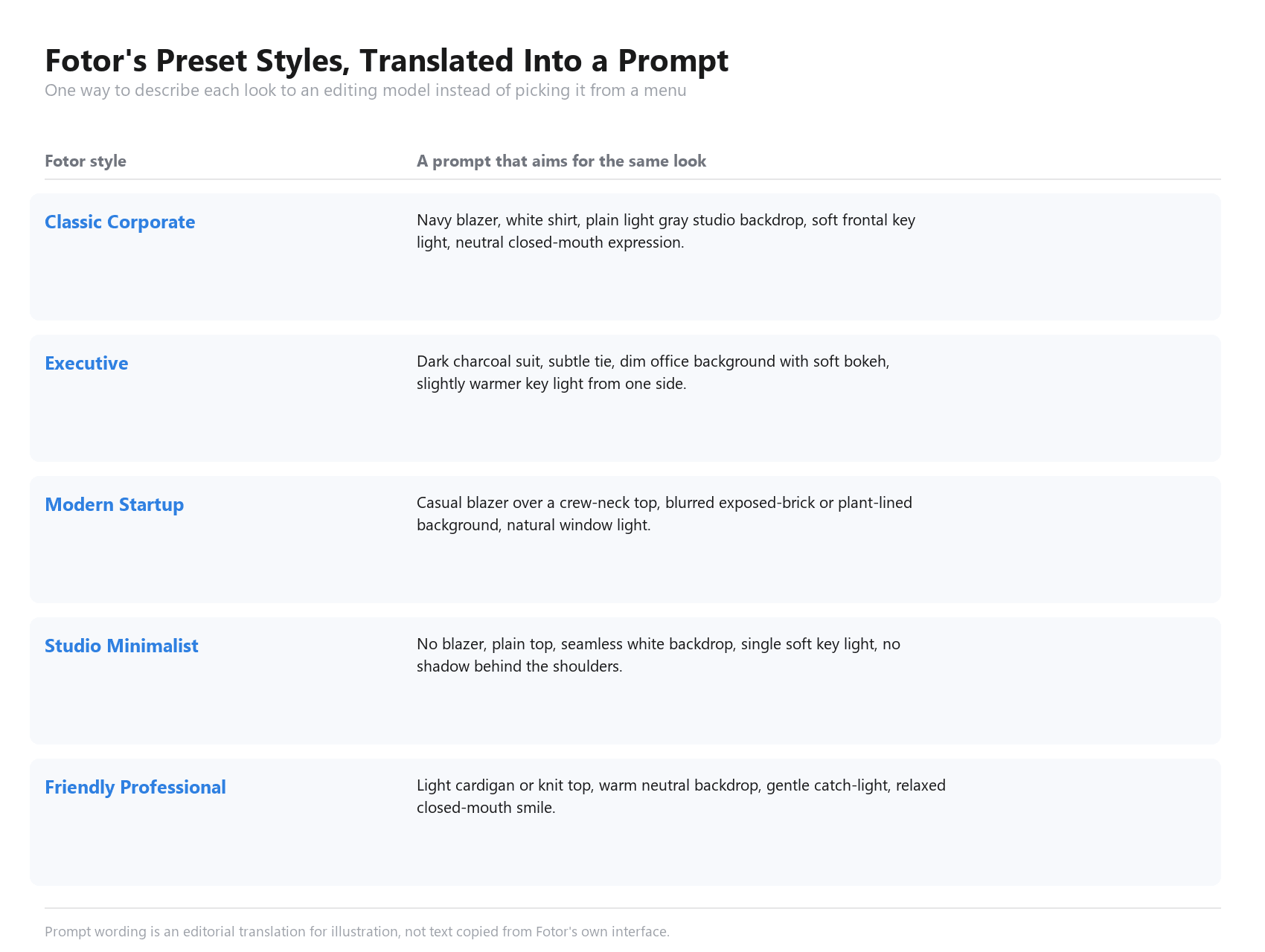
The flow itself is short. Open the tool, pick a category (Male, Female, Non-Binary, or Kids), choose between three and ten styles from what Fotor calls its library of "dozens of built-in, recruiter-approved templates," upload one life photo or selfie, then preview and download. Named styles on the page include Classic Corporate, Executive, Smart Casual, Modern Startup, Friendly Professional, Casual Formal, Corporate Counsel, Studio Minimalist, White Formal, Urban Professional, Entrepreneur Look, and Casual Look, more variety in naming than most competitors bother with.
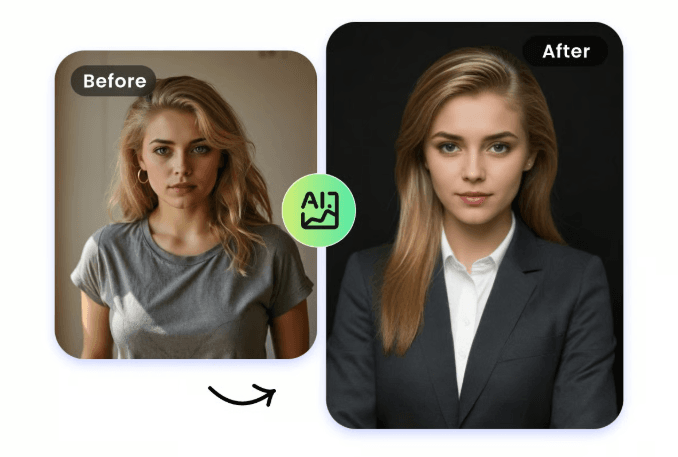
Fotor's own description leans on "over 200 facial data points" to keep the result looking like the person who uploaded it, and separately claims 3D facial modeling rather than a flat filter, which is the part of the pitch meant to explain why a headshot generator isn't just a photo overlay. The clothing swap works the same way: the page describes the tool as able to "digitally tailor" an outfit onto the subject, which is what turns a t-shirt selfie into a blazer.
The Kids category is worth a separate mention, since the same pipeline extends to children's photos, aiming for a clean studio backdrop and school-appropriate styling rather than adult business wear. On data handling, Fotor states that uploaded photos are wiped from its servers within 24 hours. What the page does not state anywhere is an output resolution, an accepted file format list, or an upload size cap, three items that show up on the spec sheet of nearly every competing tool in this category.
Fotor Headshot Generator Pricing: Credits, Packages and What "Free" Covers
Fotor runs its whole AI suite on one credit rule, stated plainly in its own help documentation: one credit is consumed for each AI image generated, headshots included, because "computation costs and server costs are incurred during the generation process." New registrants get a 7-day trial of the full Pro tier before any card is charged, unlocking the AI toolkit, the editing and beauty tools, and Fotor's broader library of more than 100,000 design templates, separate from the headshot styles above.
After the trial ends, four subscription tiers apply. Free carries no monthly credit grant. Pro runs $4.99 a month, or $47.99 billed yearly, which works out to $3.99 a month and carries a 30 percent discount badge on the page. Pro+ runs $8.33 a month, or $69.99 a year ($5.83 a month equivalent). Max runs $19.99 a month, or $167.92 a year ($13.99 a month equivalent). Pro carries 100 credits every month, Pro+ 300, Max 1,000.
Separate from any subscription, Fotor sells headshots by the pack: 20 photos for $26.99, 40 for $37.99 (the one marked "Most popular"), or 80 for $50.99, each including one free redo and an HD download. Divide those totals by photo count and the per-photo price drops as the pack grows, from $1.35 at the smallest pack down to roughly 64 cents at the largest. There's also a team program that never appears on the consumer pricing page: a minimum purchase of two seats, a base rate of $29.99 per person for 80 images each, and a volume discount that steps down as the organization gets bigger, reaching close to half the base rate at the largest published tier.
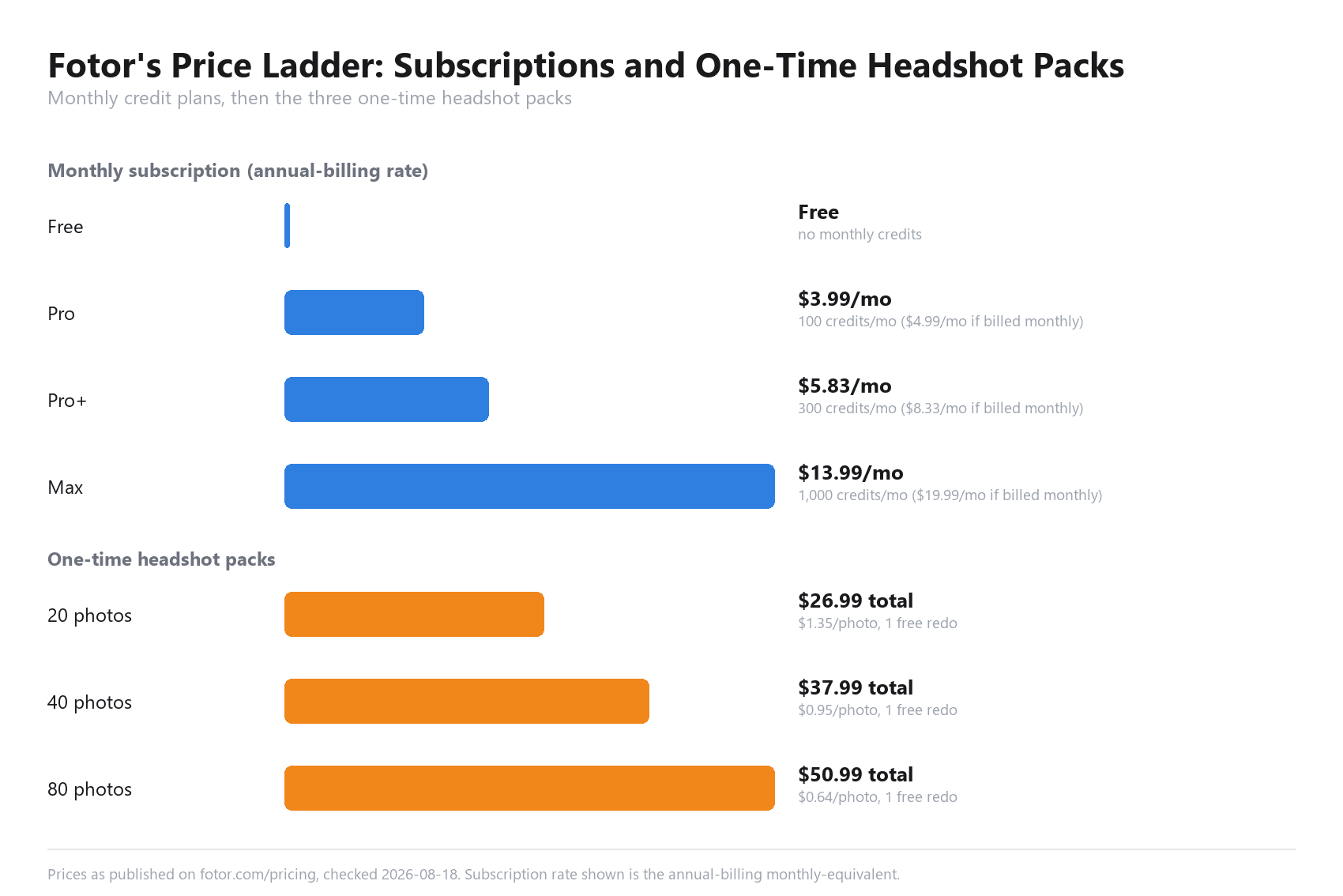
Prices as published on fotor.com/pricing, checked 2026-08-18.
Where Atlas Cloud Fits When You'd Rather Skip the Template Picker
Fotor's structure asks for a category, a gender, and a pick from up to ten named looks before a single word gets typed. Atlas Cloud runs headshot generation the other way: describe what's needed in a sentence, or skip the sentence and run the free version first.
There are two lanes here. The free one lives on the AI tools page, which collects every no-cost tool the platform offers in one place, including the free AI headshot generator. Every account gets one full generation at no charge and no card required. Run that once and the tool's own pricing note switches to metered billing at $0.045 a photo, a number printed on the page itself rather than buried in a help article somewhere else.
The metered lane belongs to the platform's image-editing models, most relevantly the Nano Banana 2 family. The Nano Banana 2 Edit endpoint quoted $0.08 per 1k image, $0.12 at 2k, and $0.16 at 4k when checked against Atlas Cloud's pricing API on August 18, 2026, with no promotional discount active at any of the three tiers that day. Set those numbers against Fotor's cheapest pack, 64 cents a photo at 80 images, and the gap holds up: a free run first, then a few cents a photo after that, or a sharper 4k edit for less than a fifth of what Fotor's smallest pack charges per print.
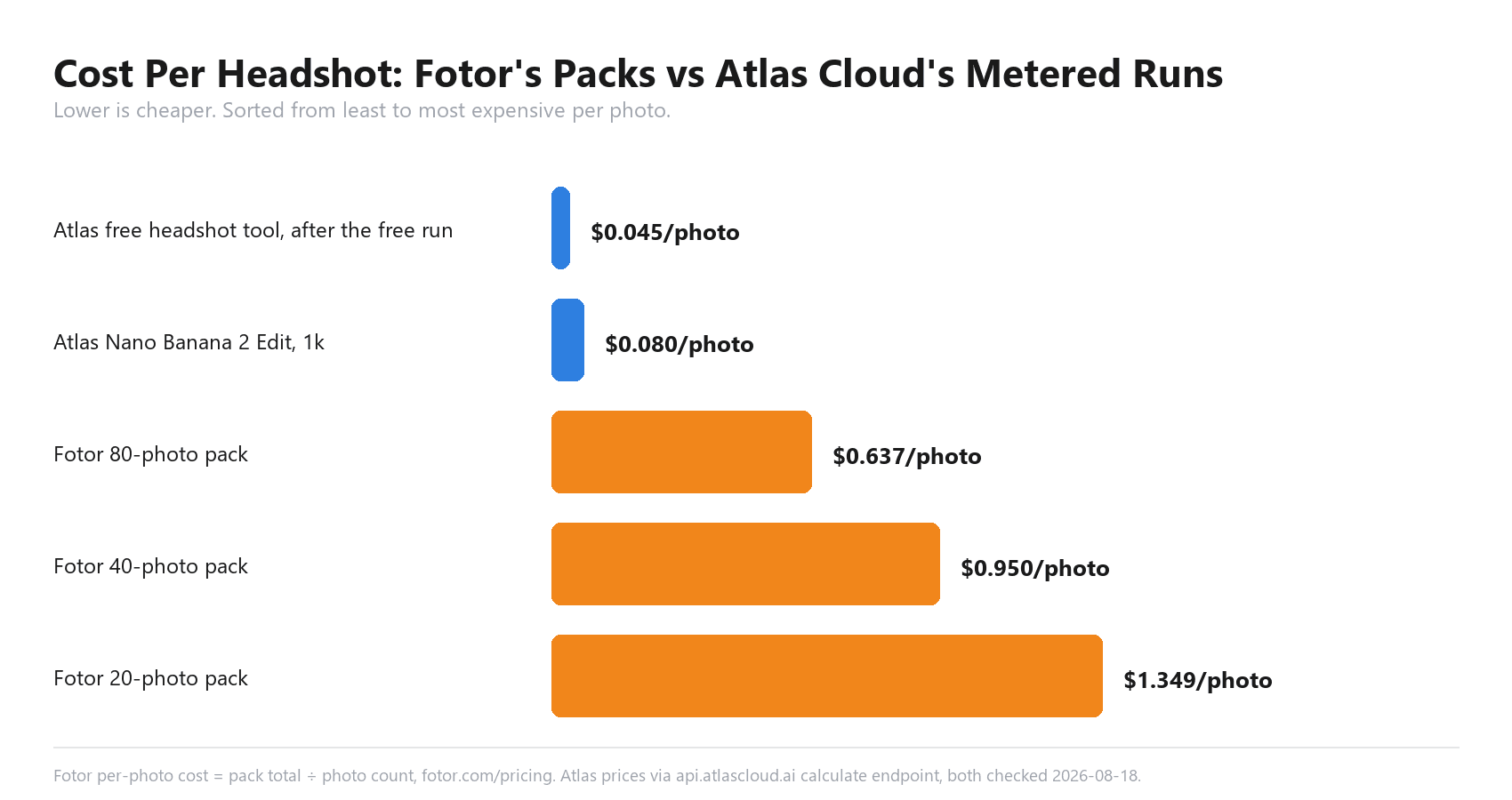
Fotor per-photo cost calculated from fotor.com/pricing. Atlas Cloud prices via the platform's calculate endpoint, both checked 2026-08-18.
Running Your Headshot on Atlas Cloud
Three ways to actually get a file out of this, roughly in order of how much control each one hands over.
Method 1: One Free Run on the Free AI Headshot Generator
Sign in first. The tool asks for account confirmation before it runs, even on the free tier. From there, open the free AI headshot generator, upload a front-facing selfie, and let it process. The tool edits the uploaded photo rather than inventing a new face, which its own page states outright, so the result should track the input's actual features instead of averaging them into someone else's.
Input guidance straight from the page: good lighting, a high-resolution original rather than a screenshot or a compressed copy, one person in the frame, nothing covering the eyes or hairline, and a relaxed, natural expression. Output comes back at what the page calls high resolution, suitable for both a digital profile and a printed copy, and is licensed for personal use on LinkedIn, resumes, and other professional profiles with no restriction on career-related use.
The catch is right there in the name: one free run per account. Spend it and the same page steps up to the metered rate covered above, or points toward the API for anyone running more than a handful, which Method 3 walks through below.
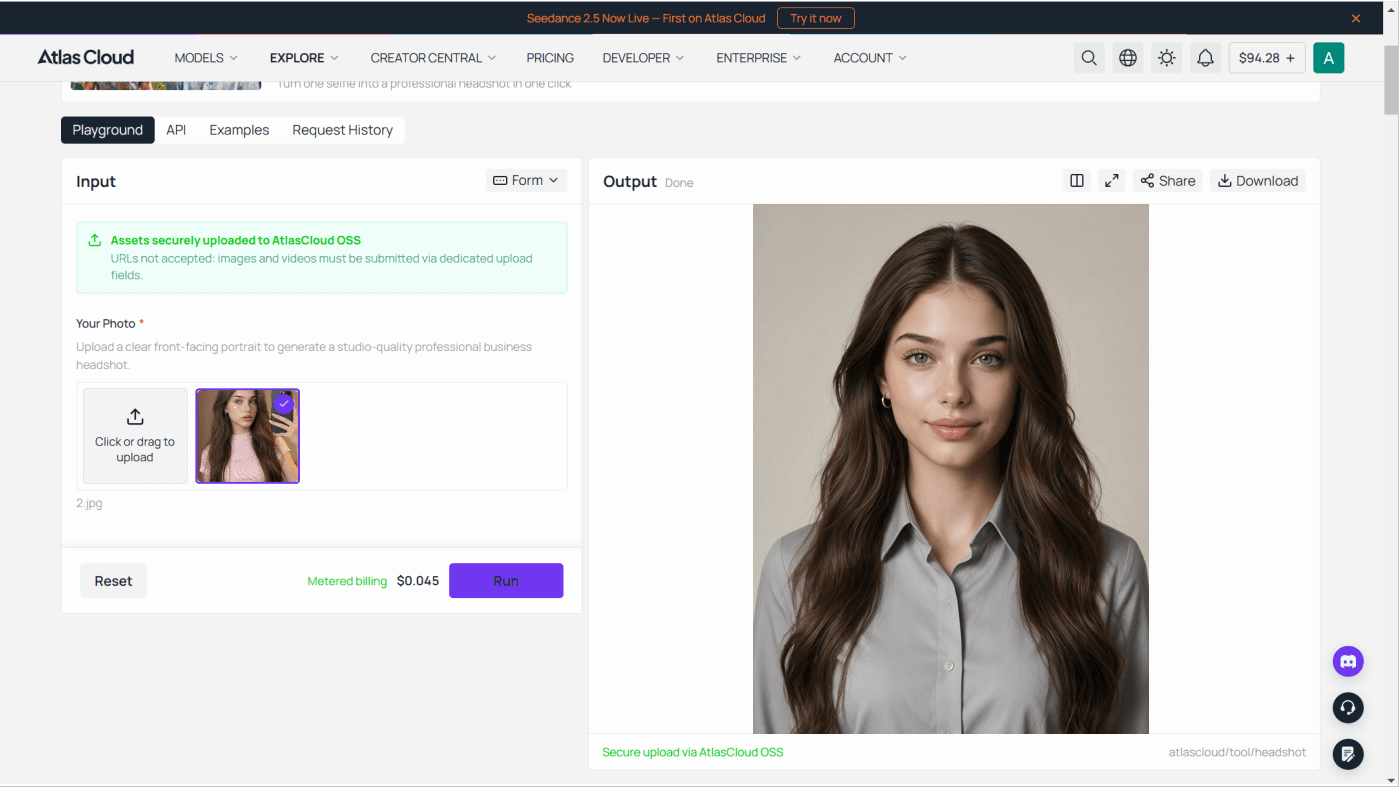
Method 2: A Custom Headshot, One Selfie in the Playground
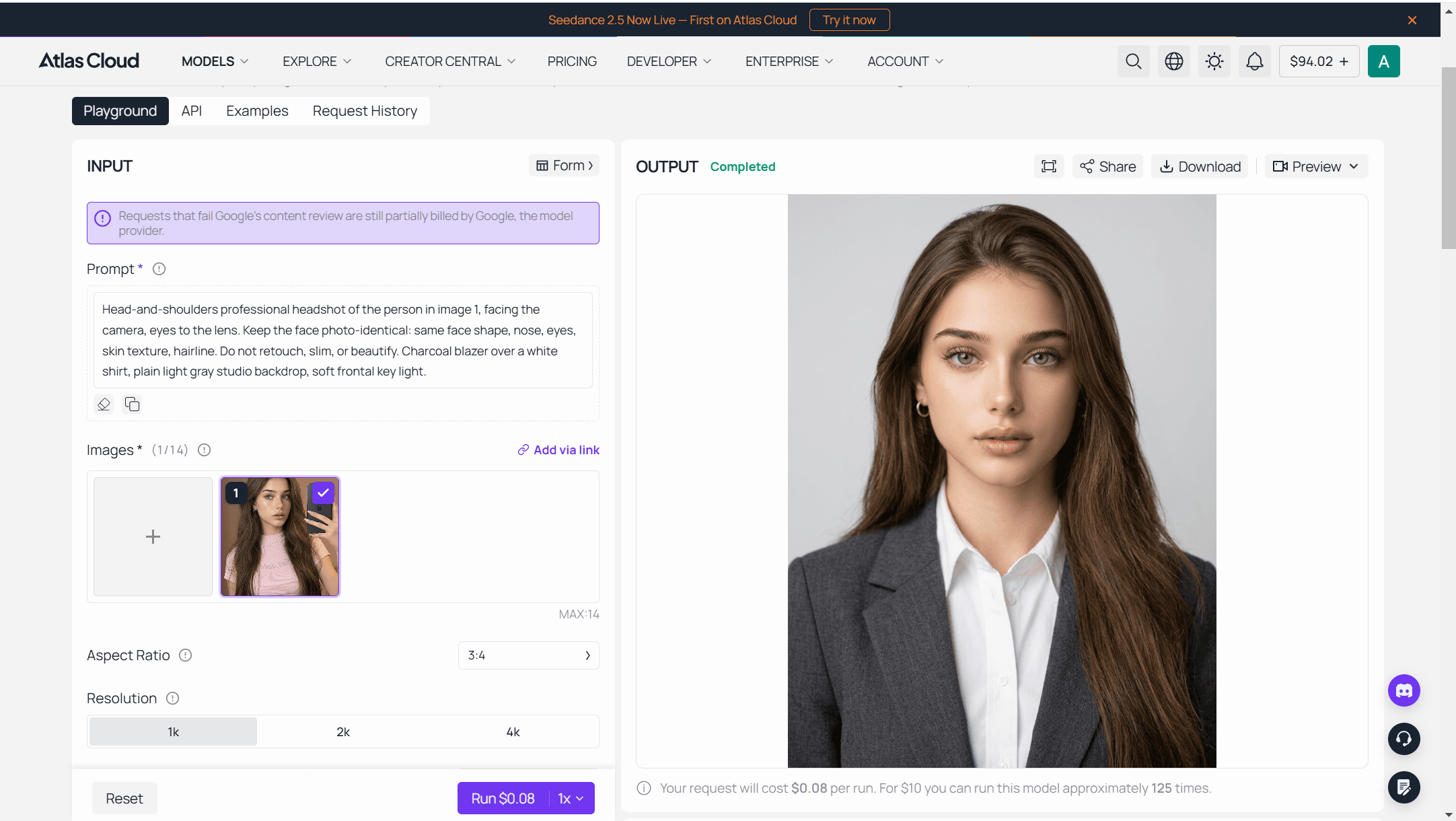
Once the free run is spent, or when the look needed isn't one of Fotor's preset styles, the Nano Banana 2 Edit playground takes over. Log in, upload the selfie, set a resolution tier, and write the instruction instead of clicking a thumbnail:
plaintext1Head-and-shoulders professional headshot of the person in image 1, facing the camera, eyes to the lens. Keep the face photo-identical: same face shape, nose, eyes, skin texture, hairline. Do not retouch, slim, or beautify. Charcoal blazer over a white shirt, plain light gray studio backdrop, soft frontal key light.
The chart below works through five of Fotor's own style names and one way to translate each into a sentence like the one above, swapping out the wardrobe and background clauses while keeping the identity instruction fixed.
Price shows on the Run button before anything commits, at the same per-resolution rates covered above.
Method 3: Batch Headshots Through the API
A paid pack's real advantage over a metered call is volume, and volume is a loop.
Step 1: Create an API key in the Atlas Cloud console and copy it.
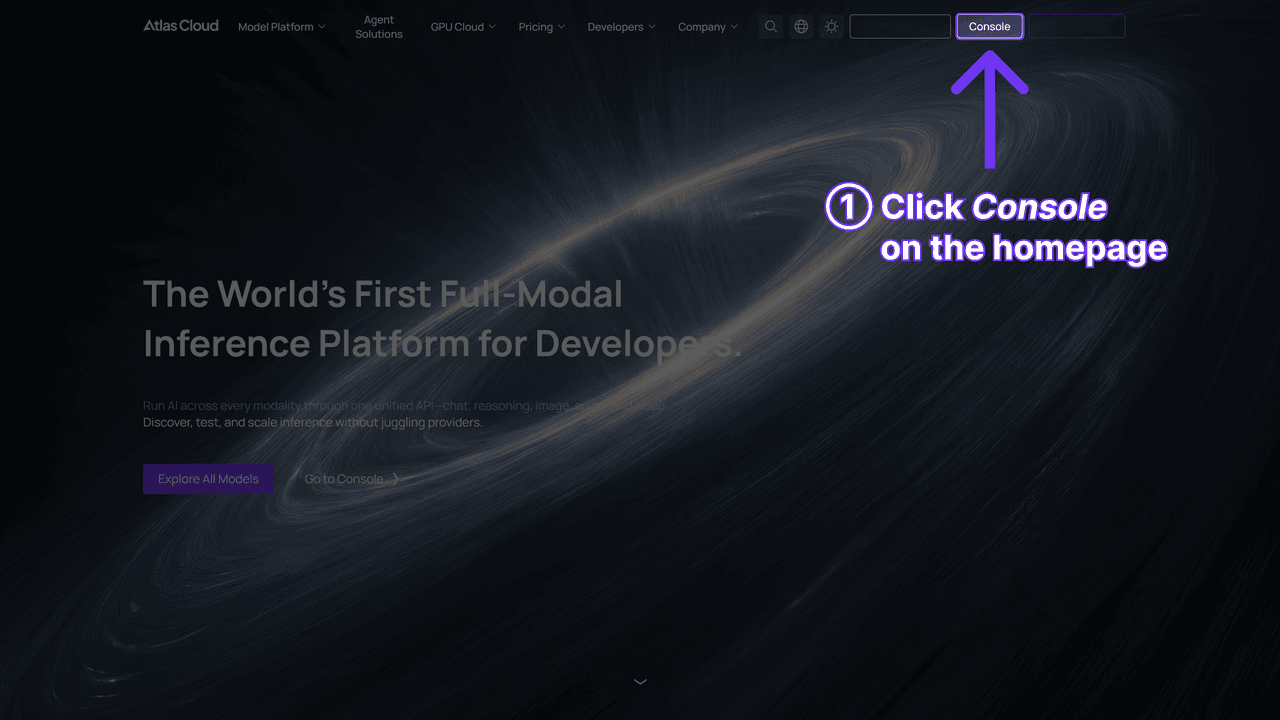
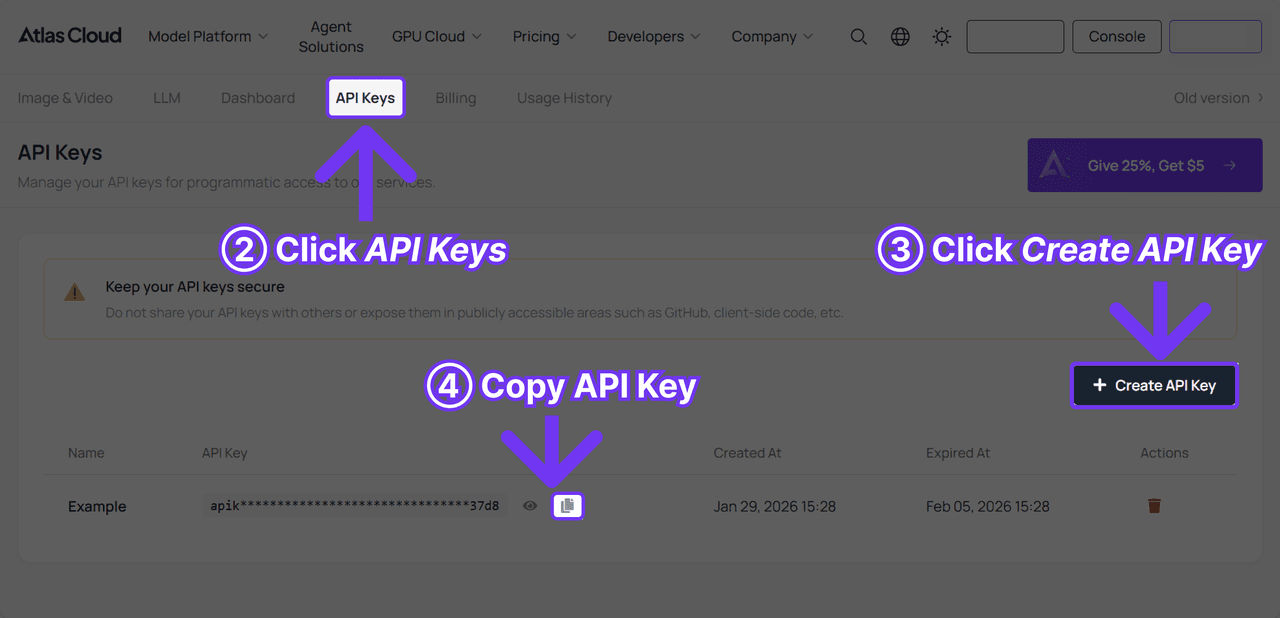
Step 2: Read the API docs for authentication and the image endpoint's parameters.
Step 3: Send the request, then poll for the result:
plaintext1curl -X POST https://api.atlascloud.ai/api/v1/model/generateImage \ 2 -H "Content-Type: application/json" \ 3 -H "Authorization: Bearer $ATLASCLOUD_API_KEY" \ 4 -d '{ 5 "model": "google/nano-banana-2/edit", 6 "prompt": "Head-and-shoulders professional headshot of the person in image 1, facing the camera. Keep the face identical, no retouching. Charcoal blazer over a white shirt, plain light gray studio backdrop, soft frontal key light.", 7 "images": ["https://your-cdn.com/selfie.jpg"], 8 "resolution": "1k" 9 }'
plaintext1curl -s https://api.atlascloud.ai/api/v1/model/prediction/<PREDICTION_ID> \ 2 -H "Authorization: Bearer $ATLASCLOUD_API_KEY"
Rewrite one wardrobe clause per call and a batch of forty comes out to about $3.20 in Nano Banana 2 Edit calls at the 1k rate, next to the $37.99 Fotor charges for its own 40-photo pack. The same key and the same two calls reach every other model on the platform, so moving to a different resolution tier, or a different model entirely, is an edit to one string rather than a new integration.
What Fotor Headshot Users Actually Report About the Results
The obvious question for any templated headshot tool is whether the result looks like a real professional photo or like something a recruiter can spot in two seconds. Fotor's own FAQ addresses this directly rather than dodging it, which is worth reading before assuming the worst.
| The concern | Fotor's own answer | What's actually checkable |
|---|---|---|
| Will it look obviously AI-generated on LinkedIn? | The page argues the output is built from the user's real facial data rather than a generic template face | LinkedIn's own photo policy doesn't ban AI-generated images outright, only images that don't reflect your likeness |
| Will recruiters reject an AI headshot? | The FAQ frames AI headshots as increasingly standard for remote hiring and professional profiles | No independent, dated survey on recruiter attitudes appears on Fotor's own pages to back this |
Neither answer is independently verified, and that's the honest limit of what a vendor's own FAQ can settle. The deeper, unavoidable gap is that a template-driven tool will occasionally return something that reads as generic rather than personal, since the styling choices are pre-built rather than described fresh for the one photo in front of it. That's less a flaw than a tradeoff: fewer decisions to make, at the cost of less control over the specific result.
Frequently Asked Questions
Is Fotor's AI headshot generator actually free?
The tool's page is titled free, and a new account does get some usage before paying anything, including a 7-day trial of the full Pro tier. Generating a headshot still draws on a credit balance, though, and every credit-consuming action is documented as costing at least one credit. Once that balance runs out, the options are a subscription, a one-time photo pack, or Atlas Cloud's own free headshot tool, which gives one full run per account with no card required.
How much does Fotor charge per headshot?
There's no single number, because Fotor prices this two different ways. Subscriptions run $4.99 to $19.99 a month depending on tier (cheaper if billed annually), bundling in a monthly credit allotment shared across every AI feature, not just headshots. One-time packs run $26.99 for 20 photos, $37.99 for 40, or $50.99 for 80, which works out to $1.35, $0.95, and roughly $0.64 a photo.
How many photos does Fotor's headshot generator need?
One. The tool works from a single life photo or selfie per generation, unlike some competing services that ask for six or more angles before starting.
What happens to my photo after I upload it to Fotor?
The upload gets deleted within a day, per the retention window covered above. What isn't addressed anywhere on the page is the generated output file itself, whether a copy stays on Fotor's side after download or not.
Is there a free AI headshot generator without credits?
Yes. Atlas Cloud's free AI headshot generator gives every account one full generation with no credit balance spent and no card on file. It's a single run rather than an ongoing allowance, and pricing switches to a flat $0.045 a photo once that run is used, which is printed on the tool's own page rather than requiring a subscription to unlock.
Does Fotor offer team or bulk headshot pricing?
Yes, through a separate program not listed on the consumer pricing page. It requires a minimum purchase of two seats at a base rate of $29.99 per person for 80 images each, with the per-seat price stepping down as the number of seats in the order grows.
Conclusion
The free label on a headshot tool tends to cover exactly one thing at a time: one trial week, one photo pack, or on Atlas Cloud, one run before metered pricing kicks in. Past that point, someone is paying per credit, per photo, or per API call no matter which tool is open. Fotor's template library is a real advantage when one of its dozens of preset looks is already close to what's needed, three clicks and a download. When it isn't, or when the per-photo math across a batch of headshots actually matters, writing the instruction yourself and paying by the run is the part templates can't do for you.