Your camera roll holds four hundred photos of other people and eleven of you, and nine of those are blurry. That leaves two usable photos and a question you have probably typed into a search box already: how do I make an AI picture of myself? The honest answer starts with a count. One photo sends you down one road. Ten photos open a different one, with a wait and a bill attached.
This guide walks all three roads: a one-photo tool that rebuilds your portrait, the chatbots you already have installed, and a personal model trained on a folder of your pictures. The numbers come from each vendor's own pages and from runs we did ourselves. Start with the count, and the rest sorts itself out.
Key Takeaways
- The route depends on how many photos you have: one photo goes into a reframing or editing tool, ten or more can train a model of you.
- The free AI selfie generator on Atlas Cloud rebuilds one portrait as an arm's-length selfie with your face, hair and room carried over. Your first run is free after sign-in.
- ChatGPT, Gemini and Meta AI all take a photo of you now. Meta's likeness setup starts from one photo and asks for three more to improve results.
- Trained-model services ask for 5 to 15 photos plus a wait, and one developer's own published run still came back inconsistent from image to image.
- Before uploading anywhere, find three lines on the page: who can see the result, how long it is kept, how to delete it.
How Do I Make an AI Picture of Myself? Start by Counting Your Photos
Three mechanisms sit behind the AI picture of yourself products in this guide, and they are not interchangeable.
The first takes one photo and rebuilds it. The camera position moves, the scene may change, and your face travels across as it was. The second also takes one photo, inside a general chatbot, where a text instruction edits the image you uploaded. The third takes a folder of photos and trains a small model of you, which can then draw you from angles that were never photographed.
The dividing line is how many photos each one wants before it produces anything.
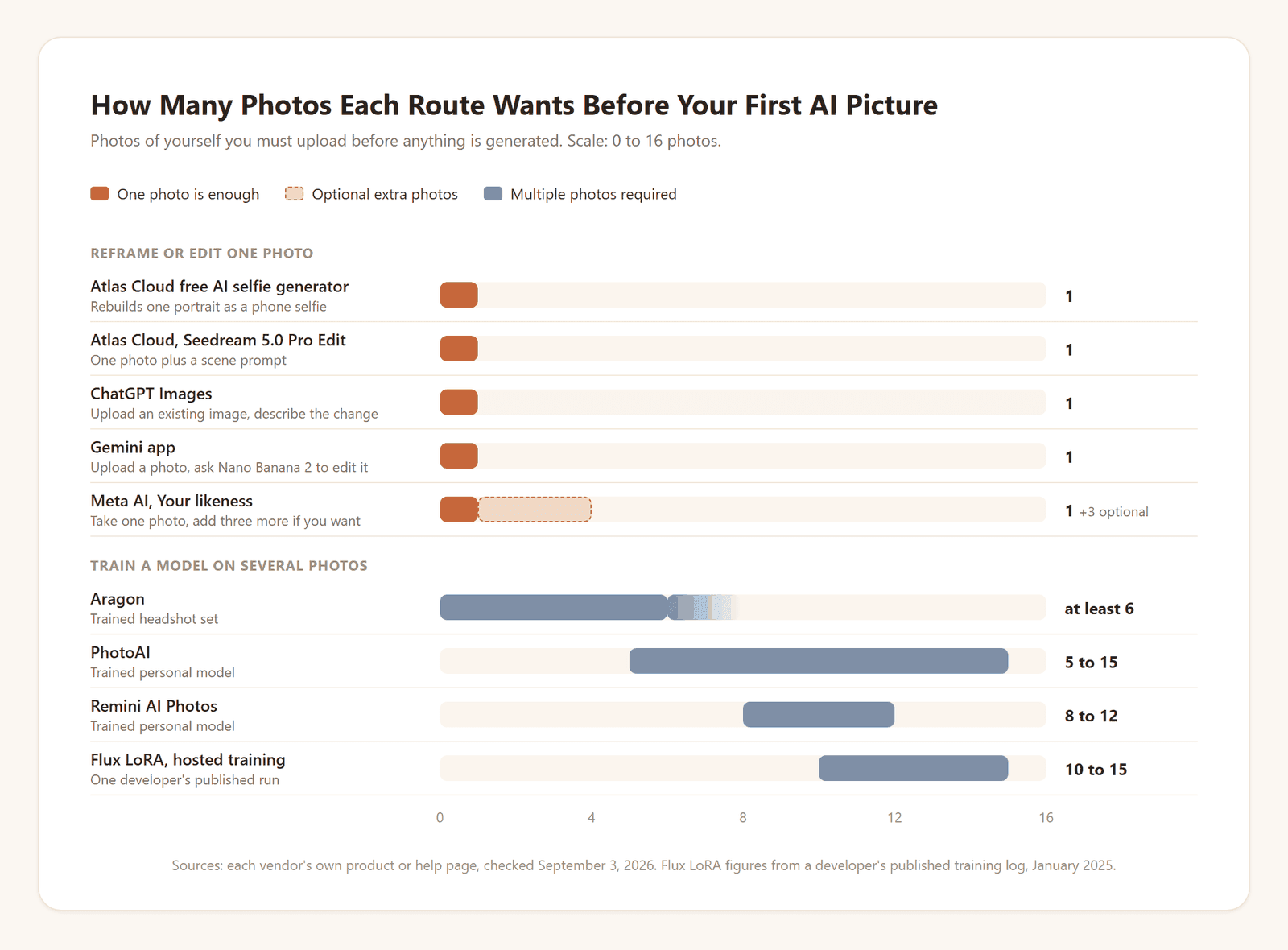
Everything in the top group accepts a single upload. Meta AI is the one that nudges you further: its help page says "Upload 3 additional photos of yourself. This helps us improve your AI images." The bottom group will not start without a set, and the set is the point.
So the question is what you want out. A better version of a photo you already have? One photo. Twenty pictures of yourself in twenty poses that never happened? You need the folder, the wait, and a tolerance for the occasional stranger wearing your haircut.
Make an AI Picture of Yourself From One Photo on Atlas Cloud
Atlas Cloud keeps its free AI tools on one page and its full model catalog behind it, and two routes there fit the one-photo case. The first is a fixed tool that turns a portrait into a phone selfie and leaves the background exactly where it was. The second is an open edit model that takes your photo plus a sentence and can change the place, the outfit and the light around you. Here is the fixed tool's official sample before any steps.
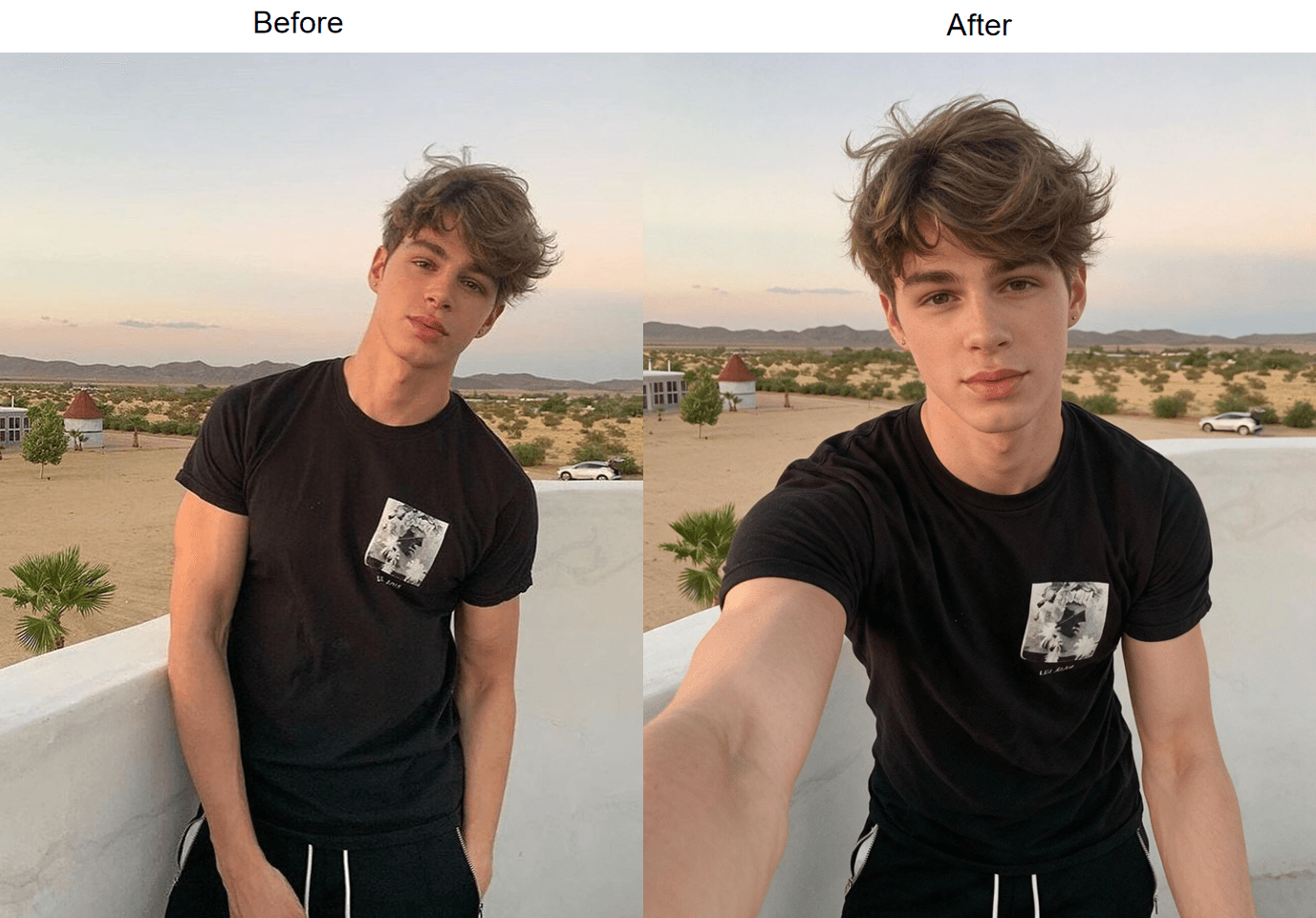
Official sample images from the Atlas Cloud free AI selfie generator page, checked September 3, 2026.
Read the two frames as a checklist. Same face, same hair parting, same small earrings, same black top, same banquette and mirror strip behind her. What changed is the camera: it moved from across the table to the end of her own arm, and the body turned to meet it. That is a re-render, not a crop, which is why an arm now reaches toward the lens.
Method 1: One Photo In, One Phone Selfie Out
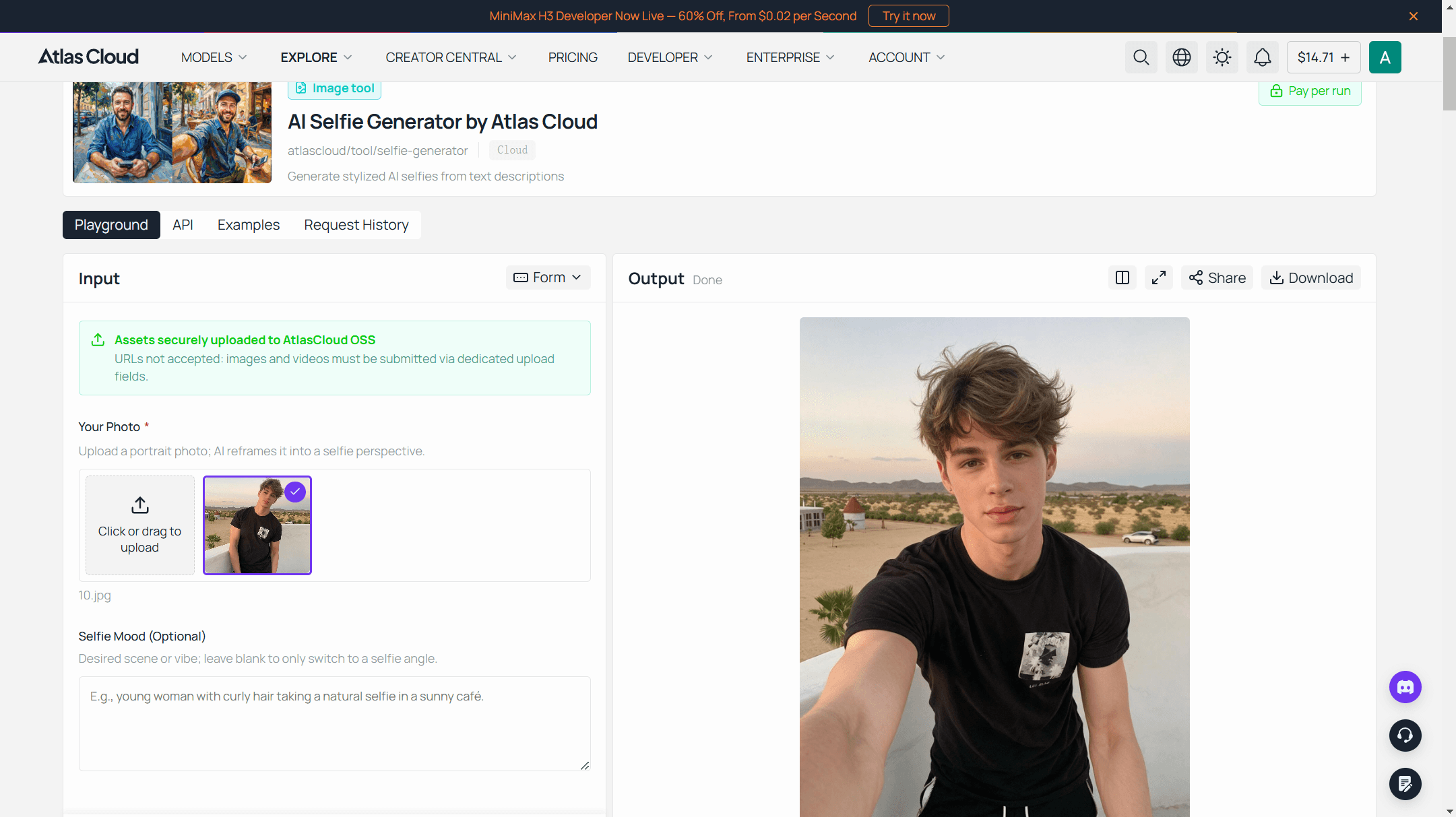
The AI selfie generator does one job, and the page describes the recipe for a good input in one line: "One person in frame and no heavy filters is most of the recipe." Three steps.
- Sign in. Google, GitHub or an email address. The tool page ties the free run to the account and files each result in your request history, so you can find it again later.
- Upload the photo. Anything up to 10MB where your face is easy to see. A photo someone else took from a normal distance works well, since the tool will move the camera closer for you.
- Run. The result arrives in about 30 seconds at 1328 x 1776 pixels, and the download has nothing stamped on it. There is an optional mood line for a new setting. In our runs the background stayed as it was in the source photo, with the line filled or empty, so pick a photo whose room you already like.
The first generation on each eligible account is free. After that, the Run button shows the metered price before you commit.
Method 2: An AI Photo Generator With My Face in Any Scene
Say the room is the problem. You like your face in the birthday photo and hate the restaurant carpet. For a new place, outfit or pose you want an edit model that treats your photo as a reference and your sentence as the brief.
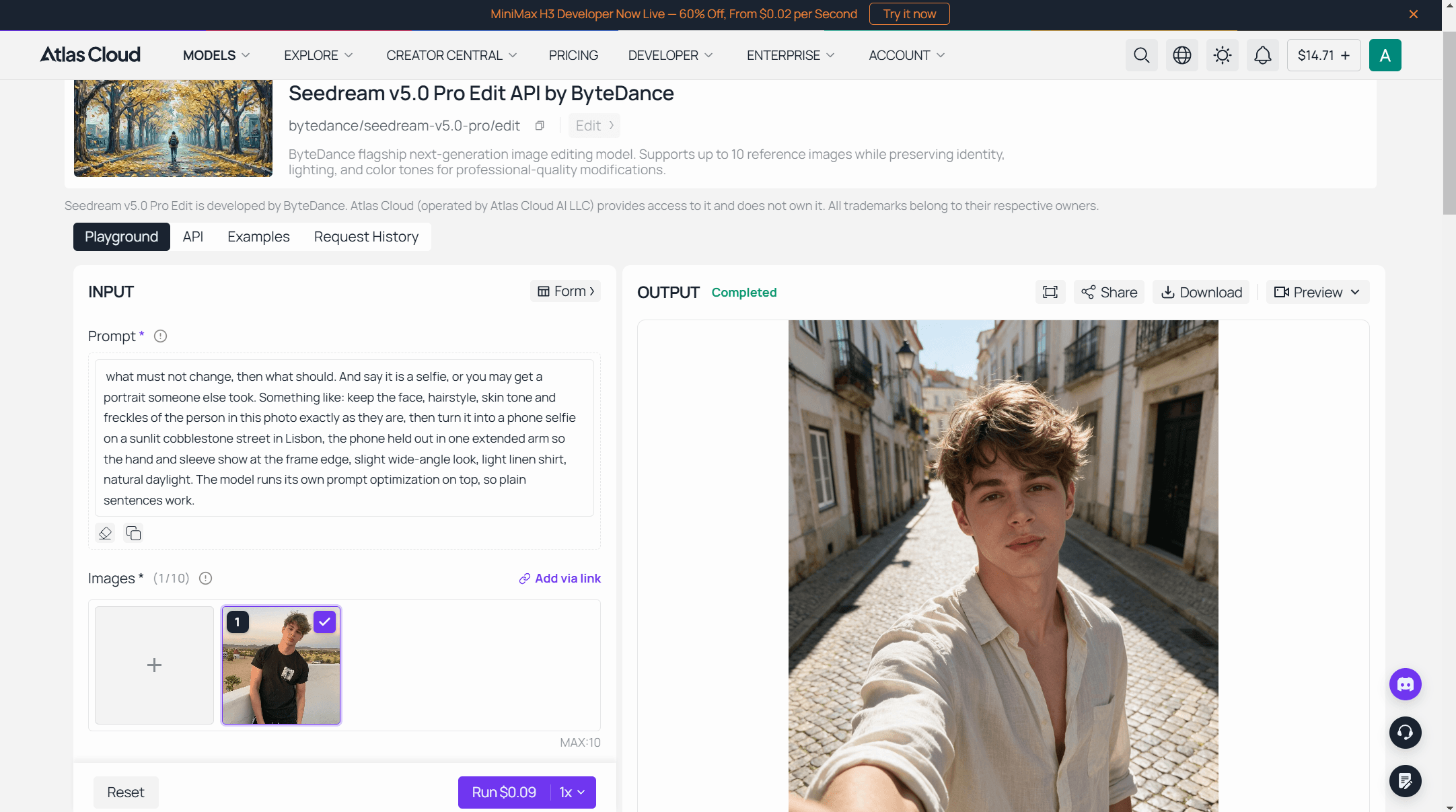
On Atlas Cloud that is Seedream 5.0 Pro Edit, the reference-editing mode of ByteDance's flagship image model. The model page puts the brief in one line: it "preserves facial features, lighting direction, and color grading of the source material while executing the requested modification."
The form has three fields that matter for this job.
- Images. Add your one photo. The field takes up to 10 reference images, as URLs or uploads, in JPEG, PNG, WEBP or HEIC among other formats. For a picture of yourself, one is the right number.
- Prompt. Write it in two halves: what must not change, then what should. And say it is a selfie, or you may get a portrait someone else took. Something like: keep the face, hairstyle, skin tone and freckles of the person in this photo exactly as they are, then turn it into a phone selfie on a sunlit cobblestone street in Lisbon, the phone held out in one extended arm so the hand and sleeve show at the frame edge, slight wide-angle look, light linen shirt, natural daylight. The model runs its own prompt optimization on top, so plain sentences work.
- Size. Pick a preset in pixels. 1328*1776 is a phone-portrait 3:4 in the model's economical tier; 1728*2304 is the same shape one tier up. Output comes back as JPEG by default, PNG if you ask.
For prompt wording that keeps skin and light believable, the Seedream portrait guide goes deeper. If the picture you actually need is a business portrait rather than a street scene, the selfie to headshot guide covers that variant on its own.
Method 3: The Same Edit Through the Atlas Cloud API
The playground is fine for one picture. It is tedious for twenty, and useless if you are building a small app that makes pictures of your friends, with their permission. The same edit model answers over the API with three steps.
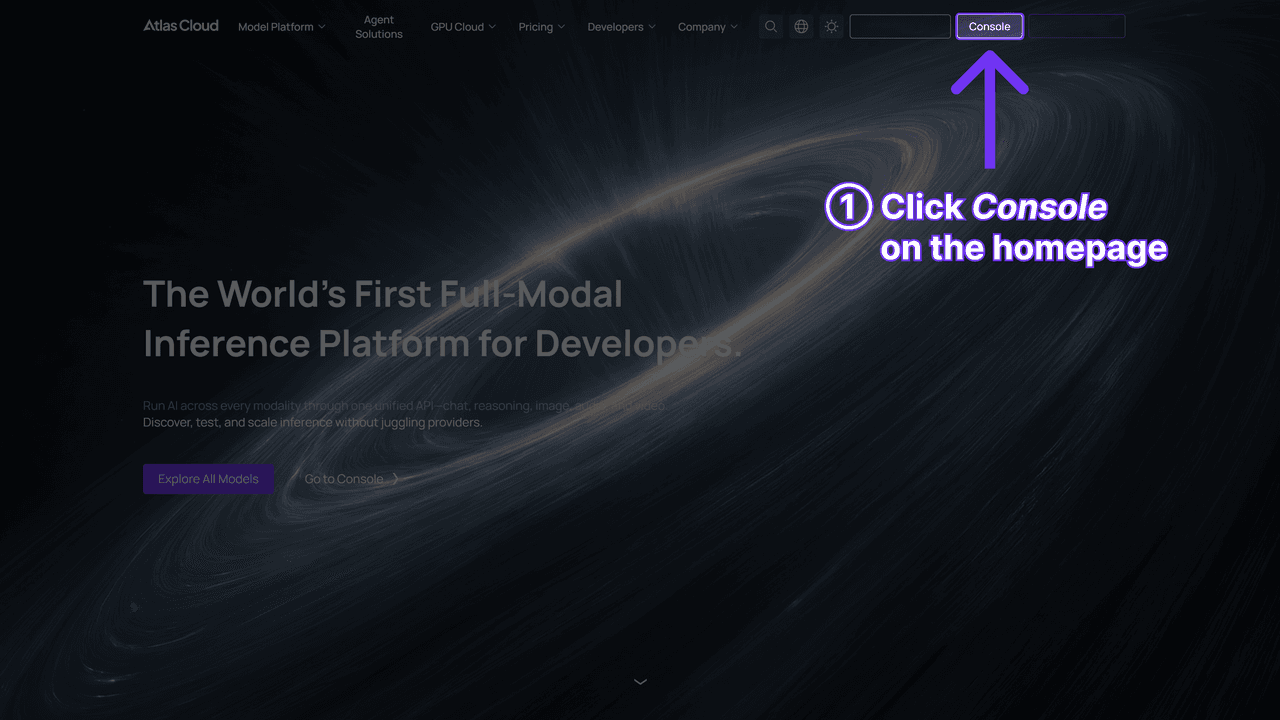
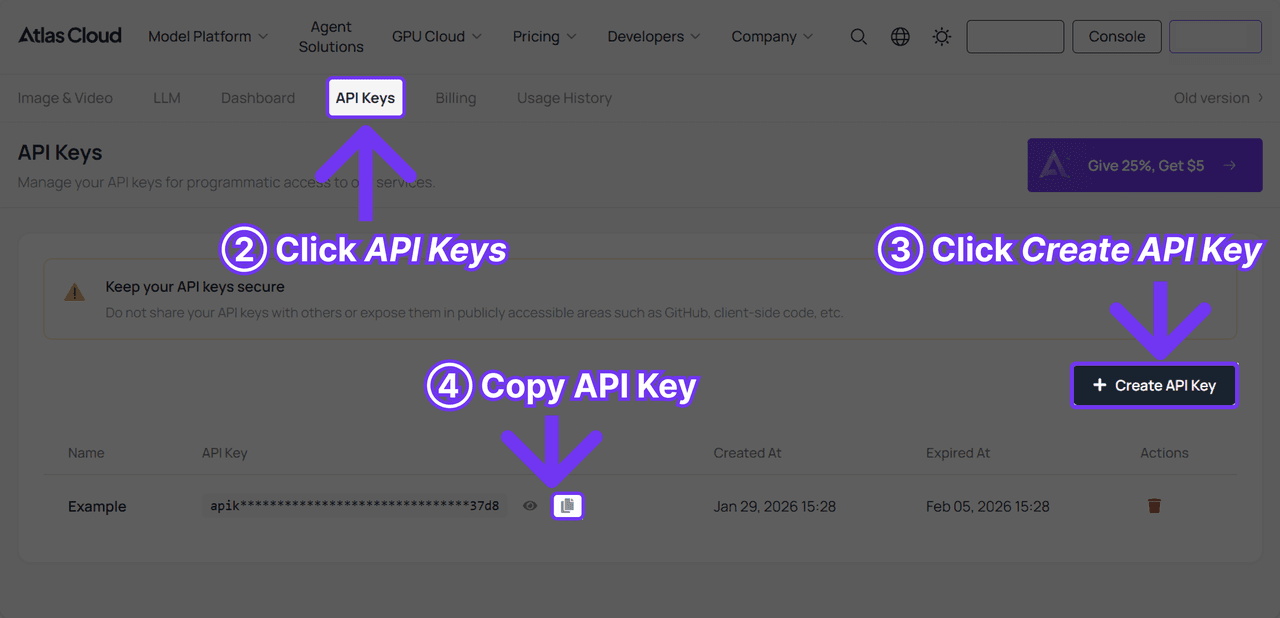
Step 1: Create an API key. In the Atlas Cloud console, generate a key and copy it once. Keep it server-side. One key works across the platform's models.
Step 2: Check the request shape. The API docs describe the image endpoints, and the model page has an API tab with the same fields as the form: images, prompt, size, output_format. One trap: the API defaults to 2048*2048, the larger tier, so pass size explicitly.
Step 3: Send the request and poll. Submission is asynchronous. The first call returns a prediction id; the second call reads its status.
Bash1curl -X POST https://api.atlascloud.ai/api/v1/model/generateImage \ 2 -H "Content-Type: application/json" \ 3 -H "Authorization: Bearer $ATLASCLOUD_API_KEY" \ 4 -d '{ 5 "model": "bytedance/seedream-v5.0-pro/edit", 6 "prompt": "Keep the face, hairstyle, skin tone and freckles of the person in this photo exactly as they are. Turn it into a phone selfie on a sunlit cobblestone street in Lisbon, the phone held out in one extended arm so the hand and sleeve show at the frame edge, slight wide-angle look, light linen shirt, natural daylight.", 7 "images": ["https://your-cdn.com/portrait.jpg"], 8 "size": "1328*1776", 9 "output_format": "jpeg" 10 }'
Bash1curl -s https://api.atlascloud.ai/api/v1/model/prediction/<PREDICTION_ID> \ 2 -H "Authorization: Bearer $ATLASCLOUD_API_KEY"
Poll until status reads completed and take the image URL from outputs. Swap the model string and the same endpoint, key and polling loop drive any other image model on Atlas Cloud, which is the whole idea of one API.
An AI Version of Me Inside ChatGPT, Gemini or Meta AI
Many people asking this question already have one of these apps open. Each of them now accepts a photo of you, and each documents the path in its own help center. The table pulls the official wording together so you can compare without opening three tabs.
| App | Where you start | What you upload | What the official page adds |
|---|---|---|---|
| ChatGPT Images | Ask in a conversation, or "select More and then select Images" | An existing image plus a description of the change | An aspect ratio picker; "Images with thinking is available on Plus, Pro, and Business" |
| Gemini app | "Open Sidebar" then "Images", a template or a prompt with Nano Banana 2 | A photo, or an image already in your Library, then "Chat" beneath it | Can use the people labels you set up in Google Photos; a daily quota of Nano Banana 2 images applies, number not published |
| Meta AI and Vibes | Menu, profile picture, "Your likeness", "Get started" | One photo taken in the app, three optional extras | Optional voice recording; privacy controls for who can use your image; "not yet available everywhere" |
Table compiled from each vendor's help page, checked September 3, 2026.
The ChatGPT path takes one sentence to describe. OpenAI's help page for Images in ChatGPT puts it in one sentence: "You can also upload an existing image and describe the changes you want ChatGPT to make." The ChatGPT Images landing page also carries an "Add yourself" control, though the help article does not yet describe what it stores.
Gemini goes further into your library. Google's page on generating and editing images with Gemini Apps states that "Gemini can use the labels you've set up in Google Photos to identify people and pets to generate images of them." Convenient, and worth knowing before you ask for a picture of yourself with a named friend.
Meta's flow is built around a stored likeness. Its help page on AI images of yourself walks through a "Your likeness" setup that starts with a photo taken in the app, then offers extra uploads and a voice recording, and ends with a control over who may use your image. There is also a "Delete your likeness" option, which the next section comes back to.
What you give up in a chatbot is the itemized control. An exact pixel size, a file format and a price shown per run sit in the Atlas Cloud playground before you click. In a chat window the app decides most of that, inside whatever daily limit your plan carries.
One more difference for anything you plan to post: Google said in its August 2025 Nano Banana announcement that all images created or edited in the Gemini app carry a visible watermark plus its invisible SynthID marker.
Best AI Image Generator Using My Photos: When 10 Photos Beat One
Now the other road. If you want dozens of pictures of yourself in poses and angles nobody ever shot, one photo runs out of information. That is what the folder is for.
A detailed first-hand account of the developer version comes from Cory Zue, who published his training log in January 2025. He fine-tuned a Flux model with LoRA on a hosted GPU service, using "10-15 random photos of myself with different expressions / scenes / lighting / angles."
Training "will finish in about 20 minutes," the cost came to "~2.50permodel"plus"about2.50 per model" plus "about2.50permodel"plus"about.03 / image," and the whole experiment landed "just shy under $10" for three models.
His verdict on likeness: "Sometimes the model produces something that looks quite similar to the trained person, and sometimes it only has a mild resemblance." He also found that "it seems to break down if you try to include other people."
Consumer services wrap the same idea in a subscription or a package, and they publish their own timings.
| Route | Wait before the first picture | What comes out | How you pay |
|---|---|---|---|
| Flux LoRA, hosted training | About 20 minutes of training | Your own model, images on demand | Per training run, then per image |
| Aragon | 15 to 45 minutes, depending on package | A finished set of 40 to 100 headshots | One package price |
| PhotoAI | "It will be done in about a minute" | Photos on demand from your model | Subscription |
| Remini AI Photos | "just few minutes" of training | "dozens" of photos in different poses and angles | In-app subscription |
Timings quoted from each vendor's own page, checked September 3, 2026; Aragon figures from its pricing page, August 3, 2026.
Two things decide whether this road is worth it. Volume: if you need a set, the training wait pays for itself. Angles: a model trained on varied angles can draw a view none of your photos shows, which a one-photo edit can only guess at. For the trade-offs inside one of these packages, the Aragon package breakdown goes line by line.
Why an AI Picture of Yourself Stops Looking Like You
Here is the part all three routes share. The result comes back, and something is off. The jaw is wider, the eyes sit closer, the person is handsome and not quite you. Google described the gap in its own October 2025 tips post as moving from "your AI distant cousin" to images that look like you, which tells you how common the cousin used to be.
The causes sort into a short table, and each has a fix you can apply before the next run.
| Symptom | Likely cause | Fix |
|---|---|---|
| The face is close but generic | A generating model drew a new face from learned features instead of carrying yours over | Use a reframing or editing route for a single picture; for trained models, add photos with varied angles and light |
| Soft, waxy skin | A compressed or filtered source photo left the model nothing to keep | Start from the original file, not a chat-app forward or a beautified export |
| Wrong angle, wrong ears | The source shows a profile and you asked for a front view, so the unseen half was invented | Feed a photo that already faces roughly where you want the result to face |
| Two people merged | A group photo or a prompt naming a second person | Crop to one person, and send one person per request |
Meta's answer is to ask for more photos at setup, which its help page says helps improve the images. The Atlas Cloud selfie tool takes the opposite bet and works from one photo by reframing rather than regenerating, which is why its sample keeps the earrings. Both get better when the input is sharp, front-lit and unfiltered.
Where Your Photos Go After the AI Pic of Me Is Done
An AI pic of me is also a photo of me sitting on someone's server. Before you upload, three lines on the page deserve a read: who can see the result, how long it is kept, and how to remove it. The table shows what the official pages say, and where they say nothing.
| Service | Who can see the result | How long it stays | How to remove it |
|---|---|---|---|
| Atlas Cloud selfie generator | Filed in your own request history after sign-in | Not stated on the tool page | Not stated on the tool page |
| Meta AI, Your likeness | You set who can use your image during setup | Not stated on the help page | "Delete your likeness" or "Replace photos" in the likeness menu |
| Gemini app | Images sit in your Library; Google Photos labels can be read if you let them | Not stated on the image help page | Not stated on the image help page |
| ChatGPT Images | Your conversation; teen accounts may see a reminder before some uploads | Not stated on the image help page | Not stated on the image help page |
| VAKPixel (selfie service) | Its FAQ says generated images are public by default unless on a paid plan | Not stated on the tool page | Not stated on the tool page |
| Magic Hour (selfie service) | Your account | Its privacy panel says one day, its FAQ says seven | Not stated on the tool page |
Compiled from each service's own tool or help page, checked September 3, 2026.
Two rows stand out. A public-by-default gallery is a surprise many people do not expect from a selfie tool, and a retention period that differs between two pages of the same site means neither number is safe to rely on. Where the table says "not stated," that is a prompt to check the general privacy policy before uploading a photo of your face, or to use a photo you would not mind seeing again.
Frequently Asked Questions
How do I make an AI picture of myself for free?
Sign in to the Atlas Cloud free AI selfie generator and run one photo. The first generation on each eligible account costs nothing. Inside the chatbots, what is free depends on your plan: OpenAI's help page ties its Images with thinking mode to Plus, Pro and Business, and Google's page mentions a daily quota without publishing the number.
Can I make an AI pic of me from just one photo?
Yes, as long as the picture you want is a rebuild of that photo. A reframing tool moves the camera, and an edit model changes the scene, outfit or pose while keeping your face as its reference. What one photo cannot do is show a side of your head it never saw, which is where trained models come in.
How many photos does an AI photo generator with my face need?
One, for anything that reframes or edits an existing picture. Between five and fifteen, for services that train a model of you, with Aragon asking for at least six and Remini for eight to twelve. Meta AI sits between the two: one photo to start, more optional.
What is the best AI photo generator with my face?
It depends on the road. For one photo turned into a natural phone selfie, the Atlas Cloud tool keeps the face and the room. For one photo placed in a new scene, Seedream 5.0 Pro Edit with a two-part prompt. For a set of dozens, a trained model. Our ranked comparison of selfie AI generators tests eight tools on the same portrait.
How much does an AI picture of myself cost after the free run?
On Atlas Cloud, Seedream 5.0 Pro Edit was listed at $0.045 for a 1328*1776 output and $0.09 for a 1728*2304 output on September 3, 2026, with one reference image included and no discount running. Each extra reference image adds $0.003.
The selfie generator shows its metered price on the Run button before you commit; the platform's price calculator returned $0.045 per run on the day we checked. Both figures are per image, with no subscription.
Will an AI version of me carry a watermark or AI label?
It depends where you made it. Google states that images created or edited in the Gemini app carry a visible watermark and an invisible SynthID marker. The Atlas Cloud selfie generator's download has nothing stamped on it visibly. The Seedream 5.0 Pro Edit model page on Atlas Cloud carries no watermark statement, so treat that as unknown rather than absent.
Conclusion
The count decides the route. One good photo of you, and the fastest path is a tool that rebuilds it: a phone selfie from the Atlas Cloud generator, or a new scene from Seedream 5.0 Pro Edit with a two-part prompt. The chatbots get you there too, with fewer dials and a watermark in Gemini's case. A folder of photos and an hour to spare opens the trained-model road, with its sets of dozens and its occasional distant cousin.
Whatever you pick, the same two habits protect the result: start from a sharp, unfiltered original, and read the three lines about visibility, retention and deletion before you upload your face. Do that, and the question of how do I make an AI picture of myself has a short answer. Count your photos, then pick the tool built for that number.