Your retargeting audience has already seen your product once. That is the whole problem: serving them the same polished ad again buys you frequency, not conversions. The short answer to how to optimize UGC for Meta ads retargeting is to stop rotating products and start rotating hooks: a pain point opener for people who scrolled past, proof for cart abandoners, an authority angle for past buyers.
This guide maps each stage to the UGC format that fits it, weighs brand created vs UGC creative, and compares tool routes for shoppable UGC videos. Every spec and policy detail here was checked in late August 2026.
Key Takeaways
- Retargeting audiences respond to hook changes more than product changes: match pain point, proof, and authority openers to the three warm stages of the funnel.
- UGC-style creative fits retargeting because it reads as a recommendation from a person, while a repeated studio ad reads as the same commercial twice.
- IAB research fielded through January 2026 found 73% of consumers saying an AI disclosure label would not reduce their purchase intent, so labeling is not the obstacle.
- One product photo and a one-line brief are enough to generate a stage-matched variant free with the UGC Product Ad tool.
- Meta labels detected GenAI ad creative automatically; mandatory self-disclosure applies only to social issue, electoral, and political ads.
Why UGC Meta Ads Behave Differently in Front of a Warm Audience
A prospecting audience judges your ad against every other ad. A retargeting audience judges it against the memory of your last one. When the second impression looks exactly like the first, people file it as a rerun, and the click never comes. UGC Meta ads sidestep that by changing the messenger: the second touch arrives as a person talking about the product instead of the brand presenting it, so the impression reads as new information rather than repetition.
The trust math also favors this format with warm traffic. Someone who visited your product page does not need the pitch again; they need a reason to believe it. A face, a claim tied to lived use, and phone-shot framing supply that in a way a lifestyle montage cannot. TikTok's own case studies attach published conversion numbers to creator-style ads, and we collected them in our guide to how UGC ads work; the mechanics carry over to Meta placements.
One caution before you generate anything with AI. Consumer sentiment on AI-made creative is measurably cooler than ad executives assume, per IAB's 2026 study with Sonata Insights:
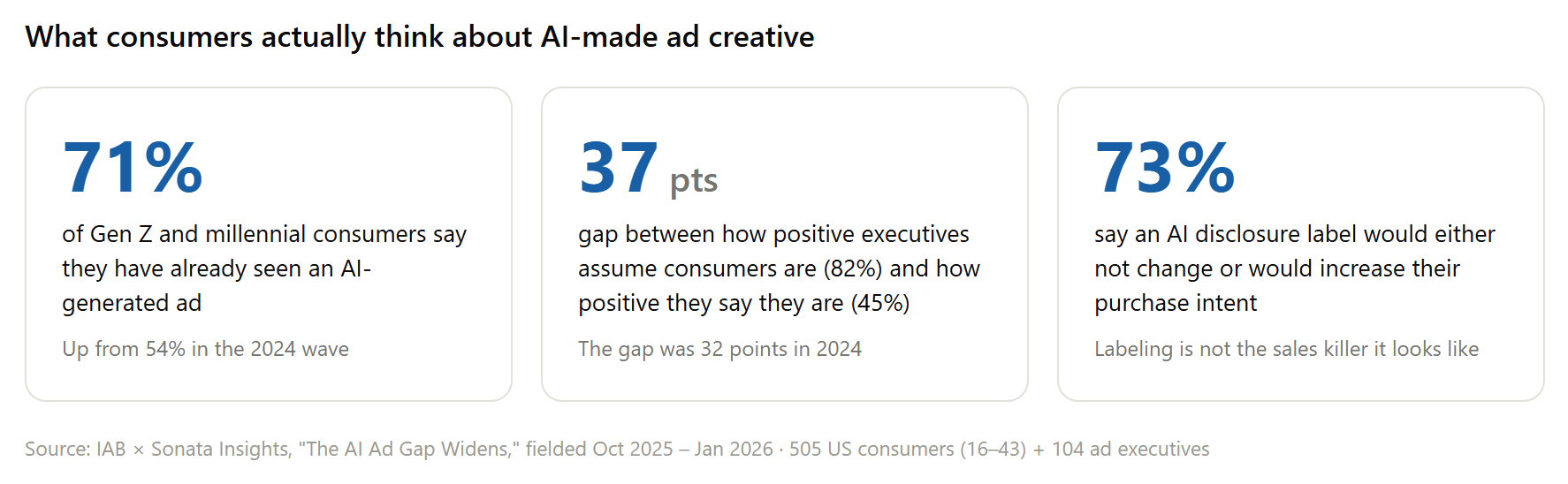
Read the three numbers together and the practical takeaway is clear. Skepticism punishes creative that pretends to be a real customer and gets caught. Labels barely hurt. So optimize for usefulness per second, disclose where required, and spend your effort on hook-to-stage fit instead of on faking authenticity.
Make Retargeting-Ready UGC Facebook Ads from One Product Photo
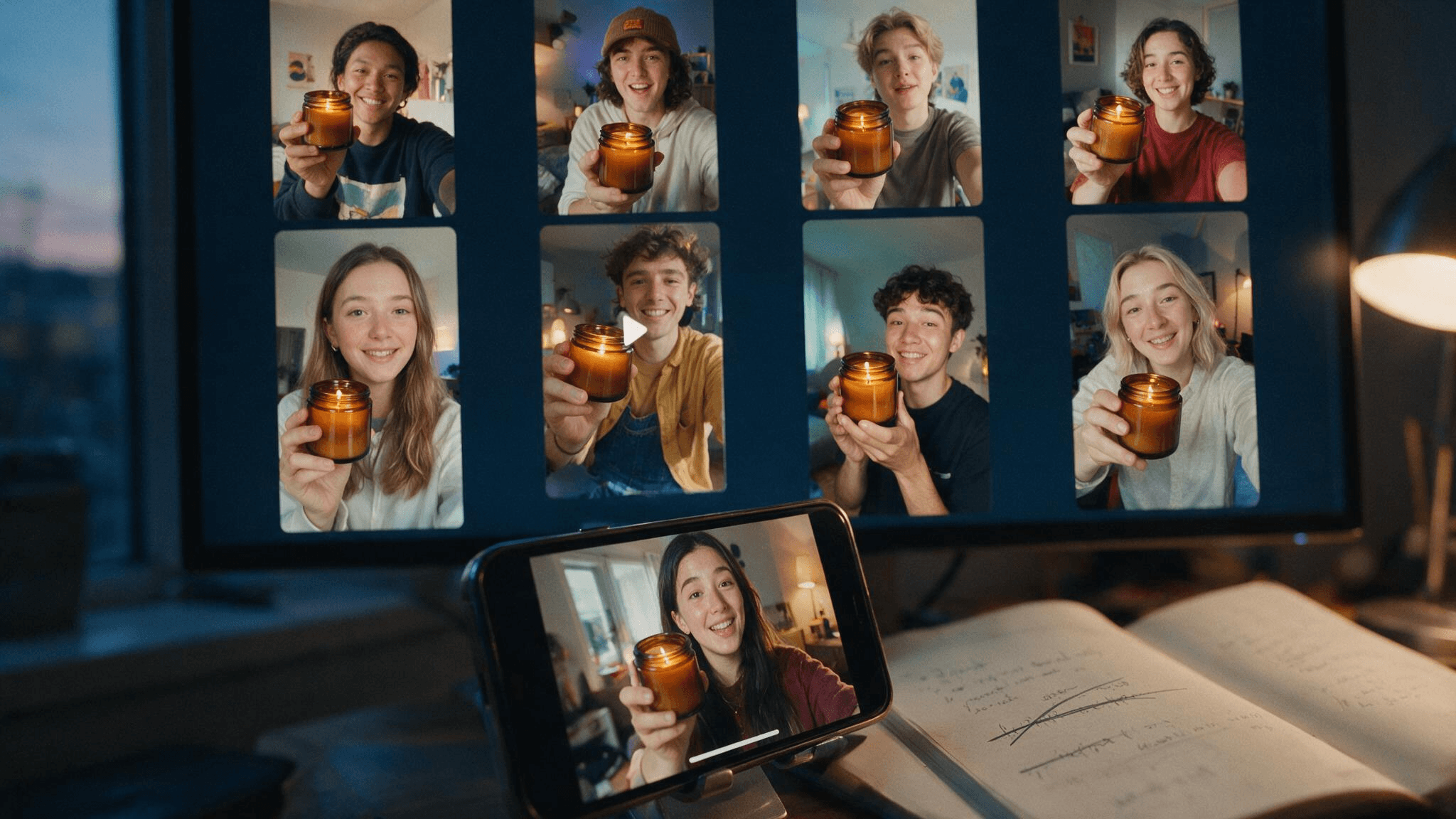
Before the stage-by-stage framework, here is what the production side looks like now, because the whole approach depends on variants being cheap. The clip below is a 12-second candle testimonial. The inputs were reference photos of the jar and a written brief; one photo is the minimum, the extra angles were for consistency. The presenter, script, voice, and room are all generated.
See for yourself:
That clip came from Atlas Cloud, whose AI tools lineup includes a free UGC Product Ad generator built for exactly this workflow.
You write a one-line brief, upload up to 4 product images, optionally add a presenter photo, and pick from 16 ad formats, 11 opening hooks, and 11 scene settings. Clips run 4 to 15 seconds in 9:16 and four other ratios.
The menu that matters for retargeting is the hook list. Pain point, Before-after reveal, Expert authority, Freebie hook: these are the levers this article keeps pulling, and having them as presets means a stage-matched variant takes a menu change rather than a reshoot. Generation runs on a free plan, so you can test the format against your current retargeting creative before committing budget.
Batch Stage-Matched Variants Through the Atlas Cloud API
The stage framework below asks for three audiences, each with its own hook, and at two variants apiece that is already twelve clips for a single product. Past that scale the web form stops being the right interface, and the same generator is callable from code.
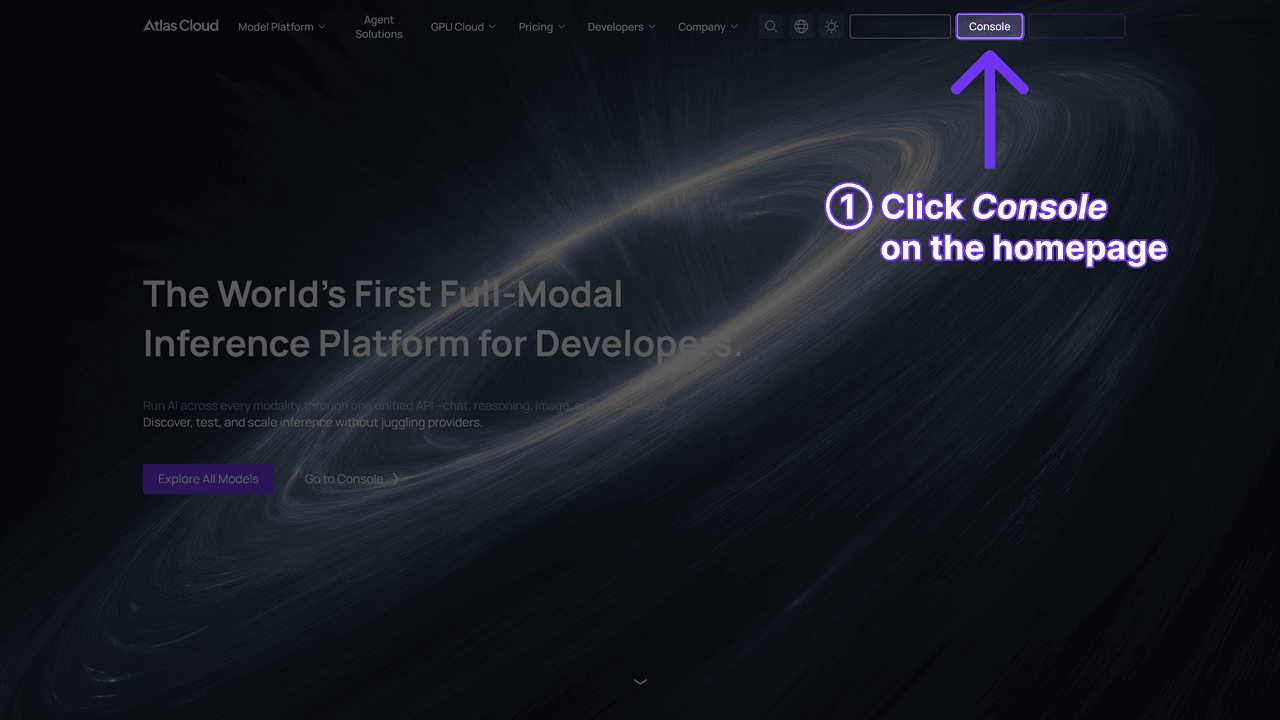
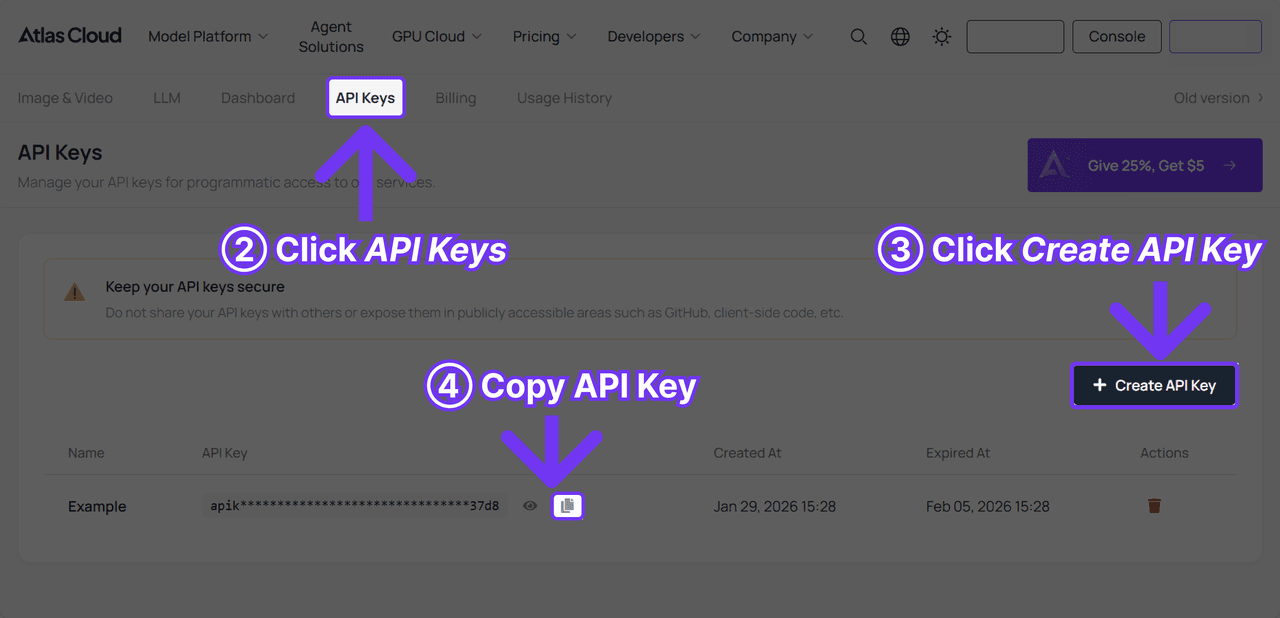
Step 1: Create an API key. Generate one in the Atlas Cloud console and keep it server-side; one key covers every model on the platform.
Step 2: Check the request shape. The API documentation covers authentication and polling. The endpoint takes your product image, the brief, and the same choices as the web form; ad_type accepts creator recommendation, before-and-after, and unboxing, and count returns up to two variants per call.
The field worth noticing for retargeting is the optional presenter photo: keep it constant across calls and the same face follows your buyer from the pain point clip to the restock reminder, which quietly builds recognition across stages.
Step 3: Send the request and poll. Generation is asynchronous; the first call returns a request id you poll until the clip is ready.
plaintext1curl -X POST "https://api.atlascloud.ai/api/v1/model/generateVideo" \ 2 -H "Authorization: Bearer $ATLASCLOUD_API_KEY" \ 3 -H "Content-Type: application/json" \ 4 --data-raw '{ 5 "model": "atlascloud/studio/ugc-ad", 6 "product_image": "https://your-store.com/products/ember-lane-candle.jpg", 7 "model_image": "https://your-store.com/presenters/mia.jpg", 8 "user_prompt": "Ember Lane amber-cedar candle, back in stock for returning customers. Expert, calm tone; one concrete scent note; close on a restock reminder.", 9 "ad_type": "creator_recommendation", 10 "duration": 12, 11 "ratio": "9:16", 12 "resolution": "480p", 13 "count": 2 14 }'
plaintext1curl "https://api.atlascloud.ai/api/v1/model/prediction/<request_id>" \ 2 -H "Authorization: Bearer $ATLASCLOUD_API_KEY"
When status reads completed, the outputs array holds hosted video URLs. Loop the call over your audience list instead of your product list: same product, same presenter, different hook per stage.
How to Optimize UGC for Meta Ads Retargeting, Stage by Stage
Start from the audiences you already have in Ads Manager: video viewers and page visitors who never clicked through, shoppers who added to cart in the last week or two, and buyers 30 to 90 days out. Each group abandoned you at a different point, for a different reason, so each gets a different opener. The map looks like this:
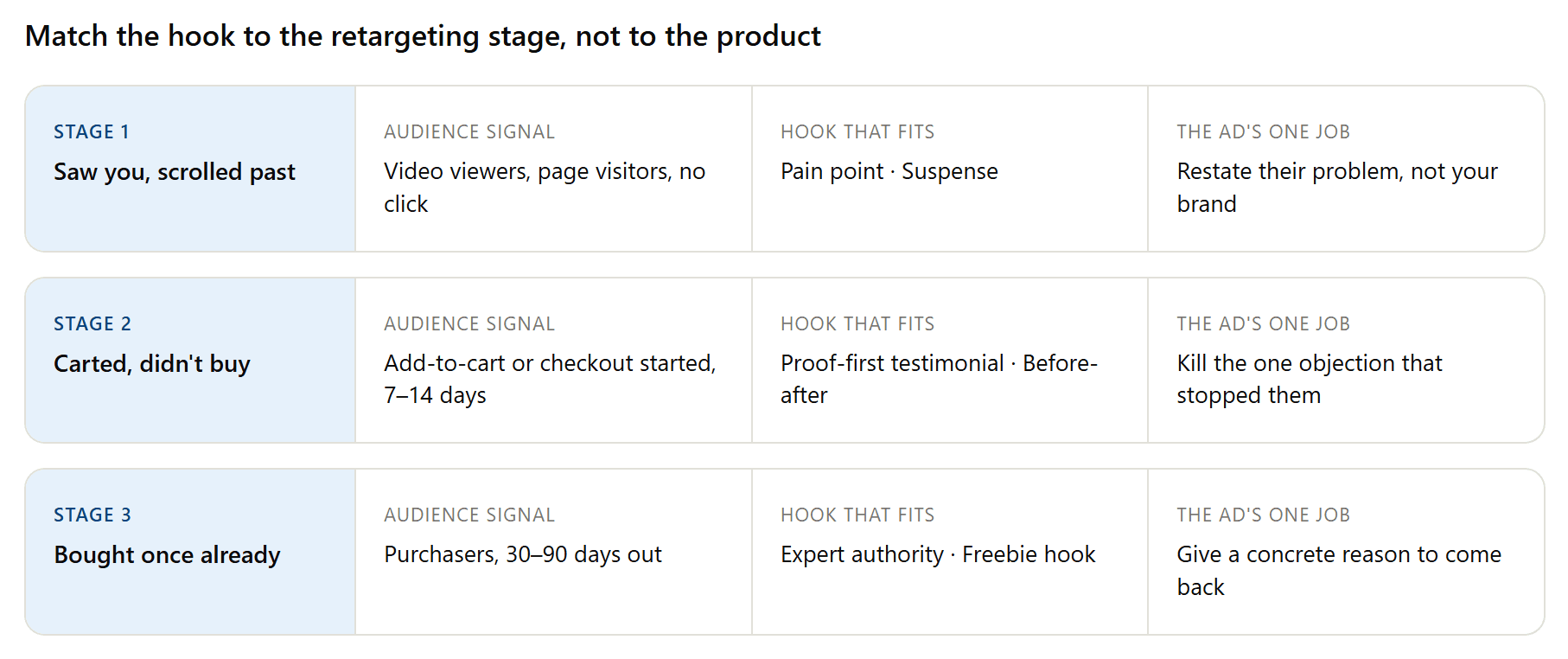
Warm pools are small, so impressions per person stack quickly. When cost per result drifts up as frequency climbs, swap the opener before you touch the offer; the first two seconds wear out long before the product story does.
Stage 1: Pain Point Hooks for Viewers Who Scrolled Past
This group watched a few seconds and left, which usually means the product never connected to a problem they own. So the retargeting clip should open with the problem, stated in the viewer's own words, and let the product interrupt it. Here is that structure as a finished ad:
The opener is a complaint: "My room looked so boring on camera until this." Anyone who lingered on a sunset lamp ad once has thought some version of that sentence. The proof lands mid-clip at the flip of a switch, with no cut, and the close borrows creator slang instead of ad copy.
For your own version, put the complaint in the first line of the brief and pick Pain point from the hook menu; we broke this exact clip down shot by shot, along with six others, in our UGC video examples teardown.
Stage 2: Proof-First Testimonials for Cart Abandoners
Someone who carted and left was convinced enough to click and doubtful enough to stop. Price aside, that doubt is usually a single unanswered objection: will it actually work on me? The variant for this stage exists to answer that one question, which is why proof density beats production value here.
Watch how much evidence fits in 15 seconds: a time frame (two weeks of daily use), a dosage note (one dropper), a texture remark, and a pointed no-filter moment where she touches her own cheek. The opener, "Okay, real talk," frames what follows as a confession rather than a pitch.
If your product has a visible result, the Before-after reveal hook or the before-and-after format compresses the same argument into a single visual; for everything else, stack specific, checkable claims the way this script does.
Stage 3: Expert Authority Hooks for Past Buyers
Buyers 30 to 90 days out do not need convincing that you are legitimate; they need a concrete reason to return. A restock reminder, a new variant, a seasonal drop. The Expert authority hook fits here because this audience already trusts the product, so the clip's job is to deliver news, and an expert register presents that news as information rather than as another round of enthusiasm.
Authority in this format is a register, not a resume. The opener leads with the news itself, assumes the viewer already knows the product, and then explains what changed in specifics, the way someone who knows the category talks. No credentials get claimed, and none are needed.
A working brief for that clip, reusable for any replenishable product:
Product: Copper Fern whole-bean coffee, new autumn seasonal roast, aimed at returning customers who already know the brand.
Presenter: male.
Tone: calm expert authority, like a barista giving honest advice, no hype.
Opening hook, use this exact line: "If your coffee has tasted flat lately, the beans are stale, not your technique."
Structure: 0-3s the presenter delivers the hook straight to camera with the sealed bag standing on the kitchen counter. 3-8s the presenter lifts the bag with both hands gripping only its side edges and brings it close to the lens, front label facing the camera. 8-12s one concrete tasting note (dark cherry and toasted hazelnut) and a reminder that the autumn roast is a short run.
Rules: the bag stays sealed the whole time, fingers never cover the front label, the label text stays readable in every frame, fixed phone framing on the kitchen counter, no background music, no on-screen text or captions.
Two craft notes. The fixed-framing line matters more than it looks: with the default handheld selfie position, one hand holds the phone, so two-handed actions only render cleanly when the brief locks the camera down. And the timestamped structure is what keeps a 12-second clip from wandering; the generator follows beats far better than adjectives.
Brand Created vs UGC Video Ads for Ecommerce Facebook Advertising
The debate over brand created vs UGC video ads for ecommerce Facebook advertising usually gets framed as a question of style. In a retargeting context it is really an economics question: which creative can you afford to replace the moment it fatigues? Here is the honest side-by-side:
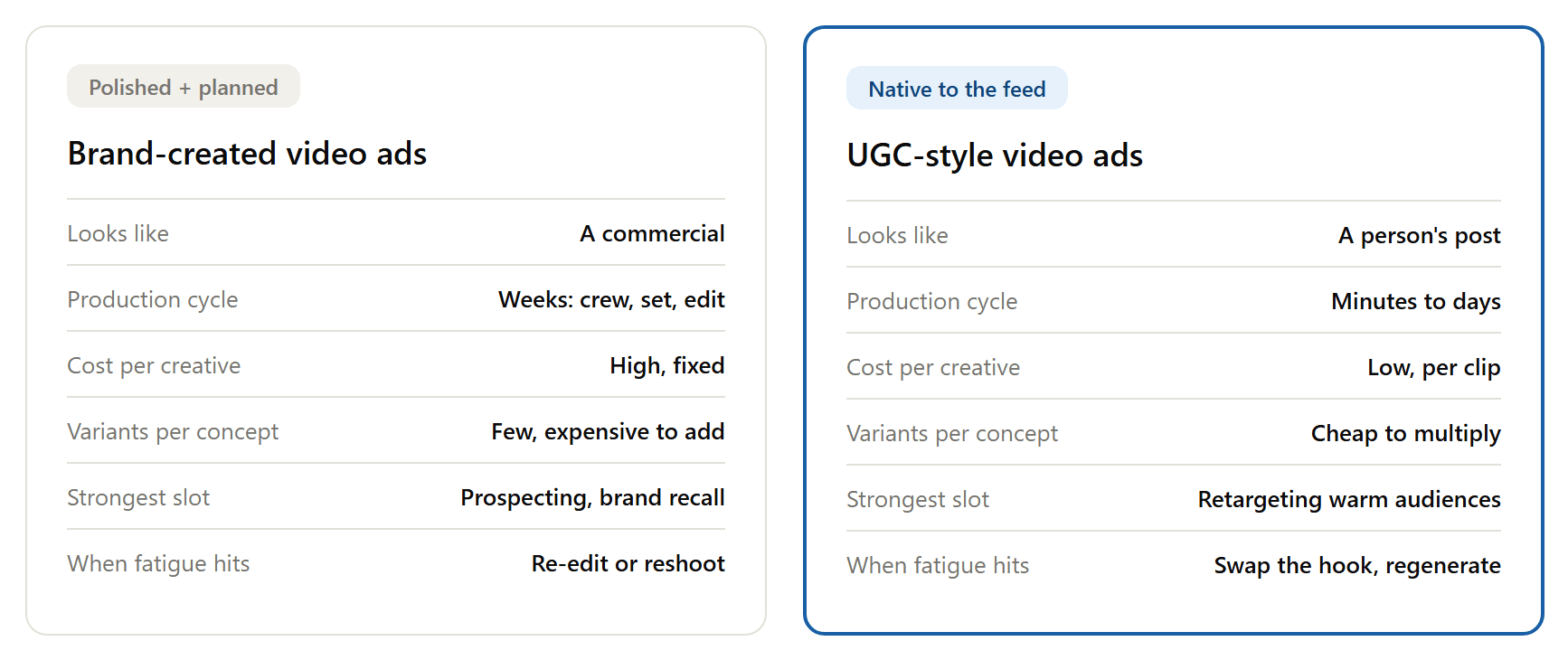
Nothing in that table retires brand creative. A polished spot still earns its budget at the top of the funnel, where you are introducing the product and controlling the aesthetic.
The retargeting layer is where its weaknesses compound: given how fast warm audiences burn through creative, a format that takes weeks and real money to replace simply cannot keep pace. UGC-style clips flip that constraint, which is why the practical split many stores land on is brand creative for prospecting, UGC variants for every warm audience behind it.
Top Tools for Creating Shoppable UGC Videos for Facebook Ads
Shoppable, on Meta, mostly means the creative plugs into a catalog: the video plays while product tiles below it pull live price and availability from your synced feed, so the tap-to-buy path starts inside the ad. Roundups of the best UGC video software for Facebook ads tend to rank features; a faster way to choose among the top tools for creating shoppable UGC videos for Facebook ads is to sort by what you already have.
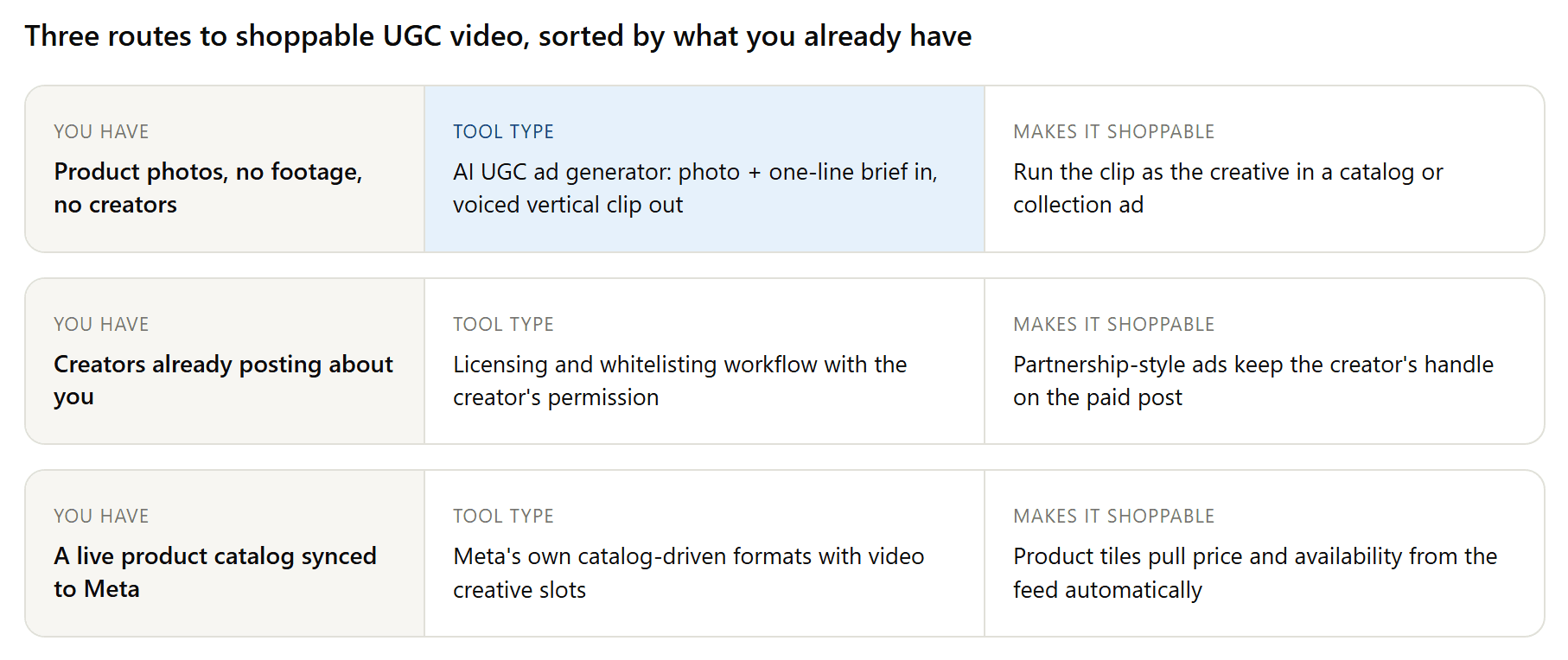
If all you have is product photography, the AI generator route covered earlier gets you the video half of a shoppable ad today. If creators already post about you, a licensing workflow turns their best content into paid placements that keep the creator's handle visible, which preserves the social proof you are paying for.
And if your catalog is synced, Meta's catalog-driven formats handle the shopping layer, so the only asset you still owe them is the video itself. The three routes stack; stores usually graduate from one to all three. For a tool-by-tool ranking with pricing and free tiers, our platform comparison scores ten of them on workflow speed.
AI Disclosure Rules for UGC Ads on Facebook & TikTok
Running UGC ads for Facebook & TikTok from the same batch of AI-generated clips is common, and the disclosure rules differ enough between the two platforms to be worth pinning down before launch:
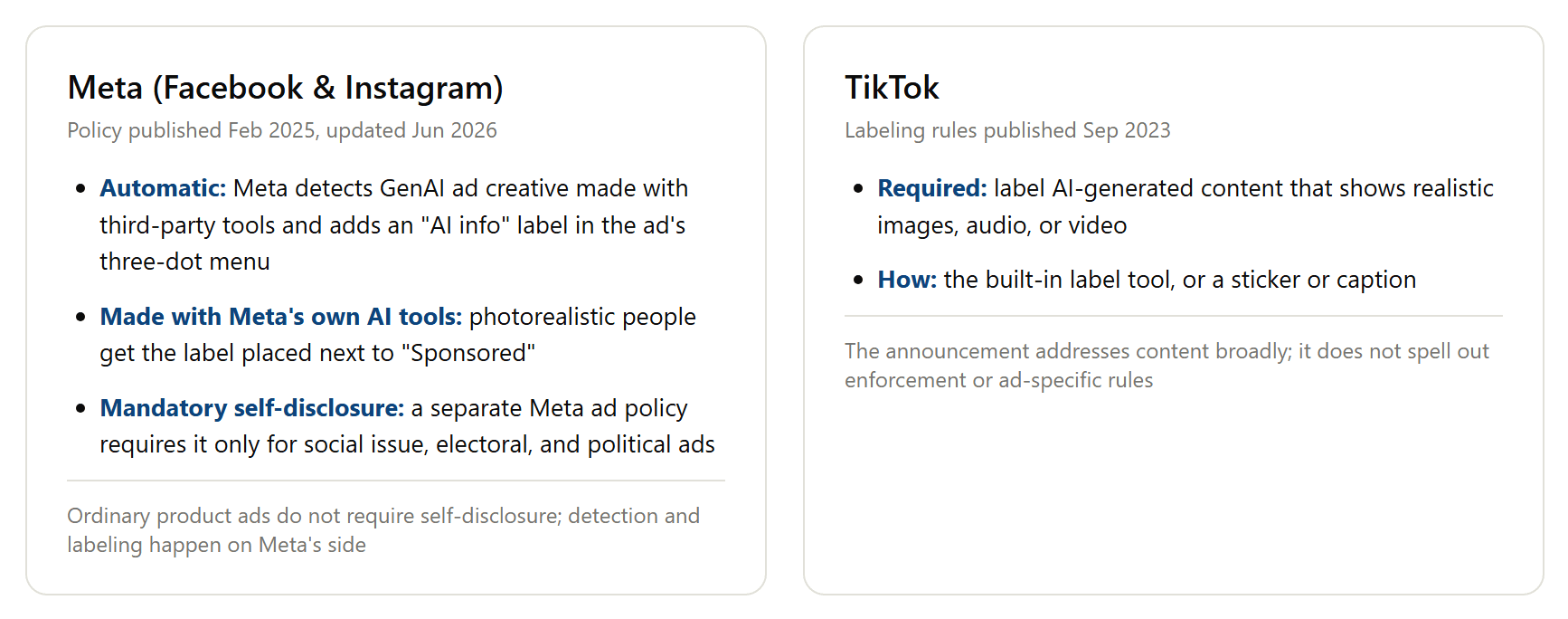
On Meta, per its ads transparency update, detection is the default path: GenAI creative made with third-party tools gets an "AI info" label in the ad's three-dot menu, and photorealistic people made with Meta's own AI tools get the label beside "Sponsored". Mandatory self-disclosure does exist under a separate Meta ad policy, but it covers only social issue, electoral, and political ads. Third-party blogs regularly inflate that into a universal rule; it is not one.
TikTok's labeling policy puts the duty on the poster instead: realistic AI-generated images, audio, or video need a label, applied through the built-in label tool or a sticker or caption.
Neither regime is a reason to avoid the format, and the IAB purchase-intent finding from earlier says most of your audience will not hold the label against you. What consumers punish is discovering the trick themselves; what the AI branch of this format actually is, and how buyers receive it, gets a fuller treatment in our AI UGC explainer.
Frequently Asked Questions
What does UGC mean in Meta ads?
UGC stands for user-generated content, and UGC in Meta ads refers to paid creative that keeps that look: a person on camera, phone-shot framing, conversational script. The category covers boosted real customer posts, licensed creator content, and UGC-style ads produced by actors or AI to match the format. Much of what runs as Meta UGC ads today sits in that third lane.
How much does it cost to generate UGC ads with AI?
The UGC Product Ad tool has a free plan to start. Past that, generation works out to roughly $0.12 per second of 480p video as of August 2026, so a 12-second retargeting variant lands around $1.40. Prices can change, so check the playground for the current figure before budgeting a batch.
Can I run the same UGC ads on Facebook and TikTok?
The files travel fine: 9:16 vertical clips under 15 seconds are native on both platforms. What changes is the disclosure duty. Meta detects and labels GenAI ad creative on its side, while TikTok expects you to apply the label yourself for realistic AI content. Keep captions platform-specific too; slang that reads native on TikTok often reads younger than a Facebook retargeting audience.
How often should I rotate UGC creative in a retargeting campaign?
Watch frequency and cost per result rather than the calendar. When the two rise together, the creative is tiring. Change the hook first; a fresh opener usually resets performance more cheaply than a whole new concept, because viewers decide within the first seconds whether they have already seen an ad.
Conclusion
Retargeting is the part of a Meta account where creative repetition is the default failure, and UGC is usually the cheapest countermeasure that matches the medium. The playbook this article laid out stays deliberately small: build the three warm audiences you already have data for, give each one a hook that answers its specific hesitation, disclose where the platform requires it, and replace clips the moment frequency says they are tired.
The production barrier that used to make this impractical is gone. One product photo now yields a pain point opener, a proof-heavy testimonial, and an expert restock reminder before lunch, free to try and cheap to scale through the API. That is the real lesson of how to optimize UGC for Meta ads retargeting in 2026: the winning accounts are the ones whose second impression never looks like a rerun.