Vidnoz puts three face swap modes on one page, asks for two uploads, and returns a result without charging you. Then you go looking for the catch, and the catch turns out to be missing. Nowhere in Vidnoz's own pricing does a face swap have a price, and the free allowance is described only as "daily free usage."
That gap is worth understanding before you build any kind of habit around this tool, and it is not the only number the page leaves open.
Key Takeaways
- Photo, video, and multi-face swapping are three tabs on a single Vidnoz page. Coverage elsewhere routinely describes them as three separate tools.
- We found no per-swap rate on any Vidnoz page we checked. Face swap appears in neither the Vidnoz AI credit-consumption table nor the Vidnoz Gen plan comparison, even though the tool's own upgrade link points at the Gen plans.
- The advertised 50-minute video ceiling is unreachable in practice. The same page caps uploads at 100MB, roughly three minutes of 1080p footage.
- Vidnoz's published API docs list three endpoints. None of them swaps a face.
- Atlas Cloud answers both halves of that: a metered face swap endpoint you can put in a script, and a free AI face swap tool whose FAQ states the terms Vidnoz leaves blank, no usage cap and no watermark.
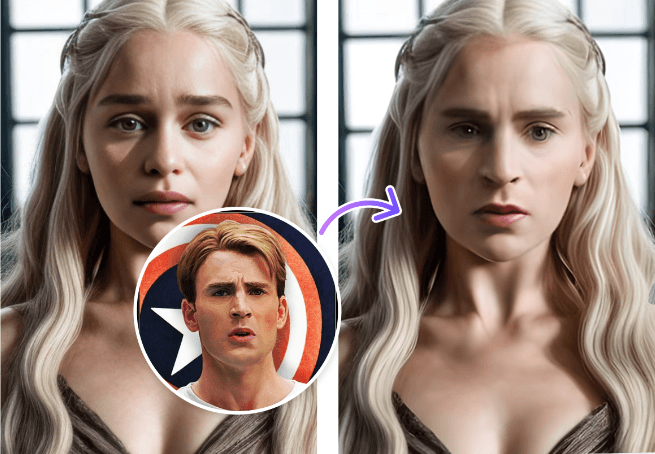
What Vidnoz AI Face Swap Covers in One Page
The first thing that trips people up is architecture. Review posts describe a Vidnoz photo swapper, a Vidnoz video swapper, and a Vidnoz multi-face swapper as though each had its own page. All three are tabs inside one widget on the face swap page, and switching tabs changes what the first upload slot accepts.
| Mode | First upload | Second upload |
|---|---|---|
| Photo Face Swap | The image you want changed | An image carrying the face you want |
| Video Face Swap | The video you want changed | A photo carrying the face you want |
| Multiple Face Swap | One file holding several faces | Photos of the replacement faces |
GIF gets its own headline treatment in a lot of coverage. On the actual page it is an accepted input format, handled by the same tabs, with no GIF-only tool anywhere.
Head swapping is genuinely separate. It lives on its own Vidnoz URL and accepts still images only, no video. Its sales copy draws the line for us: it "not only swaps faces, but also changes the entire head to another," and it promises to "swap an entire head with hair." By implication the plain face swap tool stops short of the hairline, though Vidnoz never says so directly on the face swap page.
Each mode carries an "HD Available" toggle whose own tooltip says it is "recommended to enable this feature to get videos or photos above 1080p." What you get with it switched off is never stated.
How to Face Swap on Vidnoz Step by Step
Vidnoz publishes three steps. Here they are with the parts that trip people up filled in.
- Upload the original photo or video. Vidnoz's wording: switch to Photo Face Swap or Video Face Swap, then upload a photo or video with a clear face. The slot label asks specifically for "a clear front face." Each slot also has a Random button that drops in one of Vidnoz's sample assets, which is the fastest way to see the tool work before you commit your own material.
- Upload the target photo. This is the face you are borrowing. Vidnoz calls it "the image with the target face you want to change to."
- Click Swap Face Now. Output lands with Zoom in, Share, Download, and Edit controls, plus a shortcut that pushes the result into an image-to-video tool.
Watch the direction. Upload one is the scene you are modifying, upload two is the face being lifted into it. Get those backwards and the tool still succeeds, it just modifies the wrong picture.
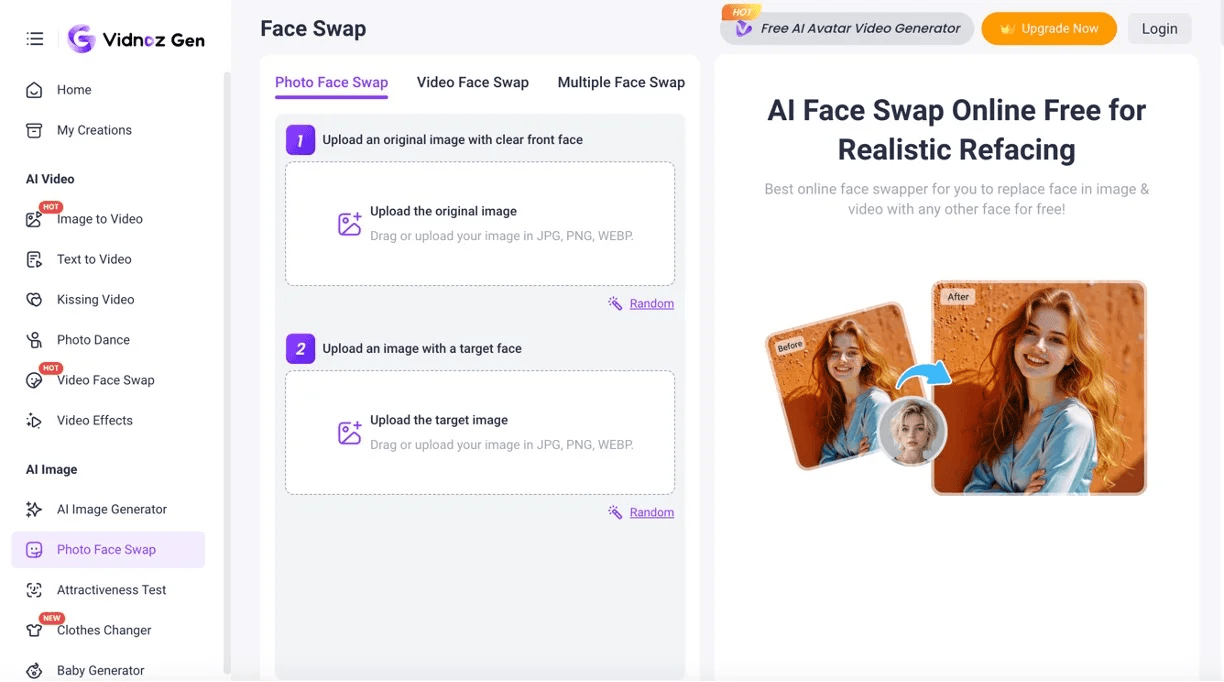
Slot wording from vidnoz.com/face-swap.html, retrieved July 29, 2026.
Nothing in the interface protects you from the second version, because in photo mode both slots take the same JPG, PNG and WEBP files, and there is no preview between upload and output.
Multi-face mode changes step one and two rather than adding steps: upload a group photo or video, then upload photos of the faces you want substituted in, then click the same button. Vidnoz never publishes how many faces it will handle in one pass, and it never explains how it decides which uploaded face maps to which person in the frame.
The tool page carries its own content policy inline, directly under the swap button, in wording worth reading before you upload anyone: "Do not create unlawful, sexual, or non-consensual content, including any involving minors. Content may be monitored. Violations may result in removal or account suspension." A second line grants commercial use "in accordance with our license." Account creation adds a separate confirmation that you are 18 or older.
Metered Vidnoz Face Swap Alternative on Atlas Cloud
A free allowance you cannot count is fine for a one-off. It stops working the moment swapping becomes a repeated task. Atlas Cloud approaches the same operation from two directions. One is a metered endpoint with a published unit price, no daily reset, and one API contract. The other is its AI tools page, a set of free image tools with a face swap among them, and Method 3 below puts that one to work.
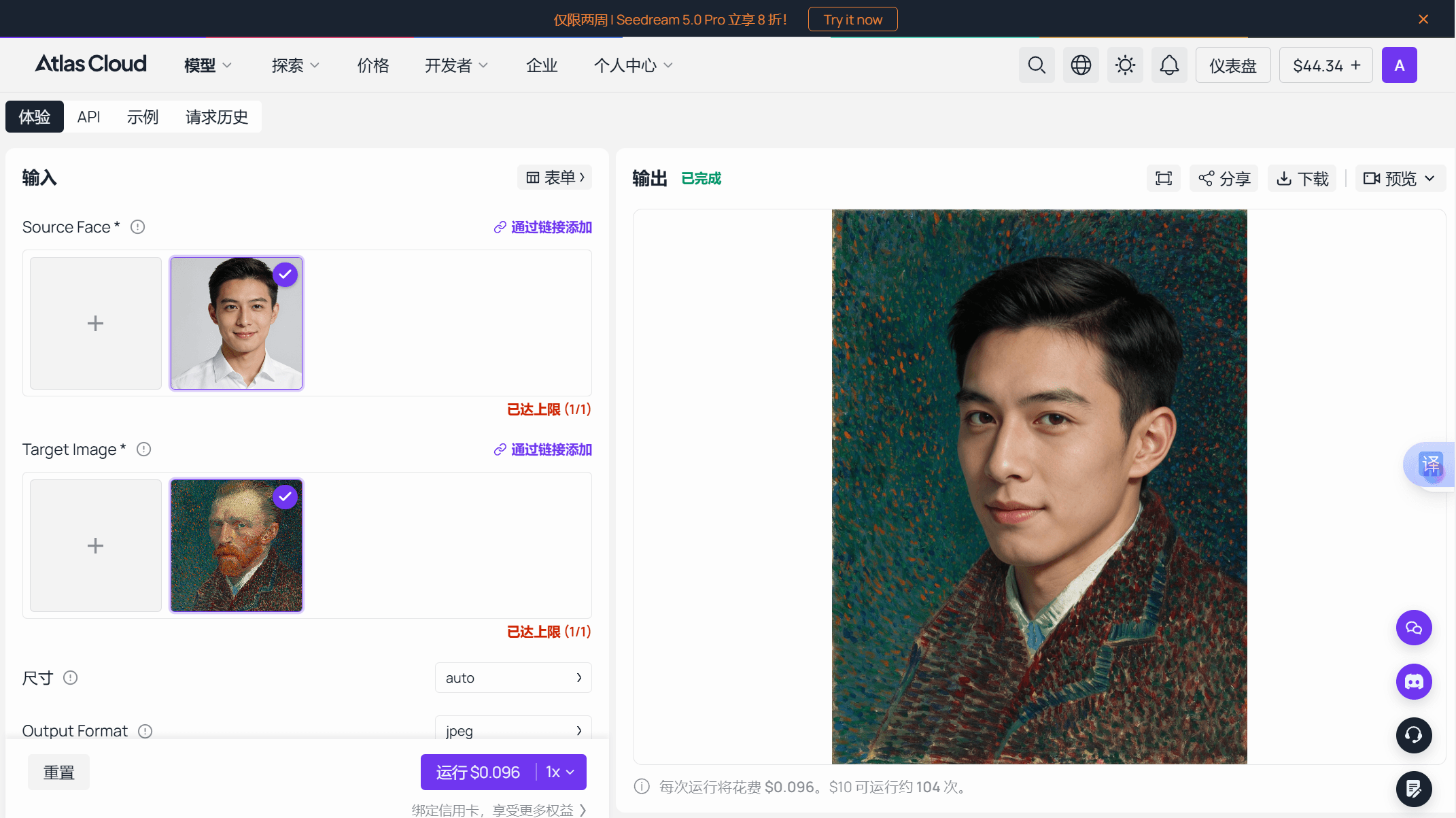
Take the metered endpoint first. Mechanically it matches what you do by hand on Vidnoz. You supply a source face and a target image, and the model transfers facial identity while holding the target's pose, clothing, background, and lighting in place. In our runs it replaced the whole head, hair included, and made no attempt to match the target's style, so a painted or illustrated target comes back with a photographic face on it. In the Face Swap playground, the default auto-size run quotes $0.096, which puts a $10 top-up at roughly 104 swaps. A companion video endpoint handles footage, listed from $0.2 per second, with target clips between two and ten seconds.
Neither side wins outright. Vidnoz takes video measured in minutes where this endpoint takes seconds, and it will work through several faces in a group shot in one pass, which the metered endpoint does not attempt. What it cannot offer is a cost you can forecast or a call you can put in a script. Fifty swapped headshots come to $4.80 at the playground rate in a single batch; fifty through a free tool with an unstated daily allowance is an unknown number of days of clicking, and the only way to learn the allowance is to hit it.
Method 1: Swap Faces in the Atlas Cloud Playground
No code required. Log in, open the Face Swap model page, and the form asks for two uploads: Source Face, which the model page specifies should be a clear, front-facing photo of the face you want swapped in, and Target Image, the photo whose face gets replaced. Auto size is the sane default, with the caveat from our test run above: it returns one of the endpoint's own presets rather than your input's exact dimensions. The size parameter accepts thirteen explicit pixel sizes, from 1024×1024 up to 2720×1530 across square, landscape, and portrait ratios. Output arrives as JPEG by default, with PNG as the alternative, and lands in the output panel for download.
Method 2: Automate Face Swaps Through the Atlas Cloud API
Three steps get you from nothing to a programmatic swap.
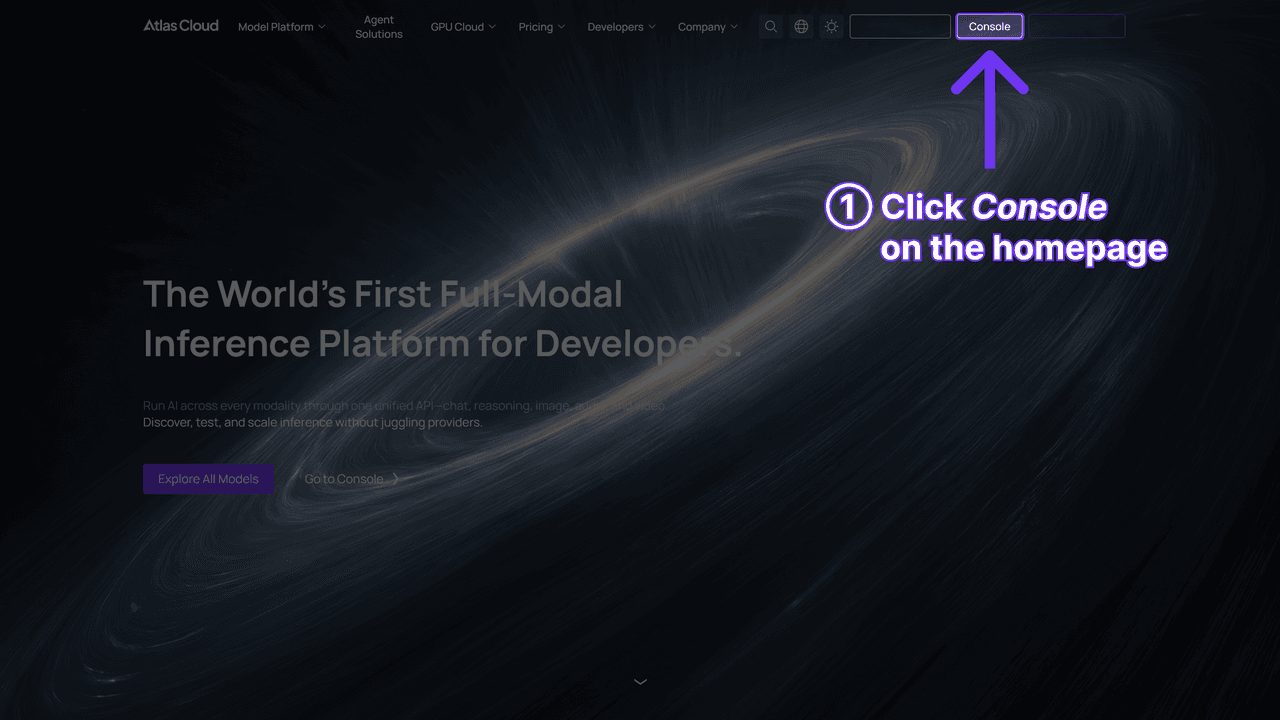
Step 1: Get your API key. Create one in the Atlas Cloud console dashboard and copy it.
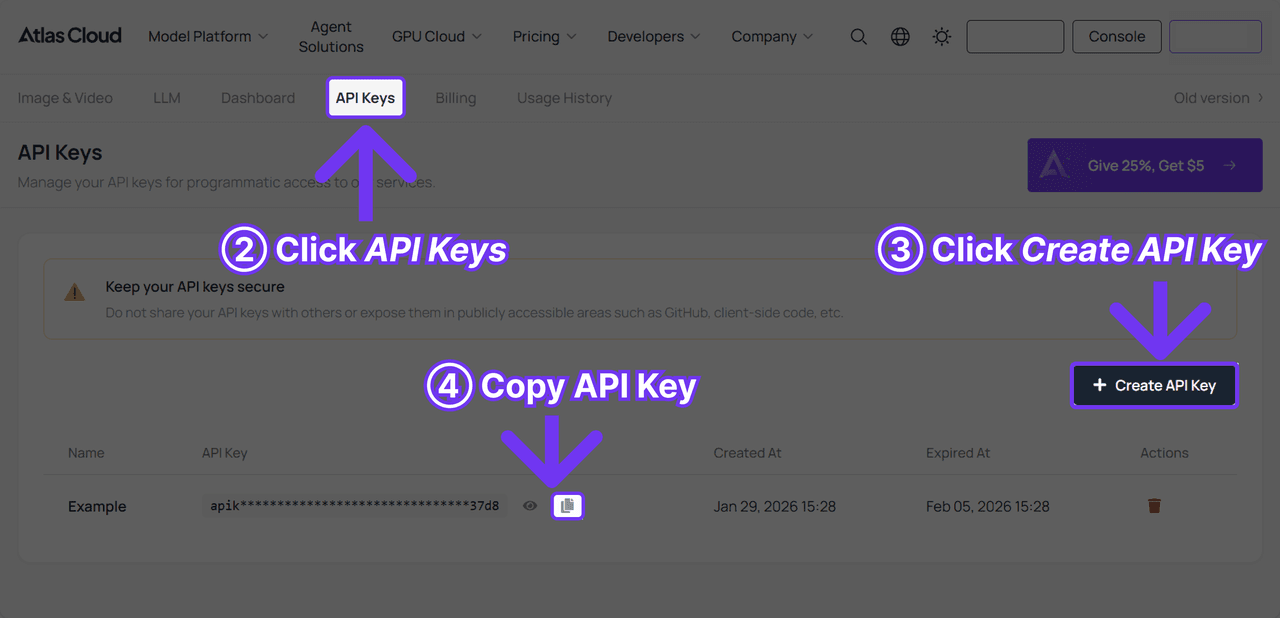
Step 2: Check the API docs for authentication, parameters, and the shared image endpoint.
Step 3: Send the request. Face swap runs through the same generateImage endpoint as every image model on the platform:
plaintext1curl -X POST https://api.atlascloud.ai/api/v1/model/generateImage \ 2 -H "Authorization: Bearer $ATLASCLOUD_API_KEY" \ 3 -H "Content-Type: application/json" \ 4 -d '{ 5 "model": "atlascloud/face-swap-image", 6 "image": "https://your-cdn.com/source-face.jpg", 7 "Image": "https://your-cdn.com/target-photo.jpg", 8 "output_format": "jpeg", 9 "size": "auto" 10 }'
One trap in that payload: lowercase image is the source face and capitalized Image is the target photo. The two field names differ by a single letter, and transposing them reverses your inputs exactly the way transposing Vidnoz's two upload slots does.
Generation is asynchronous. The response carries a prediction ID, which you poll until the status flips to completed:
plaintext1curl https://api.atlascloud.ai/api/v1/model/prediction/<prediction_id> \ 2 -H "Authorization: Bearer $ATLASCLOUD_API_KEY"
The finished image arrives as a URL in the outputs array. Video swaps use generateVideo with image for the source face, video for the target clip, and resolution set to 720P or 1080P. Same auth, same polling loop, so adding the video route to working image code is mostly a model-string change.
Method 3: Swap a Face for Free, With the Number Printed
Both methods above bill per run. The free AI face swap tool does not, and unlike the allowance this article has spent three sections failing to pin down, it says so in terms you can act on. Its FAQ answers the free question with a plain yes: no usage cap, and no watermark on the finished image. That is the sentence Vidnoz never writes.
The workflow is the one you already know from the Vidnoz tabs. Load a source face, load the target photo, and the tool maps 468 reference points on each face before aligning and blending them. About 8 seconds later the result comes back, downloadable as a PNG at the target photo's size, up to 1280 pixels on the longest side. Two sliders, Blend and Feather, clean up the seam when the first pass leaves one.
The painting swap from earlier in this section is a fair example of what this lane is for. Trying a face against an unusual target, a canvas, a costume shot, a group photo where you are unsure the model will find the face at all, is exactly the kind of experiment you do not want to pay per attempt to run. Get the pairing right here, then spend $0.096 on the endpoint when you need the larger output or the scripted loop.
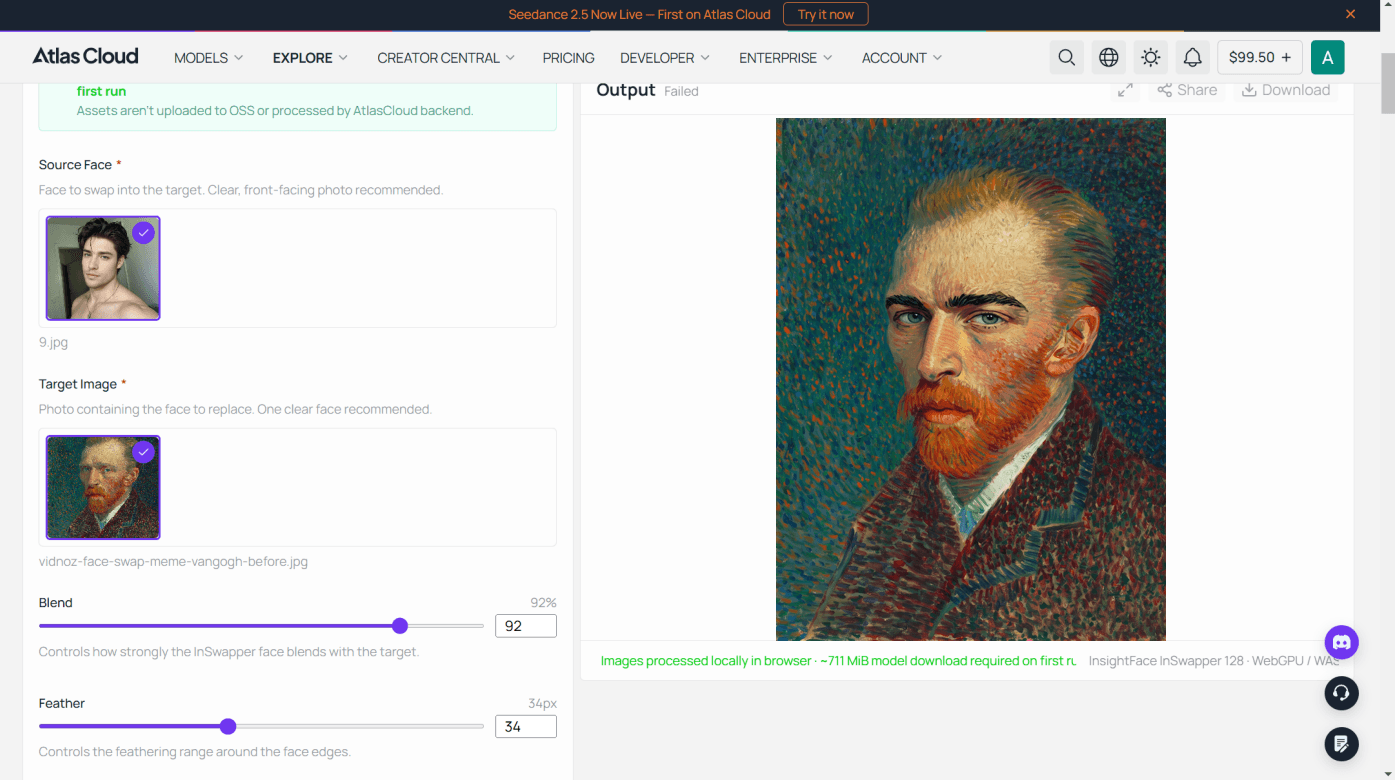
Three limits keep the comparison honest. Output tops out at 1280 pixels on the longest side, short of the fixed sizes the metered endpoint offers, so anything headed for print stays on the paid route. It takes one photo per pass, with no folder upload, so a fifty-image job is fifty passes. And the first visit pulls down a model of roughly 711 MiB before anything runs. The tool's own licence note applies the same standard the rest of this article has been asking for: "Just make sure you have permission to use both photos, especially when another person's face is involved."
Where Vidnoz Face Swap Pricing Goes Quiet
Vidnoz runs several subscriptions on separate price lists, so working out which one governs face swap takes some clicking. The tool page's upgrade and credit-purchase links point to the Vidnoz Gen plans, which makes that the relevant one. Reviews commonly quote the Vidnoz AI avatar plans instead, a different product drawing on a different credit pool, and there is a third list for Vidnoz Flex that has nothing to do with swapping at all.
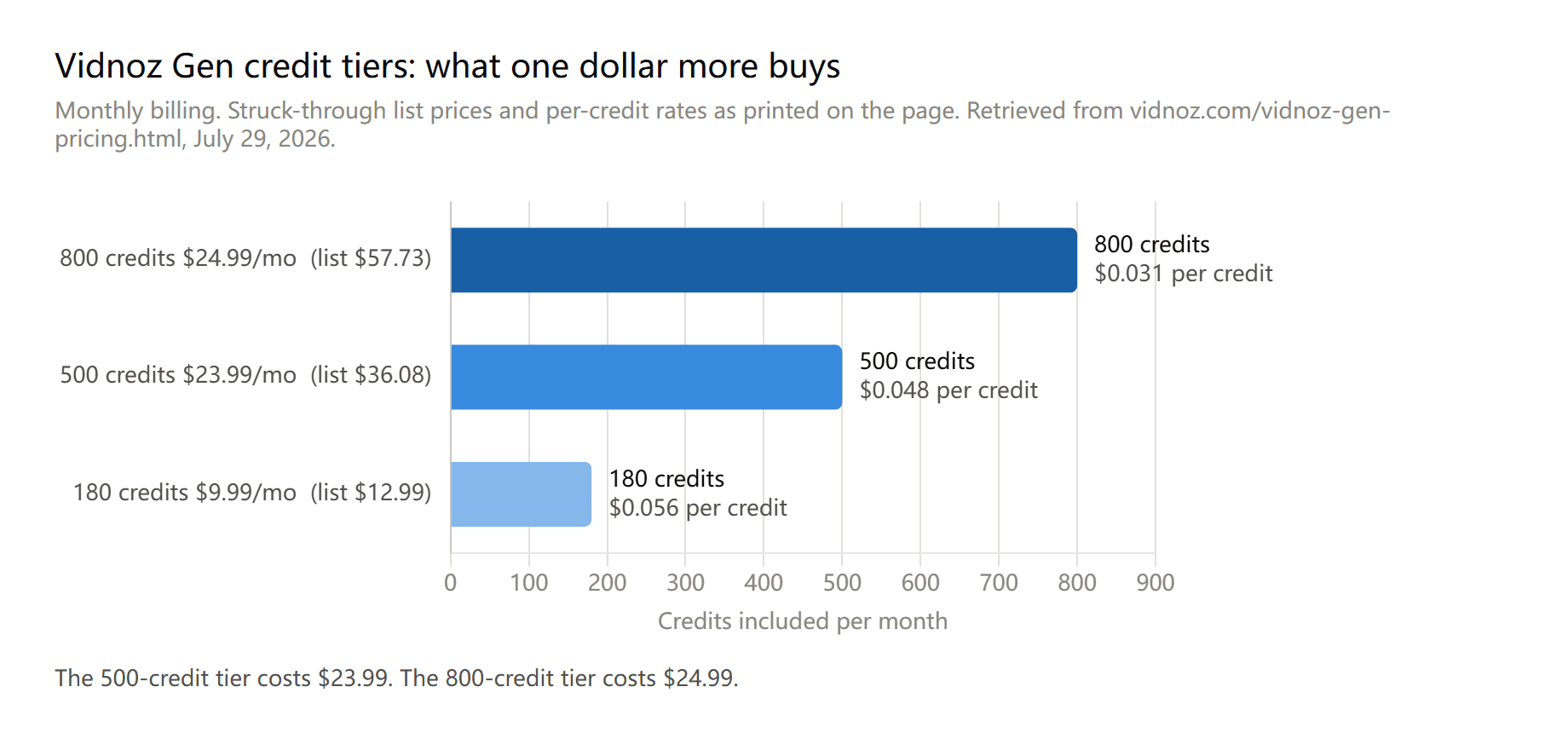
Data: vidnoz.com/vidnoz-gen-pricing.html, monthly billing, retrieved July 29, 2026. List prices shown in parentheses on the chart are the struck-through figures printed on the page.
Every paid figure on that page is a discounted one. The 180-credit tier shows $9.99 against a $12.99 list, the 500-credit tier $23.99 against $36.08, and the 800-credit tier $24.99 against $57.73, headlined as 57% off. Read the top two rows together and the ladder stops making sense: one extra dollar moves you from 500 credits to 800. Anyone who was going to pick the 500-credit plan is better off on the one above it.
The free Gen tier is thinner than the marketing suggests. Zero monthly credits, "limited use" on each tool rather than a stated count, standard generation speed, and 500MB of storage that expires after seven days. One row is worth pulling out: watermark-free exports are paid-only, which is the nearest thing to a stated watermark policy anywhere on the site, since the face swap page never raises the subject. Careful with the resolution row next to it, though. The 1024×576 free ceiling against 2048×1152 on paid is written against the image generator, not the swap tools, and the swap tools run their own separate HD toggle.
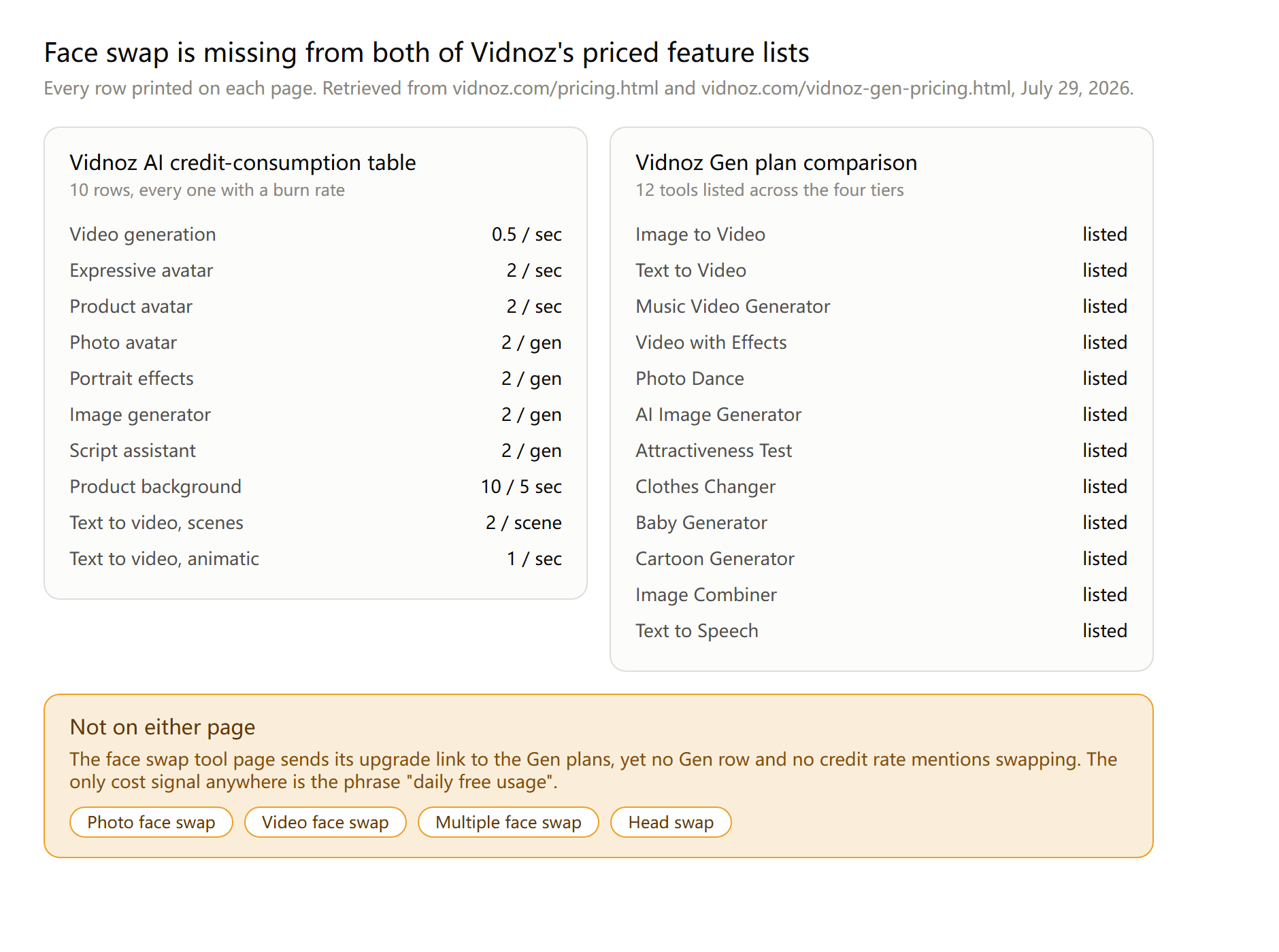
Data: vidnoz.com/pricing.html credit-consumption table and vidnoz.com/vidnoz-gen-pricing.html plan comparison, both retrieved July 29, 2026.
The absence in that graphic is the finding. Vidnoz does price its other work precisely, down to half a credit per second of generated video, so the omission is not a company that forgot to publish rates. It published rates for everything except the four tools that swap a face. We checked the avatar pricing page, the Gen pricing page, the credit table, the tool page, and the head swap page, and none of them says what a swap costs or how many the free tier includes.
Two details are worth knowing before you subscribe just to find out. Refunds run annual-only: both the refund policy and the pricing FAQ grant a seven-day money-back guarantee on one-year plans, and both state plainly that refund requests on monthly subscriptions will not be accepted. Cancellation runs through support rather than a button in your account settings, which is worth factoring into a trial you intend to end.
Vidnoz Face Swap Limits That Actually Bind
The comparison block on the face swap page advertises a maximum 50-minute video duration. The upload slot on the same page caps files at 100MB. Both cannot govern at once, and the smaller one wins.
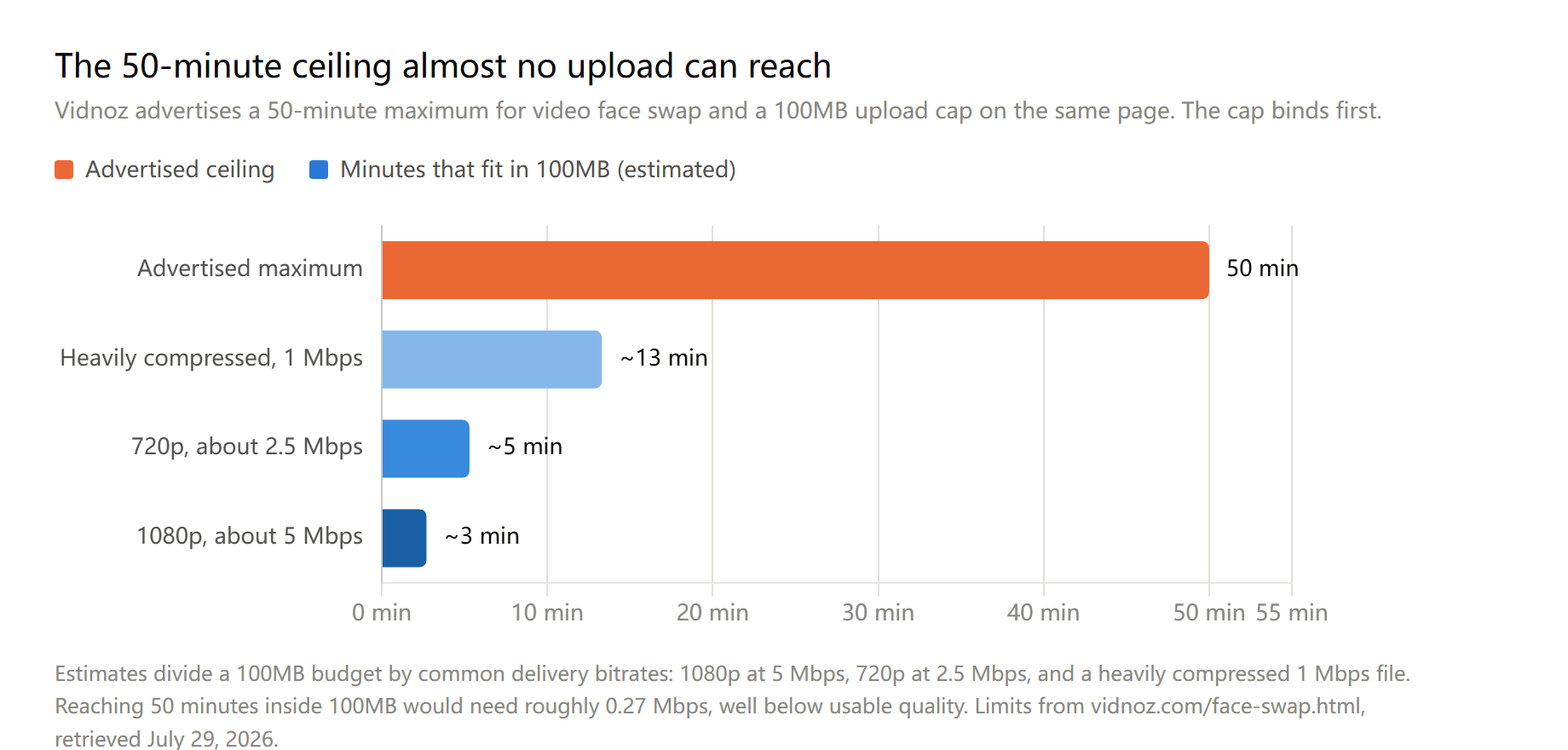
Advertised limits from vidnoz.com/face-swap.html, retrieved July 29, 2026. Duration figures are our estimates from standard delivery bitrates, not vendor numbers.
Squeezing 50 minutes into 100MB would take roughly 0.27 Mbps, a bitrate that would leave the faces too mushy to swap in the first place. Treat the advertised duration as theoretical and plan around the file size.
Here is everything the page does commit to, in one place.
| Constraint | What Vidnoz publishes |
|---|---|
| Video upload size | Up to 100MB |
| Video duration | "Maximum 50-minute" claim, bounded in practice by the size cap |
| Image formats | JPG, PNG, WEBP, GIF |
| Video formats | MP4, M4V, MOV, WEBM |
| Output resolution | HD toggle for output "above 1080p", no figure given when off |
| Faces per swap | "Multiple face swaps in a single input", no cap stated |
| Free allowance | "Daily free usage", no count stated |
| Input guidance | "Clear front faces and sharp details" |
GIF sits in an odd spot in that list. Vidnoz's FAQ files it under images, while the video-mode upload slot advertises "GIF, MP4, M4V, MOV and WEBM" as though it were footage. Either route accepts it, so the classification only matters if you are trying to work out which size cap applies to an animated file.
Note what is absent. Vidnoz says nothing about glasses, occlusion, motion blur, low light, or extreme head rotation, the conditions that actually decide whether a swap looks convincing. The frontal-face line is its entire quality guidance. Its one other piece of advice is about liability rather than results: the FAQ asks you to avoid unauthorized images "to avoid potential copyright risks."
One limit does not appear on any page because it depends on where you are sitting. From one of the locations we tested, both the Vidnoz homepage and the face swap page returned a notice stating the service is not available in that region, while the pricing pages loaded normally from the same connection. If the tool is central to your workflow, confirm it opens from wherever you actually work before you plan around it.
There is also no scripted route out of these limits. Vidnoz's published API documentation covers three endpoints, for portrait generation, talking avatars, and text-to-avatar. None accepts a target image for swapping, and the English-language API landing page returned a 404 when we checked it on July 29, 2026.
Consent Rules Behind Every Vidnoz Face Swap
Vidnoz spreads its rules across five documents, and they do not line up evenly on the one product where consent matters most.
| Document | Dated | What it says about likeness consent | Names face swap |
|---|---|---|---|
| Acceptable Use and Moderation Policy | "Last Update: July 2026" | Requires "explicit consent of the individual being represented"; bans celebrity likeness and under-18 depiction | No |
| Ethical Use of Synthetic Media | No date on page | "We will never create an AI avatar without your clear consent" | No |
| Terms of Service | July 2026 | No likeness clause; bans presenting output as human-generated | No |
| AI Terms of Service | No date; its own text reads "© 2024" while the site footer reads 2026 | No likeness clause; bans pornographic, obscene, and hateful content | No |
| In-tool notice | Printed beside the swap button | Bans unlawful, sexual, and non-consensual content, including minors | Yes |
The strongest consent language Vidnoz has written sits in the moderation policy, and its own table of contents shows the problem. The clause lives in a section headed "Avatars," under a subheading reading "Consent for Custom Avatars." From there it requires "the explicit consent of the individual being represented (the 'Actor')," gives that person a standing right to "request removal of their likeness from our Services at any time," and separately prohibits representing "real individuals, including celebrities or public figures, without their explicit consent." Enforcement escalates from automated and human review to content removal, account suspension, and referral to legal authorities.
The word "swap" does not appear in that document once. So the only face-swap-specific consent rule Vidnoz publishes is the short notice printed beside the swap button, and every stronger commitment is written about a product you are not using. For a tool whose whole function is putting a real person's face somewhere they never were, that is a thin place for the platform's most important promise to sit. Atlas Cloud's face swap model page carries a comparable notice and asks for the same thing: upload only what you have the right to use, and get consent from the people depicted.
Vidnoz's privacy policy is worth one more note. It says user inputs including images and videos are collected and retained "for the period necessary to fulfill the purposes of processing," and offers deletion through a privacy contact. What it does not contain is any statement about how long uploaded faces are kept, whether they are treated as biometric data, or whether uploads feed model training. None of this is legal advice, and rules differ by country, but the practical guidance from both vendors points the same way: swap faces you have permission to use.
Frequently Asked Questions
Is Vidnoz AI face swap free?
There is a free path, and Vidnoz markets it as "daily free usage" without ever stating the allowance. Paid access runs through the Vidnoz Gen credit plans, starting at $9.99 per month for 180 credits, but face swap does not appear in that plan's tool comparison or in Vidnoz's credit-consumption table, so what a swap draws down is unpublished either way.
How many free Vidnoz face swaps do you get per day?
Vidnoz does not say. We checked the tool page, the avatar and Gen pricing pages, the credit-consumption table, and the head swap page as of July 29, 2026, and found no number. Third-party posts circulate figures like three video swaps or eight multi-face swaps per day; none of those numbers appears on a Vidnoz page, so treat them as guesses.
Does Vidnoz have a face swap API?
No documented one. Vidnoz's published API docs list endpoints for portrait generation, talking avatars, and text-to-avatar, and its English-language API landing page returned a 404 when we checked on July 29, 2026. For a scripted swap, Atlas Cloud's face swap endpoint takes a source face and a target through a standard REST call at $0.096 per image run.
What video length can Vidnoz face swap handle?
The page advertises up to 50 minutes and caps uploads at 100MB, and the size cap is the one you will hit. That works out to roughly three minutes of 1080p footage or five minutes at 720p. Accepted containers are MP4, M4V, MOV, WEBM, and GIF.
Does Vidnoz watermark face swap output?
The face swap page never mentions a watermark. The Vidnoz Gen plan comparison lists watermark-free exports as a paid feature, which implies free output is marked, though Vidnoz does not confirm this for the swap tool specifically or show what the mark looks like.
Can Vidnoz swap multiple faces at once?
Yes, through the Multiple Face Swap tab. Upload one file containing several faces plus photos of the replacements, then run it. Vidnoz publishes no cap on how many faces one pass handles and no explanation of how it matches each uploaded face to a person in the frame, so a group shot is worth testing before you rely on it.
Conclusion
For a single meme, a swapped profile picture, or a quick check of whether the effect works on your footage at all, Vidnoz is a reasonable first stop. Three modes live on one page, it wants two uploads and no card, and it takes video, which a lot of free swappers will not.
What it withholds is numbers. The per-swap cost, the daily allowance, the face-count limit, and the true duration ceiling are all either unstated or contradicted elsewhere on the same page. That is survivable for occasional use and disqualifying for anything you plan to repeat.
Notice that the fix is not simply paying for something. A free tool can state its terms: no cap, no watermark, 1280 pixels. Once swapping becomes a task rather than a whim, what you want is a published number, whether that number is a rate per run or a stated ceiling on a tool that charges nothing.