Latest update: Wan 3.0 is now live as of August 24, 2026.
AI video gets judged by the face first. Not the camera move. Not the background. The face.
If the eyes float, the skin turns waxy, or the mouth starts doing that rubbery AI thing, the scroll is over. That is why wan 3.0 realistic faces are the real production test for creators making UGC ads, short films, testimonials, and social clips.
The useful answer is simple: realistic faces are not a beauty setting. They are a directing problem. You need a stable reference, small human actions, clear camera rules, and hard failure constraints.
This guide uses Atlas Cloud as the browser workspace because you can test Wan-3.0 Text-to-video, Image-to-video, and Reference-to-video in one place, see the run state, and check the visible cost before you submit.
Key Takeaways
- Real face quality means identity, skin, gaze, mouth, and motion continuity.
- Image-to-video is usually safer when one specific face matters.
- Prompt muscles and micro-actions, not just emotion labels.
- Use 8s drafts before paying for 24s or 30s stress tests.
- On Atlas Cloud, Wan-3.0 modes start from $0.05/sec.
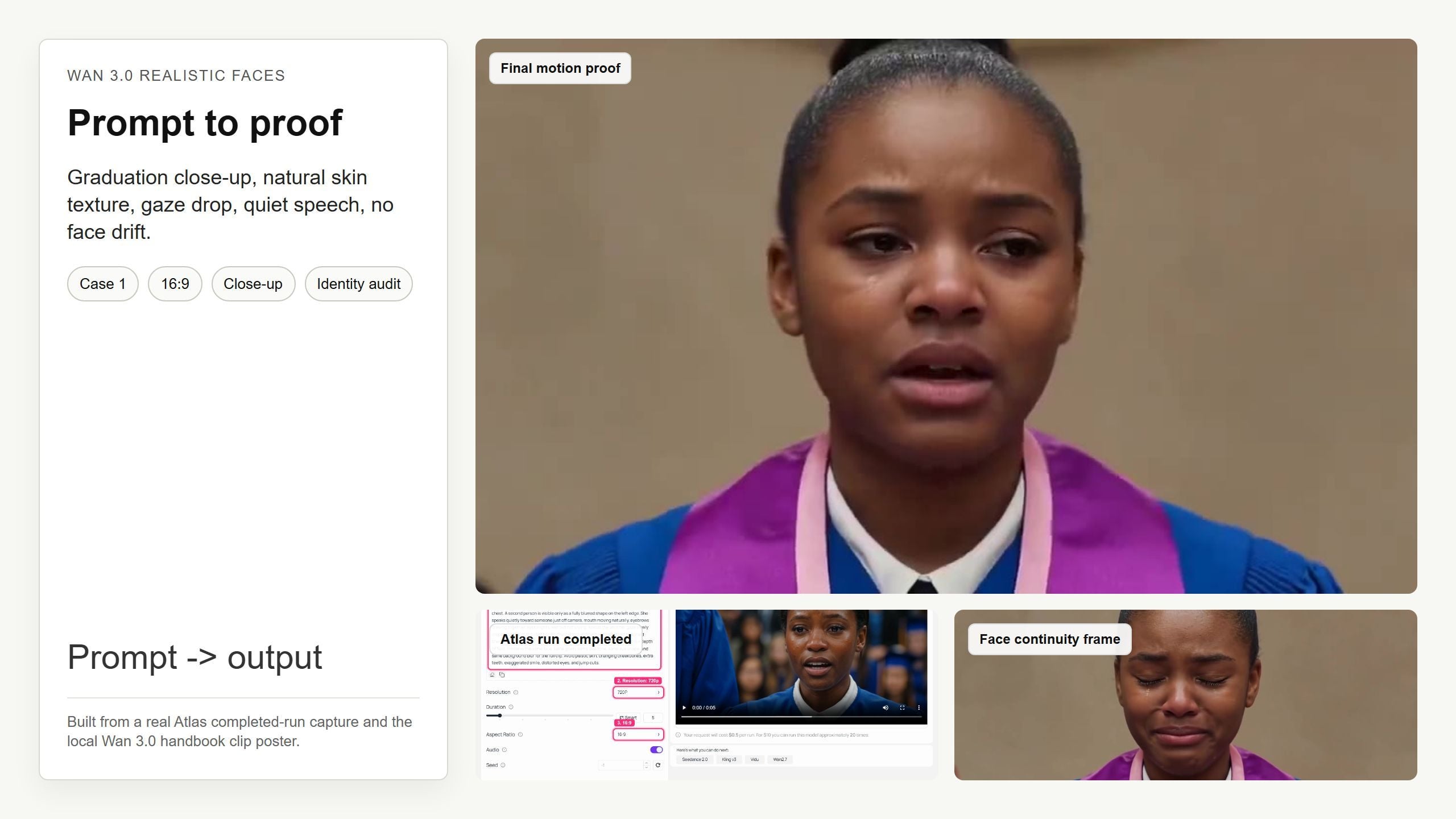
Wan 3.0 realistic faces showcase with a graduation close-up prompt card, completed run evidence, and face-stability frames
Showcase: the graduation close-up case uses one face, subtle expression, gaze movement, and a 30.07s handbook clip to stress-test realistic face continuity.
Case 1 motion proof: a young Black woman in a blue graduation gown holds one close-up face performance across a 30.07s Wan 3.0 handbook clip.
Why Wan 3.0 Realistic Faces Are Hot, and Why Most Attempts Fail
Verdict first: faces fail because prompts ask for a vibe when the model needs direction.
Wan 3.0 arrived with a bigger canvas: up to 30-second clips, 1080P output, native audio-visual generation, and broad reference inputs. Alibaba's release coverage also calls out multimodal inputs and visual continuity for human faces and micro-expressions (Alibaba Cloud Community, August 2026). The official Model Studio page frames the release around 30s storytelling, 1080P cinematic quality, native A/V, and omni reference inputs (Alibaba Cloud Model Studio, August 2026).
That sounds huge. It is.
But the creator problem is more practical: "Can this person blink, talk, hesitate, and stay the same person?"
Common failure patterns look familiar:
- Eye drift: the gaze has no clear target.
- Rubber skin: pores vanish and cheeks move like silicone.
- Bone drift: cheekbones and jaw shape change between frames.
- Fake smile: the mouth smiles while the eyes do not.
- Mouth flicker: teeth and lips pulse during speech.
- Camera-triggered identity loss: the face changes after a pan or turn.
This is not just launch hype. In older Wan workflows, users have reported face inconsistency and uncanny results during image-to-video runs, including faces that no longer stay true to the original image (ComfyUI GitHub discussion, April 2025).
Question is: how do you direct around that?
Wan 3.0 Realistic Faces Workflow Overview on Atlas Cloud
Use the simplest mode that gives you enough control.
If you do not have a reference person, start with Text-to-video. If a specific face matters, use Image-to-video with a strong first frame. If you have identity, motion, and audio references, use Reference-to-video.
You can start from the Atlas Cloud homepage, open the Wan 3.0 model page, paste the prompt, choose duration and resolution, then run the test in one browser tab. The practical win is not just access. It is that the prompt, settings, output panel, and quoted cost stay visible while you iterate.
| Need | Atlas Cloud model | Where to run it | Use it for | Price to verify |
|---|---|---|---|---|
| Start from pure prompt | Wan-3.0 Text-to-video | Wan 3.0 Text-to-video playground | Generic actor or scene | From $0.05/sec |
| Animate a first frame | Wan-3.0 Image-to-video | Same Wan 3.0 family, Image-to-video mode | Stable face, portrait UGC | From $0.05/sec |
| Lock references across motion | Wan-3.0 Reference-to-video | Same Wan 3.0 family, Reference-to-video mode | Identity, motion, voice, scene references | From $0.05/sec |
Atlas Cloud models/all currently lists Wan-3.0 Text-to-video, Image-to-video, and Reference-to-video from $0.05/SEC. Alibaba's official page also shows resolution-sensitive pricing for its own platform, so treat the visible Run button cost as the final source of truth before submitting.
Step 1: Choose the Wan 3.0 Realistic Faces Mode
Start with the workflow that matches your risk.
No reference face? Use Text-to-video. Need one stable actor? Use Image-to-video. Need a known identity plus motion, voice, or a previous clip? Use Reference-to-video.
Copy this prompt when you just need a quick mode check:
Plain116:9, 8 seconds, realistic cinematic close-up. A person sits near a window in soft daylight and speaks one short sentence with natural lip movement, small eye shifts, and relaxed breathing. Keep the same face, skin tone, hairline, wardrobe, lighting, and background blur for the full clip. Avoid face drift, waxy skin, distorted eyes, extra teeth, jump cuts, and background faces.
Settings to pick:
| Setting | Recommendation | Why it matters |
|---|---|---|
| Aspect ratio | 16:9 for article tests, 9:16 for vertical social | Face scale and crop change the failure mode |
| Resolution | 1080P for final, 720P for drafts if needed | Higher resolution helps skin and eye detail |
| Duration | 8s draft, 24s to 30s stress test | Long takes reveal identity drift |
| Audio | Room tone unless speech is the point | Keeps the face test focused |
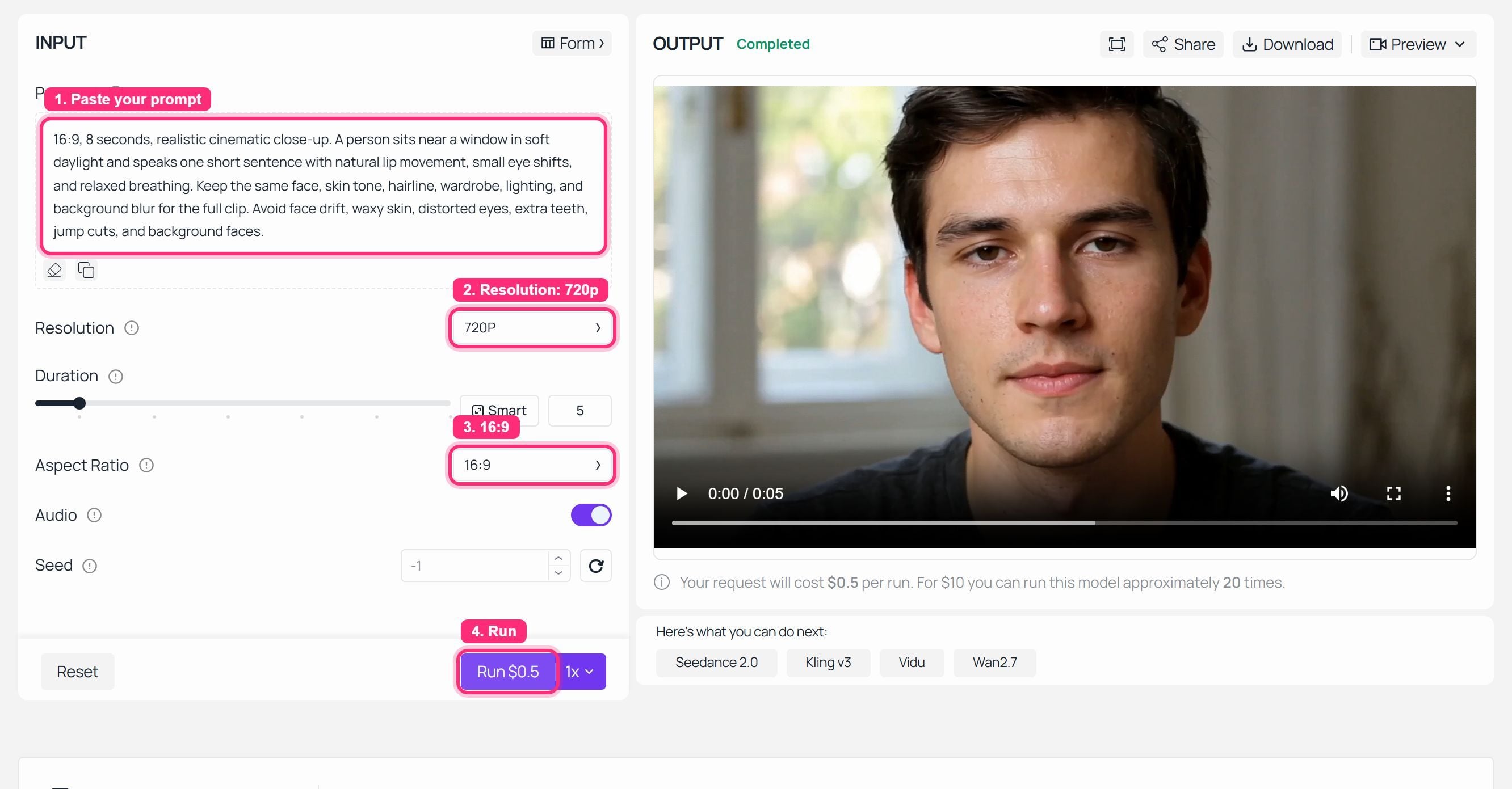
Atlas Cloud Wan 3.0 realistic faces mode settings with a completed run and visible output panel
Step 1: Atlas Cloud Wan 3.0 mode settings, captured after a completed run so the input and output are visible together.
Step 2: Run Case 1, a Wan 3.0 Realistic Faces Close-Up
This is the hard one.
A close-up removes all the hiding places. The viewer can see the mouth corners, brow tension, gaze target, and skin texture. Case 1 uses a Wan 3.0 handbook clip of a young Black woman in a blue graduation gown, framed close, speaking quietly as her gaze drops.
Copy this prompt:
Plain116:9, 8 seconds, realistic cinematic close-up. A young Black woman in a blue graduation gown stands in soft indoor ceremony light, framed from head to upper chest. A second person is visible only as a fully blurred shape on the left edge. She speaks quietly toward someone just off camera, mouth moving naturally, eyebrows drawing together, eyes slightly wet but not crying. Across the shot her gaze slowly drops from eye level to her hands. The camera is locked but has a faint handheld breathing sway. Natural skin texture, visible pores, soft overhead light, shallow depth of field. Preserve the same face, same gown, same skin tone, same eye shape, and same background blur for the full clip. Avoid plastic skin, changing cheekbones, extra teeth, exaggerated smile, distorted eyes, and jump cuts.
Settings to pick:
| Setting | Pick |
|---|---|
| Model | Wan-3.0 Image-to-video if you have a first frame, Wan-3.0 Text-to-video if not |
| Duration | 8s for a draft, 30s for the long-take proof |
| Resolution | 1080P if available, otherwise 720P |
| Ratio | 16:09 |
| Audio | Room tone only unless dialogue is being tested |
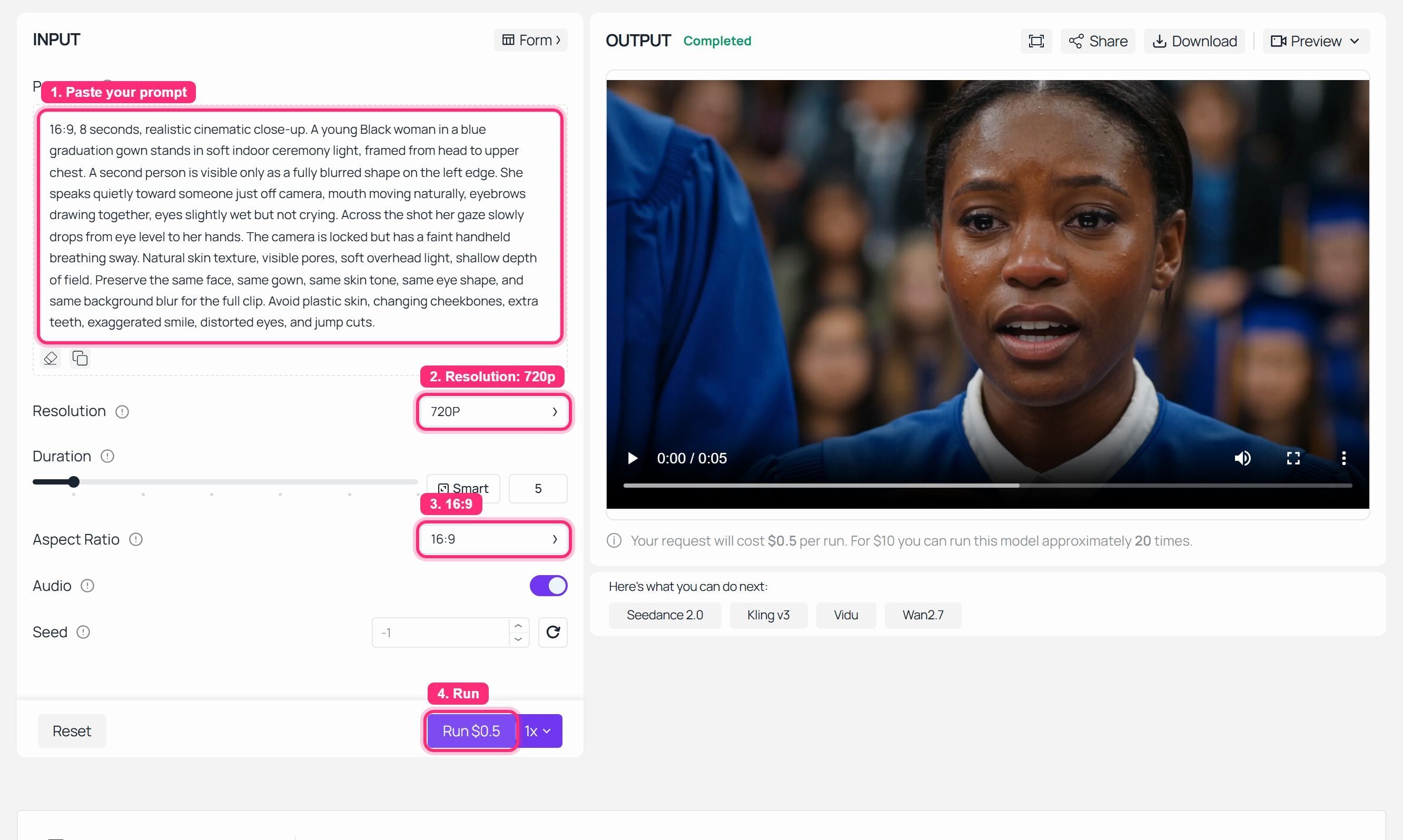
Wan 3.0 realistic faces case 1 completed run screenshot for a graduation close-up prompt
Step 2: Case 1 run evidence for the graduation close-up realistic face test. See the showcase clip above for the full motion proof.
Step 3: Run Case 2, a Wan 3.0 Realistic Faces UGC Phone Call
UGC faces fail differently.
The shot is not as tight as a beauty close-up, but speech, hand position, and soft window light can expose face morphing fast. This case uses a rainy apartment phone call: a young woman sits beside a window, listens, answers, and ends with a small half-smile.
Copy this prompt:
Plain116:9, 8 seconds, natural UGC-style realistic video. A young woman with long dark hair sits at a wooden table beside a rainy apartment window, holding a smartphone to her ear. Neon city lights blur outside the glass. She listens, then answers in a calm low voice; her lips move softly, her eyes shift down for one beat, and she gives a small half-smile at the end. Camera is a stable medium close-up from across the table, 50mm lens look, soft window light on one side of her face, warm practical lamp in the background. Keep her face, hairline, nose shape, hand position, phone, table, window rain, and lighting consistent. Avoid over-beautified skin, waxy cheeks, mismatched lip motion, face morphing, extra fingers, and background faces.
Settings to pick:
| Setting | Pick |
|---|---|
| Model | Wan-3.0 Text-to-video for a generic actor, Image-to-video for a locked face |
| Duration | 8s draft |
| Resolution | 1080P preferred |
| Ratio | 16:09 |
| Audio | Native audio on only if you are testing voice, otherwise soft rain and room tone |
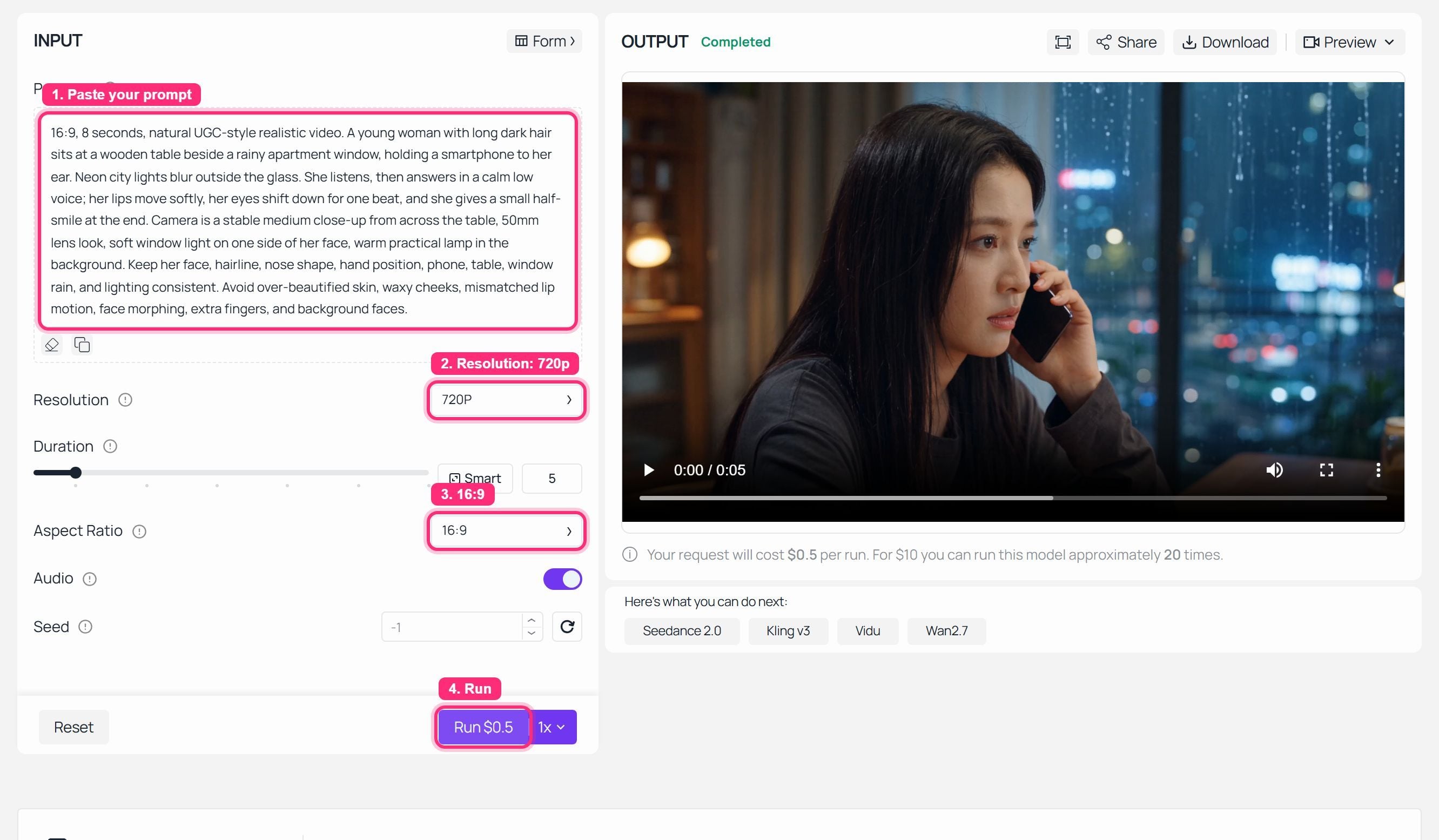
Wan 3.0 realistic faces case 2 completed run screenshot for a rainy window phone call
Step 3: Case 2 run evidence for the rainy phone-call face test.

Case 2 motion proof GIF for a rainy window phone call face test
Case 2 motion proof GIF : the 15.04s Wan 3.0 handbook clip tests speech, eye shifts, hand-to-phone consistency, and soft indoor lighting.
Step 4: Run Case 3, a Wan 3.0 Realistic Faces Vertical Social Clip
Now shrink the face.
Vertical clips are sneaky. The face is smaller, but viewers still notice if the eyes resize, legs warp, or the mirror reflection becomes a second person. This case tests full-body motion with a mirror, outfit detail, and a relaxed smile.
Copy this prompt:
Plain19:16, 8 seconds, realistic vertical social video. A young woman in a white embroidered blouse, white pleated skirt, black belt, and white platform sneakers stands in front of a clean full-length mirror in a softly lit apartment. She adjusts one sleeve, shifts her weight naturally, looks from the mirror to the camera, and gives a small relaxed smile. Full-body framing, fixed stable camera, natural daylight, no heavy beauty filter, realistic fabric texture and body proportions. Keep the same face, same outfit, same hairstyle, same mirror position, and same room layout throughout the shot. Avoid face drift, doll-like skin, changing eye size, warped legs, extra reflections, and jump cuts.
Settings to pick:
| Setting | Pick |
|---|---|
| Model | Wan-3.0 Text-to-video or Image-to-video |
| Duration | 8s draft |
| Resolution | 1080P preferred |
| Ratio | 9:16 |
| Audio | No music, soft room tone only |
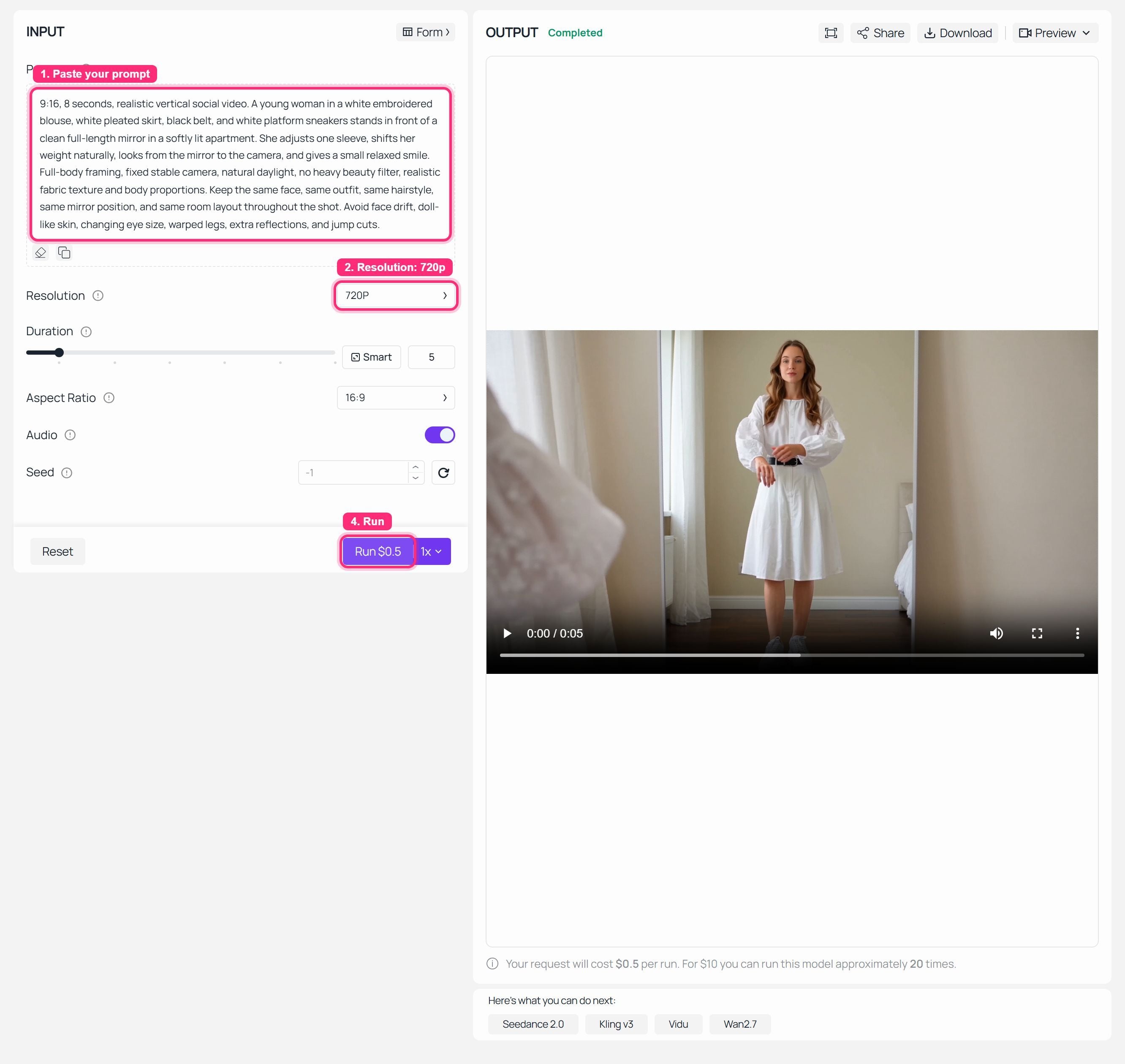
Wan 3.0 realistic faces case 3 completed run screenshot for a vertical fashion mirror clip
Step 4: Case 3 run evidence for the vertical full-body face consistency test.
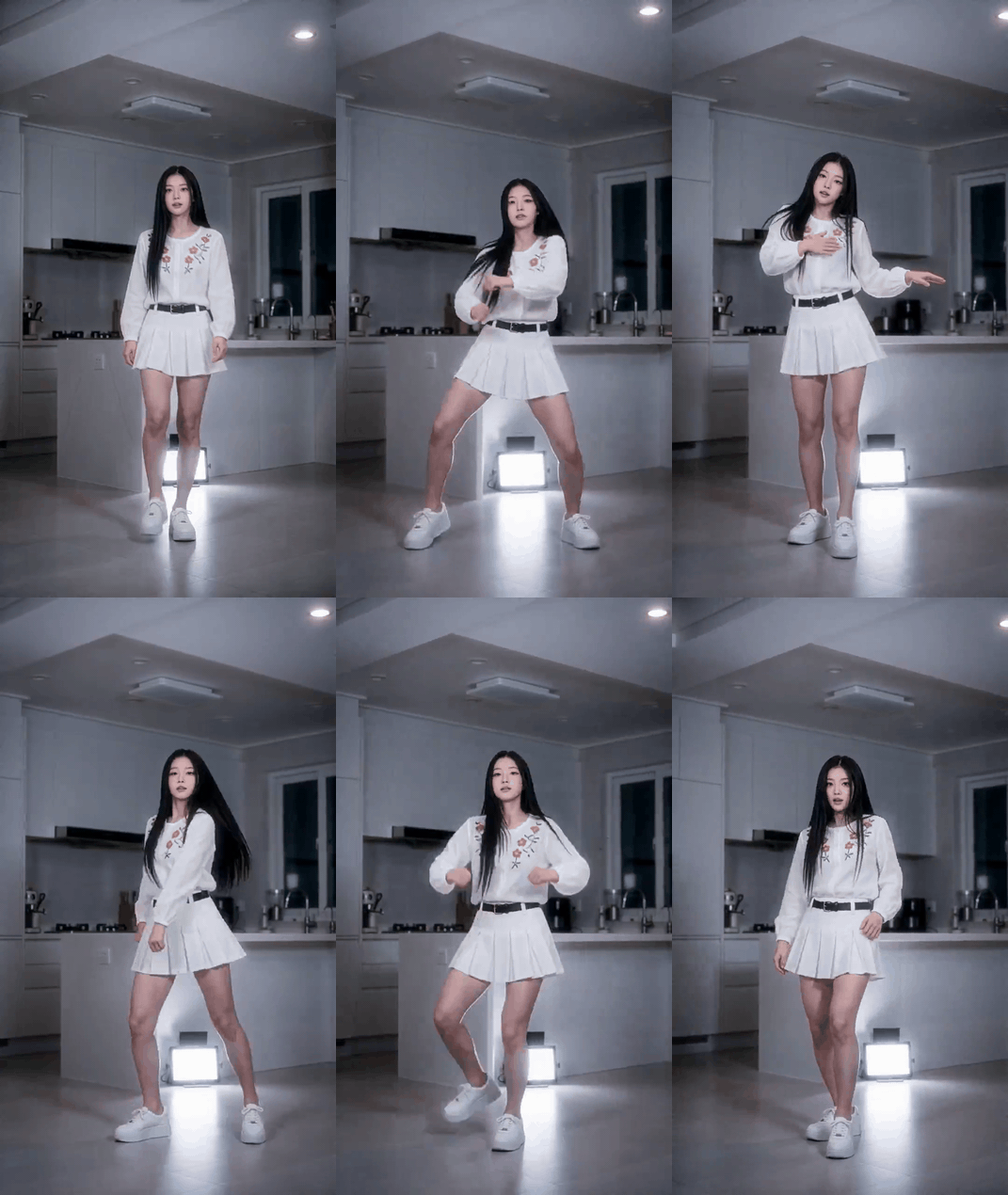
Case 3 motion proof GIF for vertical fashion face consistency
Case 3 motion proof GIF : the 15.04s Wan 3.0 handbook clip checks whether a smaller face stays stable while the body, outfit, and mirror remain coherent.
Step 5: Audit Wan 3.0 Realistic Faces Before You Regenerate
Do not regenerate because the clip "feels off." Name the failure first.
This checklist keeps the review objective:
| Check | Pass signal | Regenerate if |
|---|---|---|
| Identity | Same eye spacing, nose, cheekbones | Face looks like a new person |
| Skin | Pores and soft texture remain | Wax, plastic, over-smoothed |
| Mouth | Speech feels small and human | Jaw rubber or teeth flicker |
| Eyes | Gaze has a clear target | Eyes float or cross |
| Motion | One continuous action | Jump cut or body snap |
| Background | Blur stays background | Random faces sharpen |
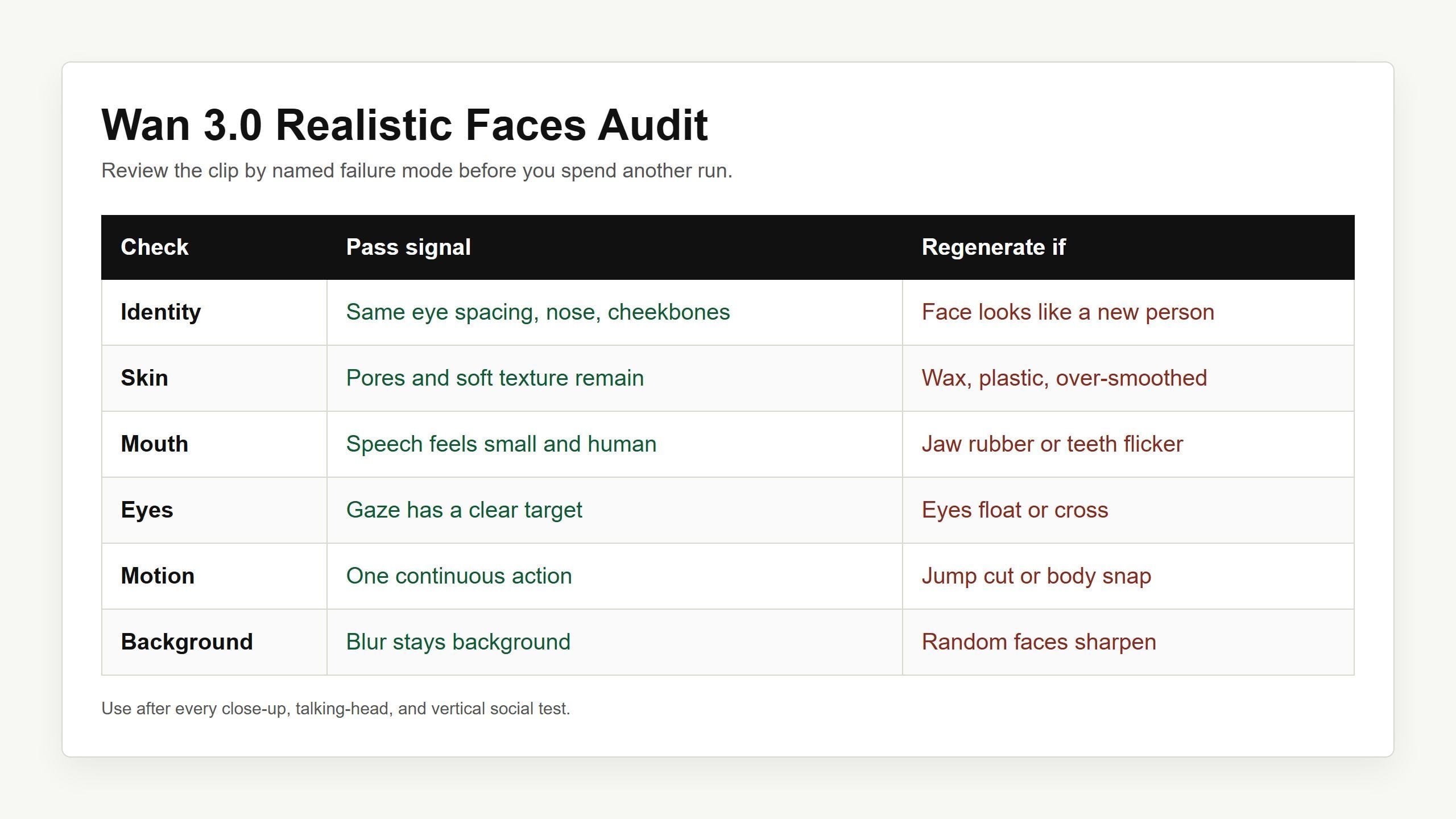
Wan 3.0 realistic faces audit checklist rendered as a clean table for identity, skin, mouth, eyes, motion, and background checks
Step 5: a face realism audit table you can use before spending another run.
Use this reusable template when you build your own test:
Plain1[aspect ratio], [duration], realistic cinematic video. [Subject with stable identity anchors] in [specific setting and lighting]. [Visible action chain: what the face, eyes, mouth, hands, and posture do]. Camera: [shot size, lens feel, movement]. Audio: [room tone / dialogue / ambience]. Preserve [face, skin tone, wardrobe, prop, background]. Avoid [face drift, waxy skin, distorted eyes, bad teeth, jump cuts, extra fingers].
Wan 3.0 Realistic Faces Variations to Try
Try these after the 3 core tests pass:
| Variation | Short prompt starter | What it tests |
|---|---|---|
| Founder testimonial | Middle-aged founder in a quiet office explains one product result in 8s | Trustworthy UGC without beauty-filter skin |
| Actor reaction shot | Actor hears surprising news, smile fades into silence | Micro-expression control |
| Product try-on face shot | Person applies glasses, lipstick, or skincare while turning slightly | Face plus product stability |
| Documentary interview | Handheld close-up, natural skin, soft background, no glam filter | Realistic imperfection |
Wan 3.0 Realistic Faces Cost on Atlas Cloud
Use the quick formula:
cost = seconds x model price per second x resolution tier if applicable
As of August 2026, Atlas Cloud models/all lists the three Wan-3.0 video modes from $0.05/sec. That gives you a planning floor:
| Test | Duration | Why use it | Estimated floor |
|---|---|---|---|
| Face draft | 8s | Quick prompt check | From $0.40 |
| UGC ad clip | 12s | Social cut | From $0.60 |
| Long close-up | 30s | Full Wan 3.0 stress test | From $1.50 |
For final delivery, check the visible run cost before submitting. 1080P can cost more than the floor on some platforms or tiers, and the Run button is what your wallet will actually see.
Legal Note for Wan 3.0 Realistic Faces
Use consent for real employees, creators, customers, and recognizable likenesses. Do not imply a real person said something they did not say. For ads, testimonials, medical claims, financial claims, or political content, keep disclosure and review tight.
That is the grown-up answer. The fun part is still creative direction, but the responsible part keeps you publishable.
Frequently Asked Questions
Can Wan 3.0 make realistic faces?
Yes, but the best results come from directed prompts and strong references. Ask for stable identity anchors, small facial movements, clear gaze targets, and specific failure constraints.
Why do faces still look uncanny sometimes?
Because faces expose tiny errors. Eye direction, teeth, cheekbones, lip timing, and skin texture all have to stay coherent at once. A broad prompt like "sad woman talking" leaves too much room for drift.
Text-to-video or image-to-video?
Use Text-to-video when any believable actor is fine. Use Image-to-video when a specific face, brand actor, creator, or first frame matters.
What is the best Wan 3.0 prompt for a talking face?
The best prompt describes one continuous action chain: where the person looks, how the mouth moves, what the hands do, and what must stay unchanged. Then add avoid terms for plastic skin, distorted eyes, bad teeth, and face morphing.
How much does it cost on Atlas Cloud?
Atlas Cloud models/all currently lists Wan-3.0 Text-to-video, Image-to-video, and Reference-to-video from $0.05/sec. An 8s draft starts from about $0.40, while a 30s stress test starts from about $1.50 before any higher-resolution tier.
Can I use Wan 3.0 realistic faces for ads or UGC?
Yes, with normal creative and legal discipline. Use consent for likenesses, avoid fake testimonials, and label synthetic UGC where disclosure rules or client policies require it.